
· 16 min read
Zoho Mail Review (2026): The Business Email Most People Often Overlook
Zoho Mail is often left off the shortlist when businesses choose between Google Workspace and Microsoft 365. I looked at its paid plans for solo workers, small businesses and enterprises, including data centres, security, migration and the full Workplace suite.
Live facts
- Free plan
- Yes, up to 5 users, 5 GB, own domain
- Based in
- India
- Encryption
- Standard
- Mail apps
- Any mail app (IMAP)
- Own domain
- Yes
Jump to section
- At a Glance: Who Zoho Mail Is (and Isn't) For
- Who Is Zoho?
- Why Zoho Gets Overlooked
- Zoho Mail Plans and Pricing in 2026
- Which Plan for Which Business?
- Onboarding: Zoho Wants to Help You Move
- Moving Across: The Split, Managed Move
- Your Data Stays in Your Region
- Security and Privacy
- Using Zoho Mail Day to Day
- Zoho Workplace: A Suite to Replace Google and Microsoft
- Buying a Domain From Zoho
- Comparative Matrix: Zoho Mail vs. the Alternatives
- Pros and Cons
- Frequently Asked Questions
- The Bottom Line
When a business picks an email provider, the shortlist usually has two names on it: Google Workspace and Microsoft 365. Zoho Mail deserves a place on that list too. It’s private, ad-free, properly supported and a fraction of the price, and for a lot of businesses it does everything they actually need.
I’ve already looked at the Zoho Mail free plan. This review is about the paid plans, the ones businesses actually rely on, from a one person business up to a large organisation. I also met the Zoho team on 6 November. They were a lovely bunch and clearly passionate about getting new customers set up properly, and I’ve included what they told me alongside what I could check on Zoho’s own pages. A big thank you to Sharath and his colleagues for their time (and apologies again for being a tad late!). Prices and plan details were checked on Zoho’s website on 7 November 2026.
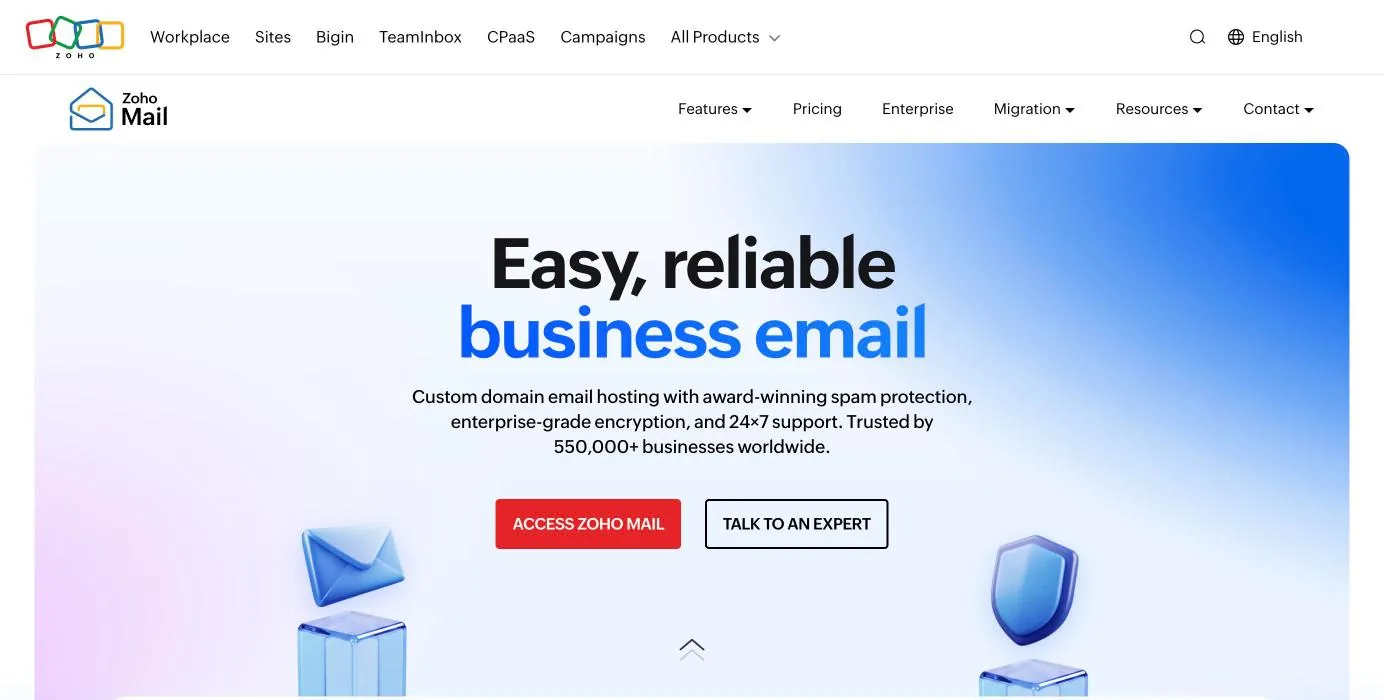
Short answer: Zoho Mail is a serious alternative to Google Workspace and Microsoft 365 for businesses that mainly need reliable email, calendars and a sensible admin console. UK prices start at £0.80 per user a month, every paid plan includes IMAP, ActiveSync and 24x7 support, and your data is kept in the region you sign up from. Choose Google or Microsoft instead if your team lives in Google Docs or Microsoft Office, or you need email that even the provider can’t read.
Reader offer: $100 Zoho Wallet credit. Open your Zoho account through my link and you’ll get $100 of free Zoho Wallet credit. You can also try the top plan free for 15 days with no card needed.
Referral link: I may earn a commission, at no extra cost to you.
At a Glance: Who Zoho Mail Is (and Isn’t) For
| Who it suits | How well | Why |
|---|---|---|
| Sole trader or freelancer with their own domain | Ideal | Mail Lite costs less than a coffee a month, with IMAP, phone apps and real support. |
| Small business paying too much for Google or Microsoft | Strong fit | Workplace Standard gives email, calendar, files, chat and video for £2.40 a user. |
| Medium or large business that wants to move gradually | Strong fit | Split delivery lets you move one team at a time, and plans can be mixed per user. |
| Regulated business needing retention and eDiscovery | Strong fit | Mail Premium and Workplace Professional add retention, eDiscovery and S/MIME. |
| Team that lives in Google Docs or Excel macros | Workable | Zoho’s office apps open Office files, but heavy users will notice the switch. |
| Anyone who needs zero-access, end-to-end encryption | Alternative needed | Encrypted at rest and in transit, not end-to-end by default. See Proton Mail. |
Who Is Zoho?
Zoho isn’t a start-up. The company began in 1996 as AdventNet in New Jersey, making network management software, and renamed itself Zoho Corporation in 2009. Zoho Mail itself launched in 2008, so it has been running business email for 18 years. Today Zoho makes more than 60 business apps, from accounting to CRM, and says it has more than 19,000 employees and 150 million users.
What I like most about Zoho is how it’s run. It has never taken money from investors, so there’s no one pushing it to squeeze its customers. It says it has never shown ads in its products, not even in the free ones, never sells customer data and doesn’t allow third-party trackers on its own websites. That’s a very different model from a company that earns its money from advertising.
| Company fact | Detail |
|---|---|
| Founded | 1996 as AdventNet, renamed Zoho Corporation in 2009 |
| Zoho Mail launched | 2008 |
| Headquarters | Chennai, India, with offices around the world |
| Ownership | Private, and has never taken outside investment |
| Leadership | Shailesh Kumar Davey became CEO of Zoho Corp in 2025; co-founder Sridhar Vembu moved to Chief Scientist |
| Size | More than 19,000 employees and 150 million users, according to Zoho |
| Zoho Mail customers | More than 550,000 businesses, according to Zoho |
| How it makes money | Paid subscriptions. No ads and no selling of data |
Why Zoho Gets Overlooked
My honest view is that Zoho gets overlooked for one reason: people buy what they already know. If you use Gmail at home, Google Workspace feels safe. If your accountant sends you Excel files, Microsoft 365 feels safe. Very few businesses sit down and ask what they actually need from their email.
When I do ask that question, the answer for most small businesses is quite simple: reliable mail on their own domain, a shared calendar, decent phone apps, good spam filtering and someone to talk to when something goes wrong. Zoho does all of those, and on price it isn’t close. Google’s cheapest Workspace plan is £5.90 per user a month on an annual plan and Microsoft 365 Business Basic is £5.40. Zoho’s Workplace Standard, which includes email, files, office apps, chat and video meetings, is £2.40.
Zoho Mail Plans and Pricing in 2026
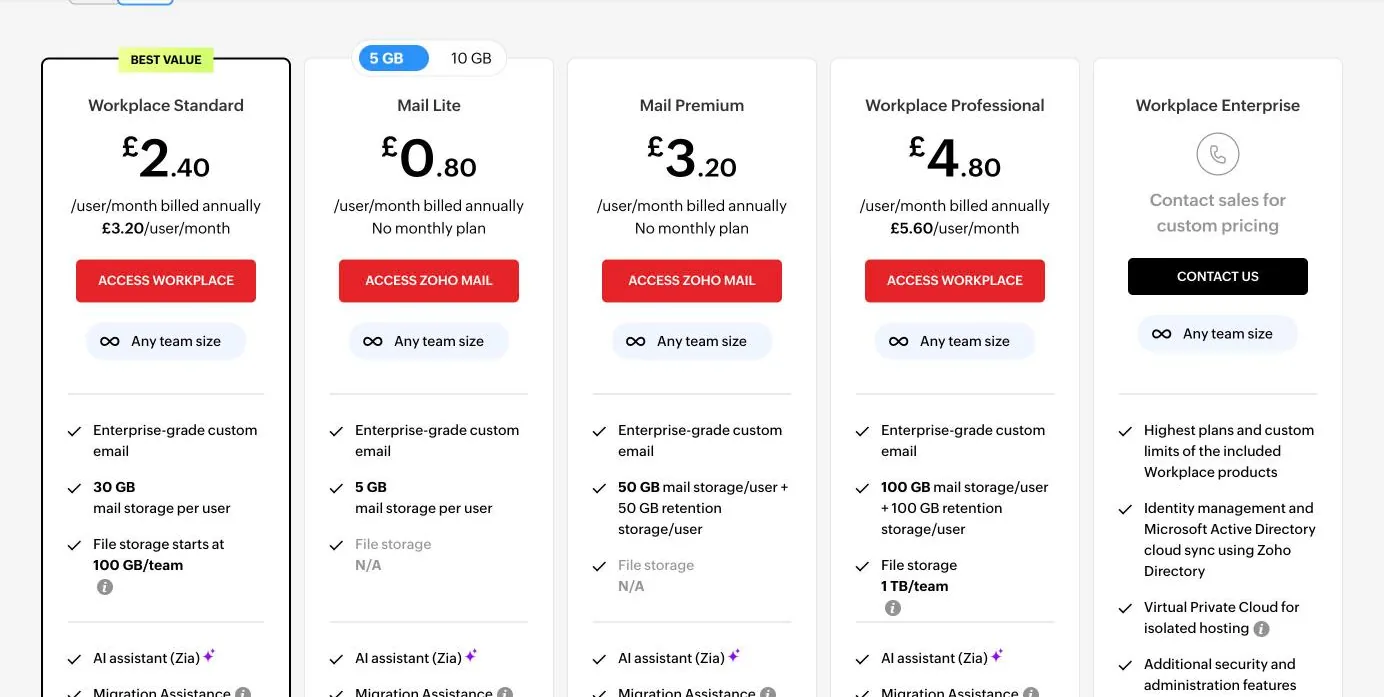
Zoho sells email on its own (Mail Lite and Mail Premium) or as part of Zoho Workplace, its full office suite. Every paid plan includes the same core mail service, 24x7 support by email, chat and phone, a 99.9% uptime guarantee, the migration tools, IMAP, POP and ActiveSync, email and domain aliases, and the mobile and desktop apps.
| Plan | Price (annual) | Monthly billing | Mail storage | Attachments | Extras |
|---|---|---|---|---|---|
| Mail Lite | £0.80 per user a month (5 GB) or £1 (10 GB) | Not offered | 5 or 10 GB per user | 30 MB, or up to 250 MB as a link | Email, calendar, contacts, tasks, notes |
| Workplace Standard | £2.40 per user a month | £3.20 | 30 GB per user | 30 MB, or up to 500 MB as a link | Adds WorkDrive files (10 GB per user), Writer, Sheet, Show, Cliq chat, Meeting, Vault password manager |
| Mail Premium | £3.20 per user a month | Not offered | 50 GB per user plus 50 GB retention | 40 MB, or up to 1 GB as a link | Adds retention, eDiscovery, S/MIME, white labelling, eProtect and mail data loss prevention (beta) |
| Workplace Professional | £4.80 per user a month | £5.60 | 100 GB per user plus 100 GB retention | 40 MB, or up to 1 GB as a link | Everything in Mail Premium and Workplace Standard, 100 GB of WorkDrive per user and Zoho Connect intranet |
| Workplace Enterprise | Custom quote | Custom | Custom, with pooled storage | Custom | Highest limits, Active Directory sync, Virtual Private Cloud hosting, extra security and endpoint controls |
UK prices as listed on Zoho’s pricing page on 7 November 2026, excluding VAT. Zoho also shows prices in euros and in other currencies depending on where you are.
Good to know: you don’t have to put everyone on the same plan. Zoho lets you mix Mail-only and Workplace plans in one organisation, so your directors could have Workplace Professional while a warehouse team shares Mail Lite.
Know the limits: Mail Lite and Mail Premium are annual only, so there’s no month-to-month option on the email-only plans. Mail Lite’s 5 GB is fine for most people but fills quickly if you keep every attachment, so I’d pay the extra 20p for 10 GB.
Which Plan for Which Business?
Zoho publishes deployment guides for four kinds of customer: solopreneurs, small businesses and start-ups, medium and large businesses, and enterprises. Here’s how I’d match the plans to each.
Solo: one person, one domain
If it’s just you, Mail Lite with 10 GB at £12 a year is hard to beat. You get your own domain, IMAP so you can use Apple Mail, Outlook or Thunderbird, Zoho’s own phone and desktop apps, aliases for things like hello@ and invoices@, and the same 24x7 support as a 500 person company. Zoho’s solo guide walks you through choosing a plan, adding your MX records, moving your old mail across, setting up aliases and adding a signature.
If you also want online file storage and a word processor, Workplace Standard at £2.40 a month is still less than half the price of Google’s cheapest plan.
Small business and start-ups
For a team of five to fifty, Workplace Standard is the sweet spot. It bundles email, shared calendars, team file storage, a password manager, team chat and video meetings. For a ten person business that’s £288 a year on annual billing, compared with £708 on Google Workspace Business Starter and £648 on Microsoft 365 Business Basic.
If you’re in a regulated sector, such as finance, legal or healthcare, look at Mail Premium or Workplace Professional instead. They add email retention policies, eDiscovery for finding mail during a dispute or audit, S/MIME signing and encryption, and Zoho’s eProtect email security and archiving.
Medium and large businesses
This is where Zoho’s migration tools really matter. Zoho’s guide for larger businesses starts with a trial domain and two or three pilot users, then looks at how the change affects the organisation before anyone else moves. Plans can be mixed by user, email policies can be applied to groups, and the admin console covers routing, forwarding, catch-all addresses, groups and mobile device management.
Enterprise
Workplace Enterprise is priced by quote. Zoho lists custom limits, pooled mail storage, sync with Microsoft Active Directory through Zoho Directory, endpoint controls and hosting in a Virtual Private Cloud, so your data is isolated from other customers. Zoho’s enterprise page describes a four stage process: understanding your needs, customising the service, a staged rollout and ongoing support. Zoho Mail can also run in a hybrid setup alongside Microsoft Exchange or Google Workspace for as long as you need, with shared free and busy calendar information between the systems.
Onboarding: Zoho Wants to Help You Move
The thing the Zoho team was most passionate about in our meeting was onboarding. They don’t want you to sign up and then struggle on your own, and they have a team whose job is getting new customers up and running. That matches what I found on the website, which is full of guides, videos, webinars and tools aimed at people moving in.
| Help on offer | What it is |
|---|---|
| Deployment guides | Step by step guides for solopreneurs, small businesses, medium and large businesses and enterprises |
| Complete setup guide | One guide covering domain verification, MX, SPF, DKIM, DMARC, users and migration |
| Migration tool | Built into the admin console on every plan at no extra cost |
| Migration wizard | A Windows tool for uploading PST, EML or Exchange files |
| Assisted migration | A dedicated migration engineer for organisations with more than 50 users, or through a certified Zoho partner |
| Support | 24x7 by email, chat and phone on every paid plan |
| Training | Webinars, videos and training and certification courses |
Moving Across: The Split, Managed Move
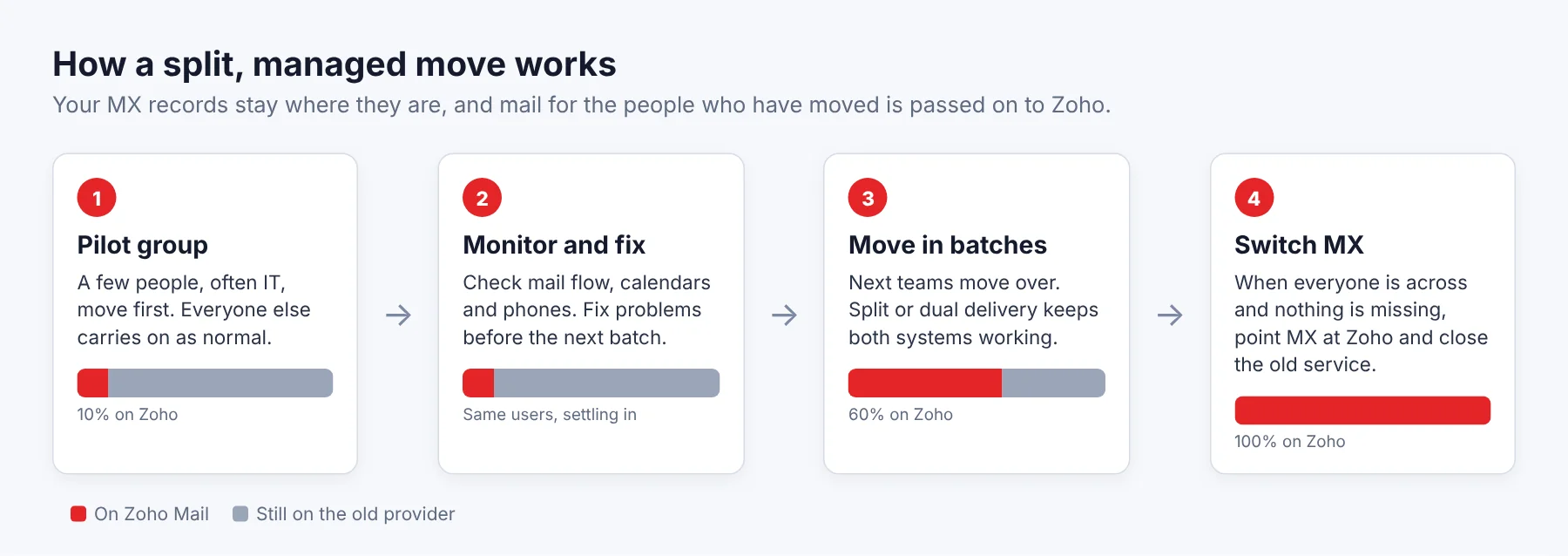
For businesses with lots of mailboxes, this is the part I found most impressive. Zoho told me that rather than moving everyone in one big bang, they move a group of users first and leave everyone else on the current provider. They then monitor how it goes, fix anything that comes up, suggest changes and then move the next group across. It’s the way I’d want to do a migration myself.
The technology that makes this possible is called split delivery. Your domain’s MX records stay where they are, and mail for the people who have moved is passed on to Zoho. There’s also dual delivery, where a copy of every message lands in both systems while you check nothing is missing. Zoho says most organisations run one of these for a week or two before changing their MX records for good.
| Moving from | How Zoho moves it |
|---|---|
| Google Workspace | One-click migration: sign in, pick users and folders, watch progress |
| Microsoft 365 or Exchange Server | One-click migration |
| Amazon WorkMail | One-click migration, useful now that WorkMail is being retired |
| Gmail, Outlook.com, GoDaddy, Zimbra, cPanel or any other host | Server to server migration over IMAP or POP |
| PST or EML files | Migration wizard |
Emails with their folders, read and unread status, contacts, calendars, tasks and notes all come across. Re-running a migration is safe because Zoho skips anything already copied, and you can choose to move only certain folders, users or date ranges.
Know the limits: filters, rules, signatures, out of office replies, third-party add-ons and Google labels that have no Zoho equivalent don’t transfer. Make a note of them before you start. I cover the general steps in how to switch email provider without losing anything.
Your Data Stays in Your Region
When you sign up, Zoho picks a data centre based on the country you choose, which it fills in from your location. Your account then lives in that region. Zoho owns and runs its own data centres rather than renting space from Amazon, Google or Microsoft, which is unusual for a company of its size.
| Region | Data centre locations | Who it serves |
|---|---|---|
| Europe | Amsterdam and Dublin | The UK, EU countries, Switzerland, Norway and the rest of Europe |
| United States | Quincy and Dallas | The US and many countries without their own region |
| India | Chennai and Mumbai | India |
| Australia | Sydney and Melbourne | Australia |
| Japan | Tokyo and Osaka | Japan |
| Canada | Toronto and Montreal | Canada |
| Saudi Arabia | Riyadh and Jeddah | Saudi Arabia |
| UAE | Dubai and Abu Dhabi | The UAE |
| China and Singapore | Separate regions | China and Singapore |
From Zoho’s Know Your Datacenter page, checked 7 November 2026.
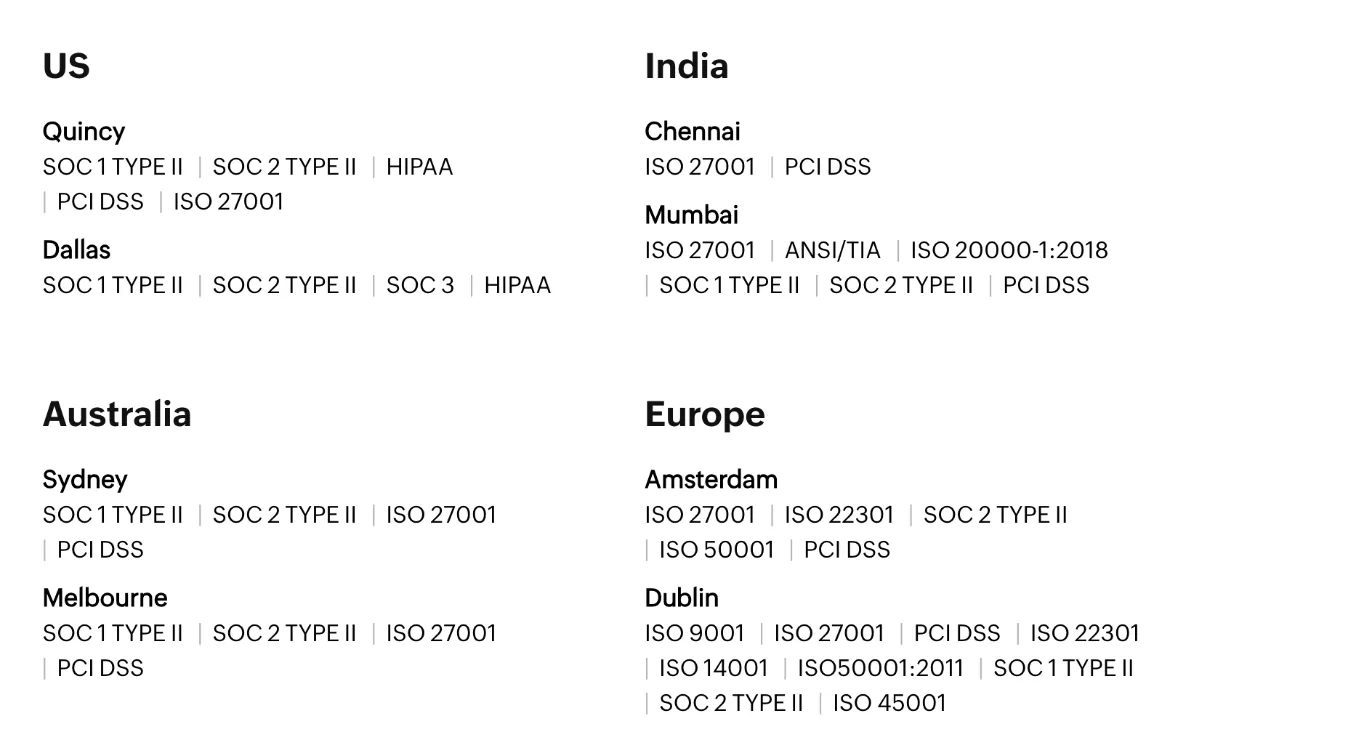
A note for UK readers: UK accounts are currently served from Zoho’s European data centres in Amsterdam and Dublin. Zoho announced in 2025 that it’s building a data centre in London so UK customers can keep their data in the UK. It wasn’t on Zoho’s data centre list when I checked, so if UK-only hosting matters to you, ask Zoho before you sign up.
Security and Privacy
Zoho takes this side seriously, and it shows in the detail. Email is encrypted on Zoho’s servers and on its way to and from them on every plan, with nothing to switch on. Zoho says its staff never read your email, spam and virus checks are automated, and the few employees who ever need to look at account data for a support case only see obscured data and are monitored while they do it.
| Security feature | What it does | Plans |
|---|---|---|
| Encryption at rest | AES-256 on all stored mail and attachments, with keys rotated every six months | All plans |
| Encryption in transit | TLS 1.2 and 1.3 with forward secrecy for webmail, apps, IMAP, POP and SMTP | All plans |
| Forced TLS, MTA-STS and TLS-RPT | Admins can refuse to send or receive mail without encryption | Admin setting |
| Encryption level indicator | Shows whether each message travelled encrypted | All plans |
| OpenPGP | End-to-end encryption for individual messages, set up by you | All paid plans |
| S/MIME | Digital signatures and encryption with your own certificate | Mail Premium, Workplace Professional and Enterprise |
| Bring your own key | Use your own encryption key | Through Zoho Directory |
| Multi-factor sign-in | Zoho’s OneAuth app and SAML single sign-on | All paid plans |
| Certifications | ISO 27001, 27017, 27018 and 27701, SOC 2 Type II, GDPR and HIPAA | Service wide |
On spam, Zoho’s home page talks about “award-winning spam protection”, and that’s backed up. Zoho Mail won the SE Labs Security Award 2026 for Enterprise Email Security Service, and it earned a VBSpam award in Virus Bulletin’s independent tests in March and June 2026. To be fair to the competition, several other products in those Virus Bulletin tests earned the higher VBSpam+ rating, so Zoho is good rather than top of that particular table.
One caveat on encryption: Zoho Mail is not end-to-end encrypted by default, so Zoho could technically access your mail if it was legally required to. Zoho is open about this and argues, fairly, that most businesses need searchable, archived mail for retention and eDiscovery. If you need a provider that can’t read your mail at all, look at Proton Mail. I explain the difference in what secure email actually means.
Using Zoho Mail Day to Day
The webmail is clean and quick, with no ads anywhere. It looks more like Outlook than Gmail, with folders down the left, your messages in the middle and a reading pane on the right. Calendar, tasks, notes and contacts are one click away on the left, and there’s a Streams feature for commenting on emails with colleagues without forwarding them around.
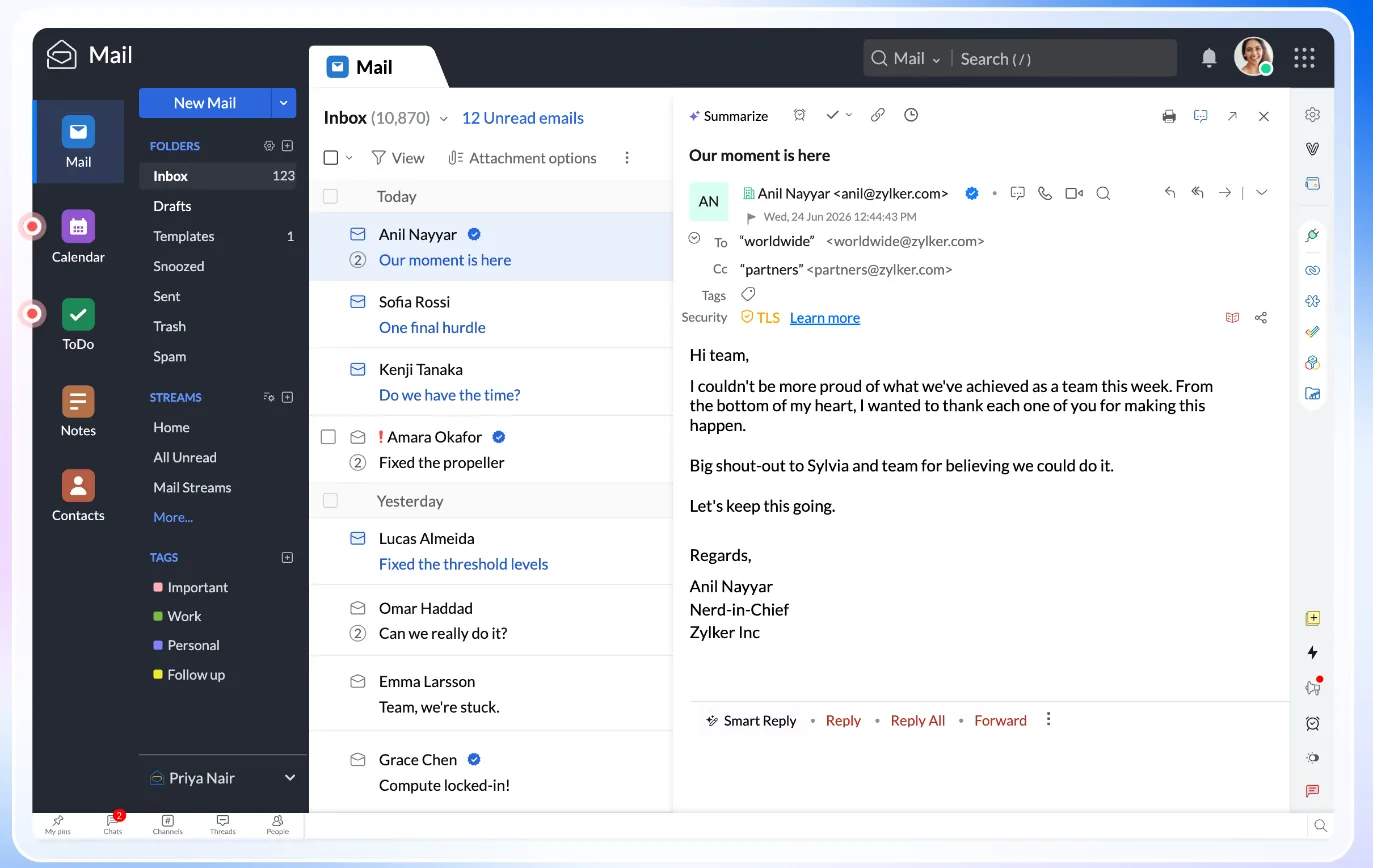
- Apps: iPhone, iPad and Android apps, a separate admin app, and desktop apps for Mac and Windows. You can also use any mail app through IMAP or ActiveSync.
- Zia: Zoho’s AI assistant can summarise long emails and draft replies. It’s included on every paid plan rather than sold as an expensive extra, which Zoho makes a point of in its #DeleteTheDrama campaign.
- Offline mode: read and write mail in the browser without a connection.
- Web Tabs: new in 2026, keep the websites you use most open inside Zoho Mail.
- Verified sender badges: also new this year, showing whether a message came from a verified sender or domain.
- Developer tools: a REST API, webhooks, a command line tool and custom extensions, plus integrations with Zoho CRM and third-party apps.
Zoho is also adding features at a steady pace. Its What’s New page lists dozens of changes in 2026 alone, from shared mailbox improvements to stricter TLS controls, and Zoho Mail is now available through AWS Marketplace for businesses that buy software that way.
Zoho Workplace: A Suite to Replace Google and Microsoft
If you want more than email, Zoho Workplace is the full suite. It’s what you get with the Workplace Standard, Professional and Enterprise plans above, and it’s Zoho’s direct answer to Google Workspace and Microsoft 365.
| You need | Zoho Workplace | Google Workspace | Microsoft 365 |
|---|---|---|---|
| Email and calendar | Zoho Mail and Calendar | Gmail and Calendar | Outlook and Exchange |
| File storage | WorkDrive | Drive | OneDrive and SharePoint |
| Documents, spreadsheets, slides | Writer, Sheet, Show | Docs, Sheets, Slides | Word, Excel, PowerPoint |
| Team chat | Cliq | Chat | Teams |
| Video meetings | Zoho Meeting | Meet | Teams |
| Password manager | Vault, included | Not included | Not included |
| Intranet | Connect (Professional) | Sites | SharePoint |
Zoho’s office apps open and save Word, Excel and PowerPoint files, and Mail, Calendar, Writer, Sheet, Cliq, Meeting and WorkDrive all have Mac and Windows apps. For everyday letters, spreadsheets and presentations they’re perfectly capable. Where I’d be careful is with heavy Excel users, complex macros or businesses whose clients insist on live co-editing in Microsoft or Google files.
Buying a Domain From Zoho
If you don’t have a domain yet, you can buy one while you set up Zoho Mail, and Zoho sets up all the email records for you, so there’s nothing to verify. At the moment that option inside Zoho Mail is only available to accounts in the US and Indian data centres, and those domains are registered through GoDaddy or OpenSRS.
Zoho also runs Zoho Domains, its own ICANN-accredited registrar, which already shows UK prices (a .com is £10 a year to register and renew, as listed on 7 November 2026). The Zoho team told me a new domain product is close to launch, for a different reason from simply selling domains. I couldn’t find a public announcement yet, so I’ll update this review when it’s out.
Good to know: I usually suggest keeping your domain with a separate registrar from your email, so one account problem can’t take out both. It’s a small step that makes switching much easier later. See why using your own email domain makes sense.
Comparative Matrix: Zoho Mail vs. the Alternatives
| Feature | Zoho Workplace Standard | Google Workspace Business Starter | Microsoft 365 Business Basic |
|---|---|---|---|
| Price per user (annual, UK) | £2.40 | £5.90 | £5.40 |
| Email-only option | Mail Lite from £0.80 | No | Exchange Online plans |
| Mail storage | 30 GB per user | 30 GB pooled per user | 50 GB mailbox |
| Ads or data used for ads | No | No ads in Workspace | No |
| Region choice | Set by sign-up country | Data regions on higher plans | Set by tenant country |
| Phone support | 24x7 on every paid plan | Standard support | Standard support |
| AI assistant | Zia included | Gemini included | Copilot Chat; Copilot in the apps on dearer plans |
| Full Review | You are here | Google Workspace review | Microsoft review |
| Try It | Get $100 credit | Try Google Workspace | Microsoft’s website |
Google and Microsoft prices from their UK pricing pages on 7 November 2026, standard annual prices before any introductory discounts, excluding VAT.
Pros and Cons
| Strengths | Weaknesses |
|---|---|
| Far cheaper than Google Workspace or Microsoft 365 | Not end-to-end encrypted by default |
| No ads, no data selling, never taken investor money | Email-only plans are annual billing only |
| 24x7 support by phone, chat and email on every paid plan | No UK-only data centre yet; UK accounts live in Amsterdam and Dublin |
| Data kept in your region, in Zoho’s own data centres | Office apps are good, but not a full replacement for heavy Excel or Google Docs users |
| Split and dual delivery for moving in stages | Filters, rules and signatures don’t migrate |
| Strong compliance list and award-winning spam filtering | Buying a domain inside Zoho Mail isn’t offered for UK and EU accounts yet |
| Mix and match plans per user | Less familiar to staff, clients and IT contractors than Google or Microsoft |
Frequently Asked Questions
How much does Zoho Mail cost?
In the UK, Mail Lite starts at £0.80 per user a month for 5 GB, or £1 for 10 GB, billed annually. Workplace Standard is £2.40, Mail Premium £3.20 and Workplace Professional £4.80. Enterprise is priced by quote. VAT is added on top.
Is Zoho Mail as good as Google Workspace or Microsoft 365?
For email, calendars and admin, yes for most businesses, and at less than half the price. Google and Microsoft are ahead on their office apps and on how many people already know them.
Where is my Zoho Mail data stored?
In the region you sign up from. UK and European accounts are stored in Zoho’s own data centres in Amsterdam and Dublin. Zoho has announced a London data centre but it wasn’t listed when I checked.
Can Zoho read my email?
Zoho says its staff never read your email and spam filtering is automated. Mail is encrypted on its servers but not end-to-end by default, so add OpenPGP or S/MIME if you need message-level encryption.
Can I move to Zoho Mail gradually?
Yes. Split delivery lets you move some users while the rest stay on your current provider, and dual delivery sends a copy to both while you check everything works. Organisations with more than 50 users can get a dedicated migration engineer.
Can I use Outlook or Apple Mail with Zoho Mail?
Yes, on any paid plan. IMAP, POP and ActiveSync are all included. The free plan doesn’t include them, which is one of the main reasons to pay.
The Bottom Line
Zoho Mail deserves a place on the shortlist. For a sole trader it’s the cheapest proper business email I know of, and for a small or medium business Workplace Standard gives you most of what Google and Microsoft offer for less than half the price, from a company that doesn’t make its money from your data. Add region-based hosting, 24x7 phone support and a team that genuinely wants to help you move, and it’s easy to see why 550,000 businesses use it.
It isn’t for everyone. If you need zero-access encryption, UK-only hosting today or your team can’t live without Excel or Google Docs, look elsewhere. For everyone else, take the 15-day trial, move a couple of people across with split delivery and see how it feels. If you sign up through my link, you’ll get $100 of Zoho Wallet credit too.
Reader offer: $100 Zoho Wallet credit. Open your Zoho Mail or Workplace account through my link and Zoho adds $100 of free credit to your Zoho Wallet.
Referral link: I may earn a commission, at no extra cost to you.
Note: this article contains referral links to Zoho and Google Workspace. I may earn a commission if you sign up, at no extra cost to you. Zoho had no say over what I wrote. See my disclaimer. Sources: Zoho Mail pricing; Zoho: about us; Zoho: know your datacenter; Zoho: email encryption; Zoho: data privacy; Zoho: secure email; Zoho: migration; Zoho: hybrid email; Zoho: enterprise email; Zoho: buy a domain; Zoho Domains pricing; Zoho: SE Labs award; Virus Bulletin VBSpam, June 2026; Google Workspace pricing; Microsoft 365 pricing. Checked 7 November 2026.

Paul O'Brien
I've spent over 25 years working hands-on with email, DNS and cloud infrastructure. I test email providers and privacy tools for real, then tell you what they're good at and where they fall short.
More about meMore like this
You're subscribed. New articles come by email, as I publish or every Thursday. Change how often
Comments