Amazon WorkMail never tried to impress. Its interface was plain and its feature list short, but underneath sat the same AWS infrastructure, encryption and governance tools that run much bigger services. That made it an interesting option for businesses that care more about resilience than about a pretty inbox.
I originally wrote this review as a case for taking WorkMail seriously. AWS has since decided to retire it, so I have reworked the post: it still explains how WorkMail worked and what it did well, but the verdict has changed.
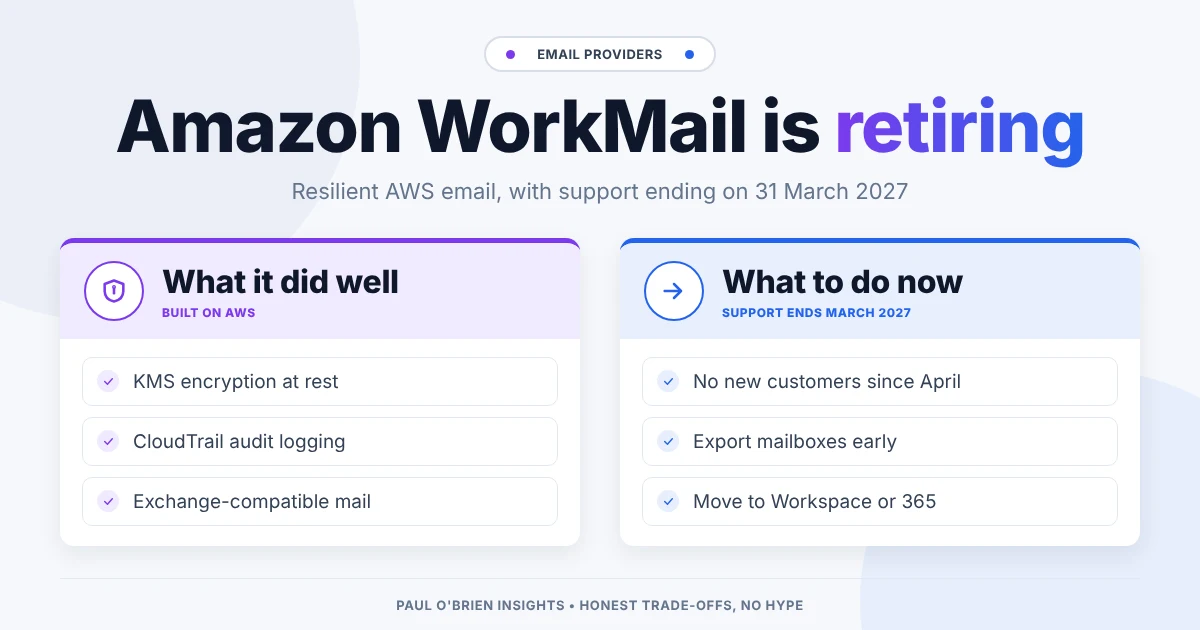
Update, October 2026: in March 2026 AWS announced that Amazon WorkMail is entering sunset. It has not accepted new customers since 30 April 2026, and support ends on 31 March 2027. Existing customers can keep using it until then, but after that date the WorkMail console and your WorkMail resources can no longer be accessed. If you are on WorkMail, plan your migration now. If you are not, don’t start on it.
Short answer: WorkMail was a lean, standards-based business email service with strong encryption, audit logging and Exchange compatibility. It is now being shut down, so nobody should start a new deployment on it. Existing users should export their mail and move before 31 March 2027, to Google Workspace, Microsoft Exchange or, for smaller teams, Fastmail.
At a glance: the sunset timeline
| Date | What happens |
|---|
| March 2026 | AWS lists WorkMail among services entering sunset |
| 30 April 2026 | WorkMail stops accepting new customers |
| Until 31 March 2027 | Existing customers can keep using WorkMail |
| After 31 March 2027 | The WorkMail console and WorkMail resources can no longer be accessed |
A minimal interface built for low cognitive load
Amazon WorkMail treated business email as utility infrastructure rather than as a workspace full of extras. The web interface was sparse. There was no design personality, no clever categorisation and no attempt to stand out visually. Folders, messages, settings, calendar and contacts were exactly where you would expect them. A beta interface existed, and it was even more stripped back.
At first it felt almost too plain. But from a continuity point of view, low visual complexity means low cognitive load. During a crisis or a failover, people don’t need novelty; they need something predictable that keeps mistakes to a minimum.
A conservative surface, familiar foundations
Setting up WorkMail was straightforward, although it helped to understand DNS and email authentication. Adding MX records, configuring SPF and verifying the domain will be routine for anyone used to business email. Less technical users may need some patience.
Once configured, everything behaved predictably. Mail delivery was fast and spam filtering was in line with other business platforms. Rules followed the traditional Exchange model: conditions based on sender, subject or header, with actions such as move, forward or delete. Outlook integration through Exchange ActiveSync was seamless, and the admin console was clean, favouring clarity over a long list of options. There were no AI features or productivity dashboards layered on top.
The price, at $4 per user per month, looked modest. The interface alone didn’t explain it. The architecture underneath did.
Encryption and key control
WorkMail encrypted mailbox data before writing it to disk, and this could not be turned off. The keys were protected by AWS Key Management Service (KMS). By default AWS managed them, but organisations with strict compliance needs could use their own customer-managed KMS keys.
This was server-side encryption, not end-to-end encryption, and the distinction matters. But with customer-managed keys, an organisation kept ultimate control: revoke the key in KMS and access to the underlying data goes with it.
Outbound mail and DMARC
All outbound mail from WorkMail went through Amazon SES, which gave it mature sending infrastructure with bounce handling, abuse monitoring and reputation management, at no extra charge.
By default WorkMail used an amazonses.com subdomain as the MAIL FROM domain, so organisations relying on SPF alone for DMARC alignment needed a custom MAIL FROM domain to avoid delivery problems. WorkMail made this visible rather than hiding it.
For new organisations, WorkMail also enforced the DMARC policies of incoming senders. If a sending domain published p=reject and a message failed authentication, WorkMail honoured it. That reduced spoofing risk without being sold as a headline feature.
Directory-based governance and audit trails
WorkMail was built around a directory. When you created an organisation, AWS either connected to an existing directory or set one up, and that directory controlled users, groups, shared resources, permissions, address book visibility and free/busy lookups.
Admin access was governed by AWS Identity and Access Management (IAM), and because changes went through IAM they could be logged in AWS CloudTrail. In an incident, that gave you a record of who changed what, when and from where, which many standalone email services don’t expose.
Exchange compatibility without the suite
WorkMail supported Exchange ActiveSync, IMAP over SSL, SMTP with TLS, Exchange Web Services (EWS), delegates, shared calendars, send-as permissions and resource booking. It deliberately left out chat, document editing and collaboration tools, which kept email separate from the fate of a wider productivity suite. It also exposed a push notifications API, so developers could trigger AWS Lambda functions from mailbox events, for example to check attachments or quarantine suspicious mail automatically.
Resilience and “break-glass” email
Because WorkMail ran on AWS, it inherited multi-Availability Zone fault tolerance within a region, so a single facility failure didn’t take email down. That is why I originally suggested it as a secondary, “break-glass” channel: a few accounts on a separate domain and separate infrastructure for incident teams if Microsoft 365 or Google Workspace went down. With no minimum contract, it was cheap insurance.
The idea still stands; WorkMail just can’t be the tool for it any more. A backup provider that is itself being switched off is no backup. For why redundancy on paper often fails in practice, see is your email provider a single point of failure?
Moving off WorkMail
If you still use WorkMail, the work is the same as any business email migration, just with a fixed deadline:
- Choose the destination early. AWS’s own notice names Kopano Cloud, Zoho Mail and Zoom Mail as options, and says other providers work too. I would also look hard at the mainstream options below.
- Export mailboxes. AWS documents a mailbox export process for getting data out before the service closes.
- Move DNS carefully. Update MX records, then re-check SPF, DKIM and DMARC for the new provider so mail isn’t rejected.
- Reconfigure clients and integrations. Outlook profiles, phones, shared calendars and any Lambda or EWS automations all need rebuilding.
| If you valued… | Consider | Why |
|---|
| Exchange compatibility and Outlook | Microsoft Exchange / 365 | The closest match for global address lists, delegates and resources |
| Resilience and admin controls | Google Workspace | Mature infrastructure, strong admin and audit tools |
| Simple, standards-based email for a small team | Fastmail | IMAP, JMAP, CalDAV and CardDAV, with responsive support |
| Low cost | Zoho Mail | One of the options AWS names; check the business plans rather than the free tier |
Verdict
WorkMail did what I liked about it very well: it treated email as structured, standards-compliant, highly available infrastructure, tied closely into cloud governance. The interface was minimal and the system underneath was built for resilience.
None of that matters if the service is closing. I would not advise anyone to start on WorkMail now, and if you are already on it, I would move well before the deadline rather than in the final weeks. For most businesses, Google Workspace or Microsoft 365 is the natural replacement, and Fastmail is a good fit for smaller teams that just want email that works.
FAQ
Is Amazon WorkMail being discontinued?
Yes. AWS stopped accepting new customers on 30 April 2026 and support ends on 31 March 2027.
Can existing customers keep using WorkMail?
Until 31 March 2027, yes. After that the console and WorkMail resources can no longer be accessed, so mail needs to be exported before then.
What does AWS recommend instead?
Its end-of-support notice names Kopano Cloud, Zoho Mail and Zoom Mail, and says other providers also work.
What is the best replacement for WorkMail?
If you rely on Outlook and Exchange features, Microsoft 365. If you want strong admin tools on mature infrastructure, Google Workspace. For a small team that wants simple, reliable email, Fastmail.
Note: checked and updated 17 October 2026. Sources: AWS: Amazon WorkMail end of support, AWS service availability updates, emailexpert: Amazon to retire WorkMail, Amazon WorkMail.

Comments