Email
iCloud Mail Needs a Redesign: A Webmail Concept
Apple’s hardware is world-class, but iCloud Mail on the web feels abandoned. Here is what iCloud Mail offers today, why it needs a rebuild, and a concept UI I mocked up.
The address you see in an email is only one of six sender identities. Here is what each does, which ones SPF, DKIM and DMARC check, and how to read the real headers.
 Paul O'Brien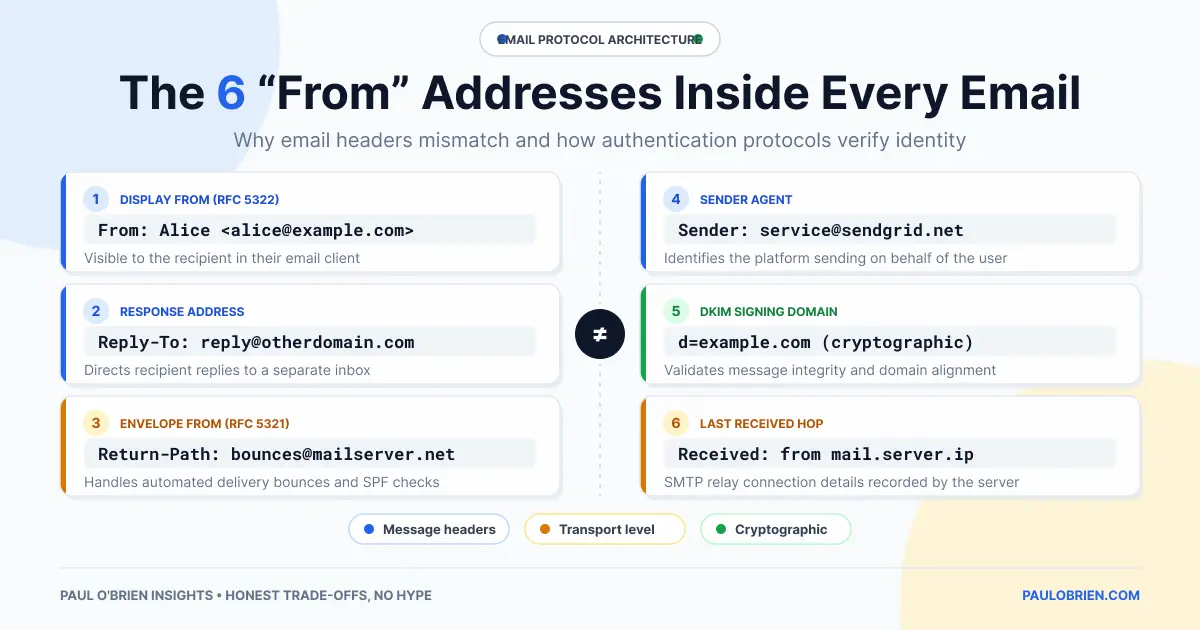
The name and address you see at the top of an email is only one of several sender identities attached to the message. Each has a different job, a different owner and a different level of trust, and the gaps between them are exactly where spoofing, bounces and most “why did my email land in spam?” problems come from.
Here are the six, in the order a message meets them, and how SPF, DKIM and DMARC tie them together.
Short answer: the From: header is what people see and is the easiest to fake. The envelope sender (MAIL FROM, saved as Return-Path:) is what servers use for delivery and bounces. Reply-To: and Sender: change who gets replies and who is named as the sending agent. The Received: chain is the only part that records the real route. DMARC is the check that makes the visible From: domain prove itself.
| Identity | Who sets it | What it does | Trust level |
|---|---|---|---|
From: | The sender or their software | The name and address shown in your inbox | Low on its own, unless DMARC passes |
Reply-To: | The sender or their software | Where your reply goes when you press Reply | Low, and a favourite for scams |
MAIL FROM (envelope sender) | The sending server, during SMTP delivery | Where bounces go; the identity SPF checks | Medium, when SPF passes |
Return-Path: | The final receiving server | A saved copy of the envelope sender | Same as MAIL FROM |
Sender: | The sending system | Names who actually sent it when that is not the author | Low |
Received: chain | Each server along the route | A timestamped trail of every hop | High for the hops your own provider added, lower for the rest |
From: address (the human identity)This is the name and address your mail app shows. The sender types it, or their software fills it in, and ordinary email delivery does not check it. That is why a message can show “Your Bank” as the name over an address that has nothing to do with your bank. Many mail apps show only the display name, which makes this easier to exploit. If you check one thing on a suspicious message, open the full address behind the name.
Reply-To: address (the interaction identity)If this header is present, your reply goes there instead of to the From: address. That is useful for support desks and newsletters, and equally useful for fraud: a message can look as though it comes from a colleague while quietly sending your reply to someone else. When a reply box fills with an address you do not recognise, stop and look.
MAIL FROM address (the delivery and bounce identity)Before the message body is sent, the sending server tells the receiving server who the mail is from, in a separate step called the SMTP envelope. This envelope sender is where bounce messages go. It is also the identity SPF evaluates: the receiving server looks up the SPF record for the envelope domain and checks whether the connecting server is allowed to send for it. If the envelope sender is empty, which is normal for bounce messages, SPF falls back to the server’s own announced name. The envelope sender is often a different domain from the From: address, especially when a newsletter platform or a service like Amazon SES sends your mail.
Return-Path: header (the saved envelope)The final receiving server writes the envelope sender into the message as a Return-Path: header when it delivers it. It is the same address as MAIL FROM, kept so you can see it later. This is why the Return-Path and the From: address so often differ on bulk mail, and why that difference is usually normal.
Sender: header (the agent identity)This names the system or person who actually transmitted the message when that is not the author. An assistant sending on a manager’s behalf, or a mailing list, are typical examples. Some mail apps show this as “on behalf of” or “via” next to the name. It carries little trust by itself.
Received: chain (the routing identity)Every server that handles the message adds a Received: line at the top, with the server name, the IP address it connected from and a timestamp. Read them from the bottom up and you see the path from first hop to your inbox. A sender can invent lines at the bottom, before the message reached any server you trust, so the lines added by your own provider are the ones to rely on. Your provider also adds an Authentication-Results: header that records the SPF, DKIM and DMARC outcomes it saw.
This invented example (example.com is reserved for documentation) shows how the identities can all differ on one genuine message:
Return-Path: <bounce-7731@mail.sender-platform.example>
Received: from mail.sender-platform.example (203.0.113.25) by mx.your-provider.example; Tue, 6 Oct 2026 09:14:02 +0100
Authentication-Results: mx.your-provider.example;
  spf=pass smtp.mailfrom=mail.sender-platform.example;
  dkim=pass header.d=shop.example;
  dmarc=pass header.from=shop.example
From: Example Shop <orders@shop.example>
Reply-To: Example Shop Support <help@shop.example>
Sender: updates@mail.sender-platform.example
Three different domains appear here, and the message is still legitimate. SPF passed for the platform’s bounce domain, DKIM passed for shop.example and DMARC passed because the DKIM domain matches the From: domain. That is what alignment means in practice.
| Check | Which identity it looks at | What it proves | Common failure |
|---|---|---|---|
| SPF | The envelope sender (MAIL FROM), or the server’s announced name if that is empty | The connecting server is authorised for that domain | Forwarding, because the forwarder’s IP is not in the original domain’s record |
| DKIM | The domain named in the signature (d=) | The signed parts of the message were not altered after signing | Mailing lists that add footers or change subjects |
| DMARC | The visible From: domain | SPF or DKIM passed and the passing domain aligns with the From: domain | Third-party senders that use their own domain and no aligned signature |
SPF and DKIM on their own do not look at the From: address people read. DMARC adds the missing link: at least one of them has to pass with a domain that matches the visible From: domain. “Relaxed” alignment accepts a subdomain of the same organisation, and “strict” alignment demands an exact match. The domain owner then publishes a policy (none, quarantine or reject) telling receivers what to do with failures. My guide to SPF, DKIM and DMARC covers the set-up.
Sender: and rewrite From: to cope with DMARC.Sender: or “on behalf of” appears.Authentication is no longer optional for anyone sending in volume. Google and Yahoo introduced bulk-sender requirements in 2024, and Microsoft has rejected non-compliant mail to Outlook.com, Hotmail and Live addresses from senders of over 5,000 emails a day since 5 May 2025, with a “550 5.7.515 Access denied” error. If you send mail from your own domain, as I suggest in why using your own email domain makes sense, SPF, DKIM and a DMARC record are part of the job.
Start with Authentication-Results:, then compare the From:, Return-Path: and Reply-To: domains. A mismatch is not proof of fraud, but a mismatch plus a DMARC failure is a good reason to delete the message.
The From: address is the one people see and is written by the sender. The Return-Path: is the envelope sender recorded by the receiving server, and it receives bounces. They are often different on newsletters and receipts, and that is normally fine.
Yes. Standard email delivery does not verify it. DMARC lets a domain owner publish a policy so receivers can reject or quarantine mail that claims their domain without passing aligned SPF or DKIM.
It usually means the message was sent through a different domain from the one shown in From:, such as a mailing list or a sending platform. It is common on legitimate mail.
The envelope sender, the MAIL FROM address. If that is empty, as with a bounce, it checks the sending server’s announced name instead. It does not check the From: header.
Because of the Reply-To: header. Legitimate systems use it to route replies to a support desk. Scammers use it to send them to an address they control.
No. It protects the exact domain in the From: address if its owner publishes an enforcing policy. It does not stop look-alike domains or a misleading display name.
An email has more than one sender, and each answers a different question: who is it from, who gets the reply, who takes the bounce, who sent it, and which servers carried it. Look at the visible From: address together with the authentication results and the reply address, and you can tell a harmless platform from a spoof in under a minute. If you run your own domain, DMARC is what lets the address people see prove itself.
Note: checked and updated 17 October 2026. Sources: RFC 5321 (SMTP), RFC 7208 (SPF), RFC 7489 (DMARC), Microsoft: fix NDR error 550 5.7.515.
Get the next post by email. Free, no ads, and you can leave any time.
Apple’s hardware is world-class, but iCloud Mail on the web feels abandoned. Here is what iCloud Mail offers today, why it needs a rebuild, and a concept UI I mocked up.
A technical look at paid Outlook and Exchange Online: which security features need which plan, how it compares to Google Workspace and Fastmail, and who should pick each.
AI is creeping into every email client. Here is how to switch off Gemini, Copilot and Apple Intelligence in Gmail, Outlook and Apple Mail, what you lose, and why I think email works fine without it.
Comments