
· 7 min read
Mailu Review (2026): A Self-Hosted Mail Server With a Friendly Admin Page
Mailu runs a complete mail server as a set of Docker containers, with webmail, an admin web page and spam filtering included. Here is what I found when I set it up, where it falls short and who it suits.
Live facts
- Free plan
- Yes, open source
- Based in
- Not confirmed
- Encryption
- Standard
- Own domain
- Yes
Jump to section

Mailu is a free, open-source mail server that runs as a set of Docker containers, one for each job. You get Postfix and Dovecot for the mail itself, Rspamd for spam, a choice of Roundcube or SnappyMail for webmail and a simple admin web page for domains, mailboxes and DNS records. It sits between the bare docker-mailserver and the much bigger mailcow.
This review covers what it does, what I found when I set it up, where it falls short and how it compares with Stalwart, mailcow and docker-mailserver. Features were checked against the project’s documentation for version 2024.06 on 30 October 2026.
Short answer: Mailu is the easiest of the Docker mail servers to get to a working, good-looking setup. The admin page shows every DNS record you need with a copy button, webmail works straight away and spam filtering is on from the start. It needs a resolver that checks DNSSEC, has no two-step sign-in and moves slowly, with the main version still dated June 2024.
How I tested: I ran version 2024.06.67 (released 23 October 2026) on a test Linux server on 30 October 2026 with Roundcube webmail, using Compose files from the project’s own setup templates. I created an admin and a mailbox, generated DKIM keys, signed in to webmail, sent and received mail over SMTP and IMAP, and sent it a fake PayPal phishing email. The test server had no public address, so real-world delivery to Gmail or Outlook is covered from the documentation, not tested. ClamAV couldn’t download its virus definitions on my test network, so I ran without it.
At a Glance: Who Mailu Is (and Isn’t) For
| Who it suits | How well | Why |
|---|---|---|
| Small business or family that wants webmail and an admin page | Ideal | Clear web panel, webmail included, DNS records shown with copy buttons. |
| Homelab user who already runs Docker | Strong fit | Runs on 1 GB without ClamAV and starts in a few minutes. |
| Agency or reseller hosting several domains | Strong fit | Per-domain admins, quotas, announcements and an API. |
| Anyone who needs two-step sign-in | Partial fit | Not in the current release. Mailcow and Stalwart have it. |
| Business needing shared calendars | Partial fit | Optional CalDAV and CardDAV server, but no calendar in webmail by default. |
| Non-technical user who just wants email that works | Alternative needed | A managed provider such as Fastmail or mailbox.org is far less work. |
What Mailu Is
Mailu started in 2016 and is run by volunteers. Its aim is a full-featured mail server that is easy to set up and maintain, using only free software and leaving out the groupware extras that bigger suites carry. Each part runs in its own container.
| Job | What it uses | Included? |
|---|---|---|
| Front door and certificates | nginx, with Let’s Encrypt built in | Yes |
| Sending and receiving | Postfix | Yes |
| Mailboxes | Dovecot for IMAP and POP3, with Sieve filters and full-text search | Yes |
| Spam and sender checks | Rspamd, with greylisting, SPF, DKIM, DMARC and anti-spoofing | Yes |
| Admin page | Mailu’s own web panel, plus a command-line tool and an API | Yes |
| Webmail | Roundcube or SnappyMail | Your choice, or none |
| Viruses | ClamAV | Optional |
| Calendars and contacts | Radicale (CalDAV and CardDAV) | Optional |
| Fetching mail from elsewhere | Fetchmail | Optional |
Setting It Up: What I Found
The usual route is the setup page at setup.mailu.io, which asks a few questions and gives you a docker-compose.yml and a mailu.env file. You start the containers and create the first admin with one command. Everything else is done in the web panel.
| What I checked | What happened |
|---|---|
| Starting up | Ten containers, all healthy in a few minutes once the images had downloaded |
| First hurdle | The admin container wouldn’t start until the server had a DNS resolver that checks DNSSEC. The FAQ explains this, but it catches people out on home networks |
| Domains and mailboxes | Simple forms in the admin page. A mailbox created by an admin has to change its password at first sign-in, which is a nice touch |
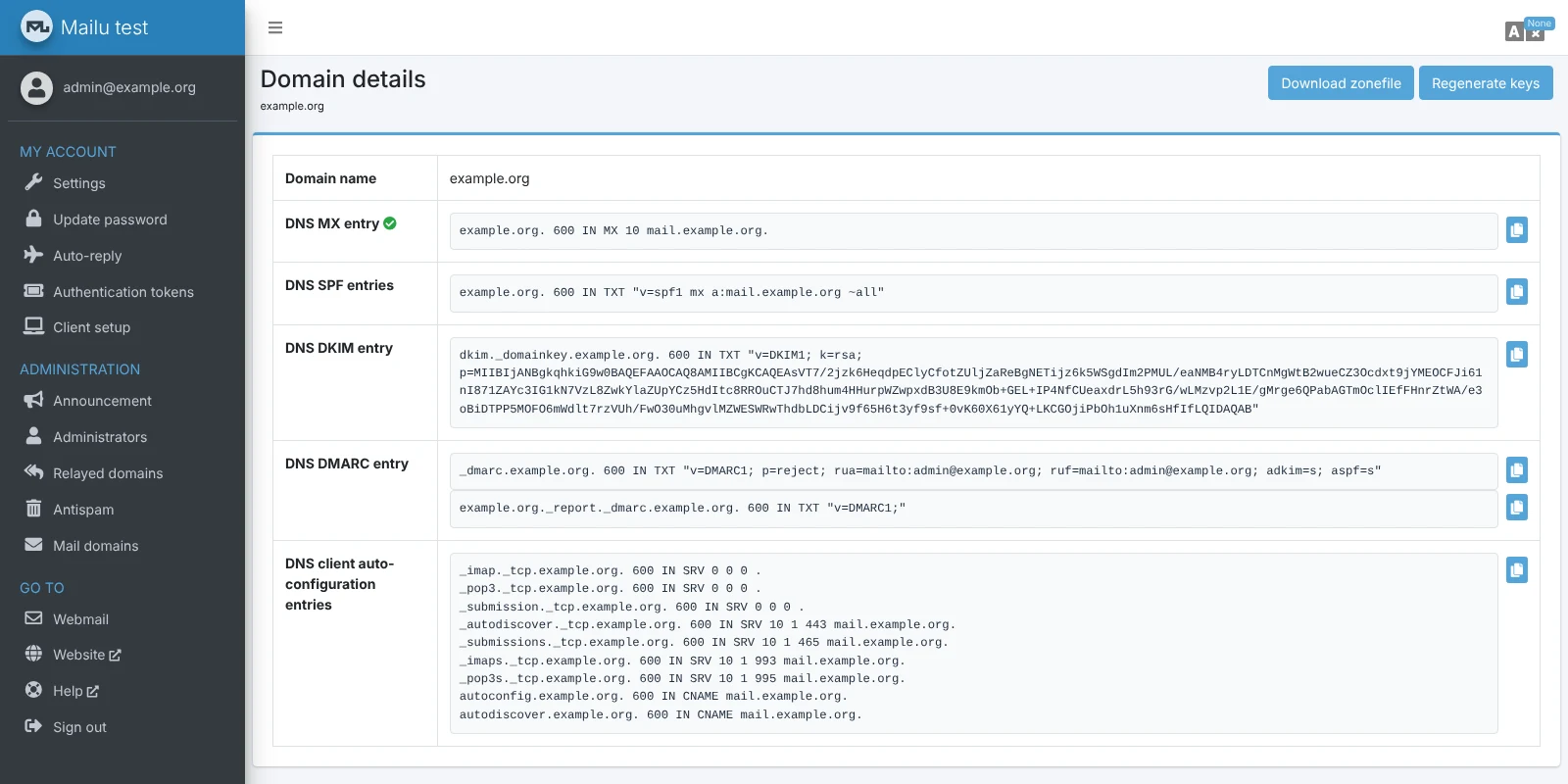
| DNS records | The domain page lists MX, SPF, DKIM, DMARC and auto-configuration records with copy buttons, and can download them as a zone file. DKIM needs one click on “Generate keys” first |
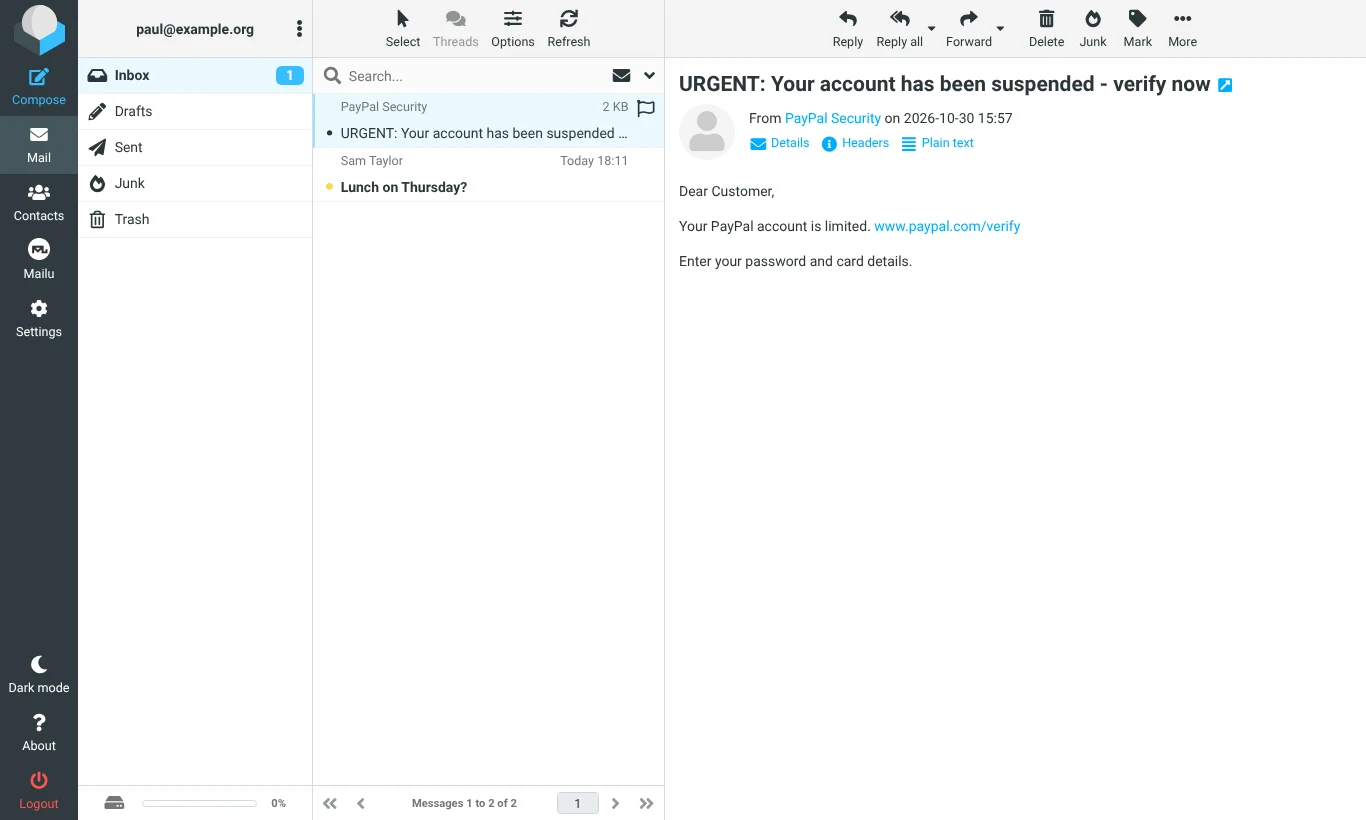
| Webmail | Roundcube opened straight from the sign-in page, with Inbox, Junk and Sent already set up |
| Sending and receiving | Worked over SMTP and IMAP, with outgoing mail DKIM-signed |
| Spam filter | My fake PayPal email scored 7.3 out of 15 when sent from an outside address. Rspamd spotted the fake paypal.com link but the score was below the default limit, so it landed in the inbox |
| Memory | About 700 MB across all containers without ClamAV, with the admin panel and Rspamd using about 230 MB each |
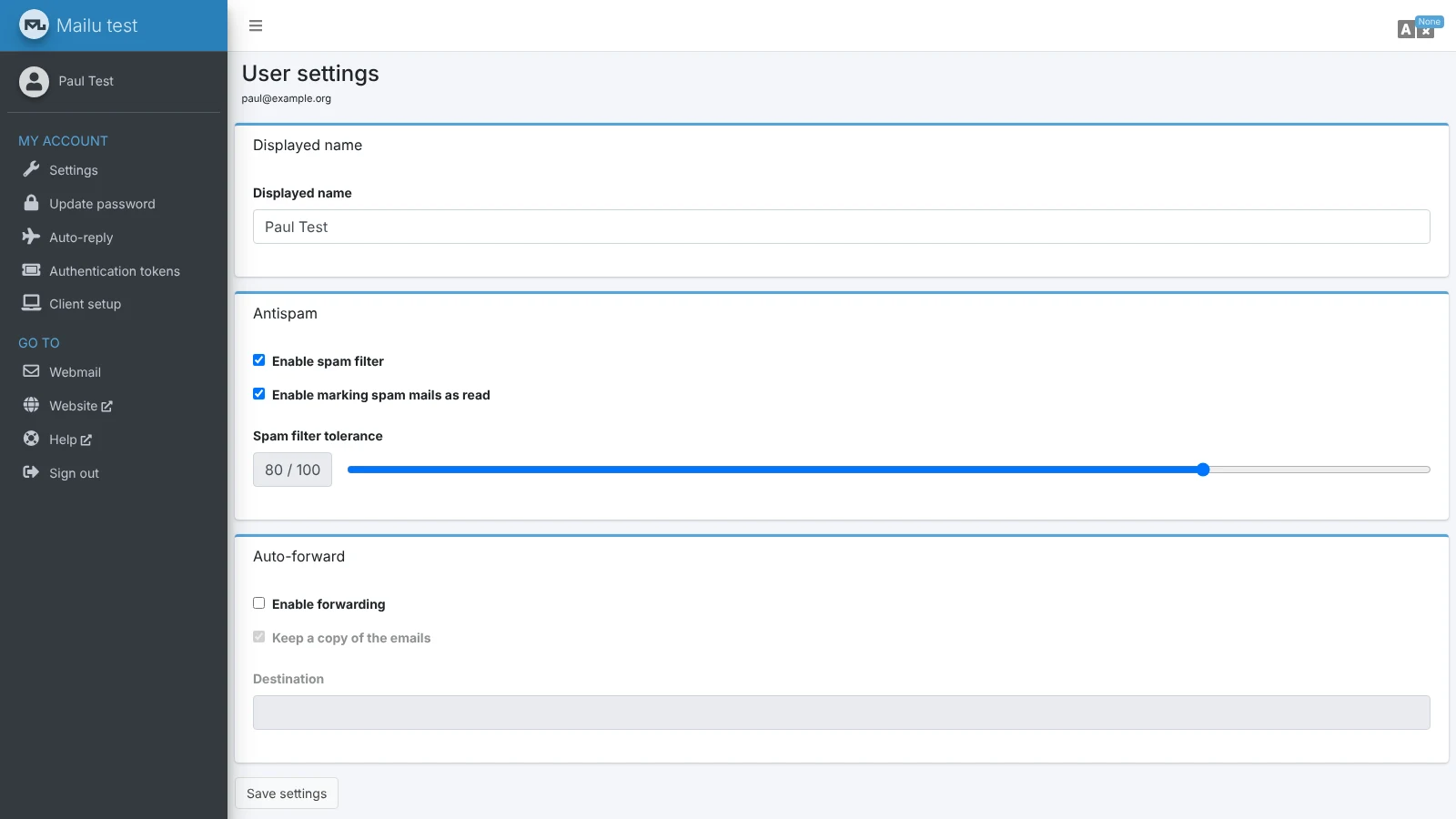
Each user can change their own spam tolerance, set an auto-reply and forward mail from their settings page. Moving a message to Junk teaches Rspamd, so filtering improves as people use it. On a new server with no history, though, my phishing test got through.
Check your DNS resolver first: Mailu refuses to start its admin panel unless the server’s DNS resolver checks DNSSEC. Most hosting providers are fine. If yours isn’t, the FAQ shows how to test it and what to change.
Know the limits: there is no two-step sign-in in the current release, no calendar in webmail and no built-in backup tool. Authentication tokens for mail apps are available and recommended.
What It Takes to Run
| Requirement | Details |
|---|---|
| Memory | 1 GB plus 1 GB of swap without ClamAV. 3 GB plus 1 GB of swap with ClamAV |
| Software | Docker and Docker Compose on Linux, with Debian stable recommended. Kubernetes is supported too |
| Network | A static IP address with matching reverse DNS, port 25 open in both directions, and a DNSSEC-checking resolver |
| Certificates | Let’s Encrypt built in, or your own certificate |
| Updates | Pull new images and restart. You can only move forward between main versions, so back up first |
Mail is stored as maildir folders on your server and settings in a small database, so backing up means copying the Mailu folder. As with any self-hosted server, getting the IP address and DNS right matters more than the software, or your mail ends up in spam.
Security
| Feature | Details |
|---|---|
| Sender checks | SPF, DKIM and DMARC, with anti-spoofing rules that reject mail pretending to be from your own domains |
| Connections | Enforced TLS, DANE and MTA-STS |
| Sign-in | Passwords and per-app authentication tokens, with rate limiting against password guessing. No two-step sign-in yet |
| Attachments | Blocks dangerous file types, checks Office macros, and scans for viruses if ClamAV is on |
| Encrypted email | Roundcube comes with its PGP plugin switched on, so users can encrypt and sign messages in webmail |
| Stored mail | Not encrypted on disk |
| Licence | MIT |
Who Is Behind It
Mailu is a volunteer project on GitHub with no company behind it and no paid support. Help comes through GitHub discussions and a Matrix chat room, and you can donate to the project. The main version is 2024.06, which still gets regular fixes: 2024.06.67 came out on 23 October 2026. A public demo server runs the development version so you can try it first.
Mailu Pricing in 2026
It is free under the MIT licence, with no paid edition and no limit on mailboxes or domains. The only cost is your server: a VPS with 2 GB of memory from a provider that allows mail servers typically costs £5 to £10 a month, more if you want ClamAV.
Comparative Matrix: Mailu vs. the Alternatives
| Feature | Mailu | mailcow | docker-mailserver | Stalwart |
|---|---|---|---|---|
| How it’s set up | Setup page, then web admin | Script, then web admin | Text files and commands | Web setup wizard |
| Recommended memory | 1 GB (3 GB with ClamAV) | 6 GB minimum | 2 GB | About 2 GB |
| Webmail | Yes (Roundcube or SnappyMail) | Yes (SOGo) | No (add your own) | Not yet |
| Calendars and contacts | Optional | Yes | No | Yes |
| Two-step sign-in | No | Yes | No | Yes |
| Full Review | You are here | Read the review | Read the review | Read the review |
Pros and Cons
| Strengths | Weaknesses |
|---|---|
| Clear admin page with every DNS record and copy buttons | No two-step sign-in in the current release |
| Webmail and spam filtering included and on from the start | Needs a DNSSEC-checking resolver, which trips up some setups |
| Light enough for 1 GB without ClamAV | Spam filter needs time to learn on a new server |
| Per-user spam tolerance, auto-reply and forwarding | Main version dates from June 2024 |
| API, authentication tokens and per-domain admins | Volunteer-run, with no paid support |
| Built on Postfix, Dovecot and Rspamd | No built-in backup tool |
Frequently Asked Questions
Is Mailu free?
Yes. It is open source under the MIT licence, with no paid edition. You pay only for your server.
Does Mailu include webmail?
Yes. You choose Roundcube or SnappyMail when you set it up, or none if you only use mail apps.
How much memory does Mailu need?
The project asks for 1 GB plus swap without ClamAV and 3 GB plus swap with it. My test used about 700 MB without ClamAV.
Why won’t the Mailu admin page start?
The most common reason is a DNS resolver that doesn’t check DNSSEC. The Mailu FAQ shows how to test your resolver and fix it.
Can I move my old email into Mailu?
Yes. Each user can add fetched accounts to pull mail from another server, or you can copy it across in a mail app.
Final Verdict
Mailu gets the balance right for a lot of people. It is lighter and simpler than mailcow, but unlike docker-mailserver it gives you webmail, an admin page and spam filtering from day one. The DNS page alone saves an afternoon of guesswork.
It isn’t the most modern option. There is no two-step sign-in yet, the main version is over two years old and the DNSSEC requirement can stop you before you start. If those don’t worry you, it is one of the most pleasant self-hosted mail servers to live with. If you want email you never have to think about, your email is too important to run on goodwill, and a managed provider will serve you better.
Sources: Mailu documentation, requirements, FAQ, release notes, Mailu on GitHub.
Note: This article contains no affiliate links. I have no connection with the Mailu project. Tested and checked on 30 October 2026. Features may change.

Paul O'Brien
I've spent over 25 years working hands-on with email, DNS and cloud infrastructure. I test email providers and privacy tools for real, then tell you what they're good at and where they fall short.
More about meMore like this


You're subscribed. New articles come by email, as I publish or every Thursday. Change how often
Comments