
· 6 min read
docker-mailserver Review (2026): A Mail Server in One Container, Configured by Files
docker-mailserver packs a full mail server into one Docker container that you configure with text files instead of a web page. Here is what it does, what you have to switch on yourself and who it suits.
Live facts
- Free plan
- Yes, open source
- Based in
- Not confirmed
- Encryption
- Standard
- Own domain
- Yes
Jump to section
docker-mailserver (often shortened to DMS) is a free, open-source mail server that runs as a single Docker container. Inside are the well-known parts, Postfix and Dovecot, plus optional spam and virus filtering. There is no database and no web page: you configure it with a few text files and a command-line tool. That makes it easy to version, back up and rebuild, and less friendly for anyone who likes an intuitive user interface.
This review covers what it does, what I found when I set it up, what you need to switch on yourself and how it compares with Stalwart, mailcow and Mox. Features were checked against the project’s documentation for version 16.0.1 on 30 October 2026.
Short answer: docker-mailserver is a solid, no-nonsense mail server for people who are happy in a terminal and like their setup kept in plain text files: one settings file and a few small files listing the email addresses. It runs comfortably on 2 GB of memory and starts in under a minute. It has no webmail, no admin web page and no calendars, and its default settings don’t include a spam filter, so read the docs before you go live.
How I tested: I ran version 16.0.1 on a test Linux server on 30 October 2026 using the project’s own Docker Compose file, created a mailbox and DKIM key with the setup tool, sent and received mail over SMTP and IMAP, and sent it a fake PayPal phishing email, first with the default settings and then with Rspamd switched on. The test server had no public address, so real-world delivery to Gmail or Outlook is covered from the documentation, not tested.
At a Glance: Who docker-mailserver Is (and Isn’t) For
| Who it suits | How well | Why |
|---|---|---|
| Sysadmin or developer who already runs Docker | Ideal | One container, plain files, easy to keep in Git and rebuild anywhere. |
| Homelab or small team that wants email only | Strong fit | Runs on modest hardware. Add Roundcube or SnappyMail yourself if people want webmail. |
| Business with an existing directory (LDAP) | Strong fit | LDAP accounts and OAuth2 sign-in are supported, with some configuration. |
| Anyone who wants an admin web page | Partial fit | Everything is done with commands and files. mailcow or Mailu give you a web panel. |
| Small business needing calendars and contacts | Alternative needed | Email only. Look at mailcow or Stalwart. |
| Non-technical user who just wants email that works | Alternative needed | A managed provider such as Fastmail or mailbox.org is far less work. |
What docker-mailserver Is
The project was started by Thomas Vial in 2016 and has been run by volunteers since January 2021. It is a packaging project: it takes standard mail software, sets it up sensibly and puts it in one container that you control with environment settings.
| Job | What it uses | On by default? |
|---|---|---|
| Sending and receiving | Postfix, with Postscreen | Yes |
| Mailboxes | Dovecot for IMAP, with optional POP3, quotas and Sieve filters | IMAP yes, POP3 and ManageSieve no |
| DKIM and DMARC | OpenDKIM and OpenDMARC, or Rspamd | Yes |
| Spam | Rspamd (recommended, and planned as the future default) or SpamAssassin through Amavis | No |
| Viruses | ClamAV | No |
| Blocking attackers | Fail2ban | No |
| Fetching mail from elsewhere | Fetchmail or Getmail | No |
| Sign-in | Built-in accounts, LDAP or OAuth2 (for example with Keycloak) | Built-in accounts |
Setting It Up: What I Found
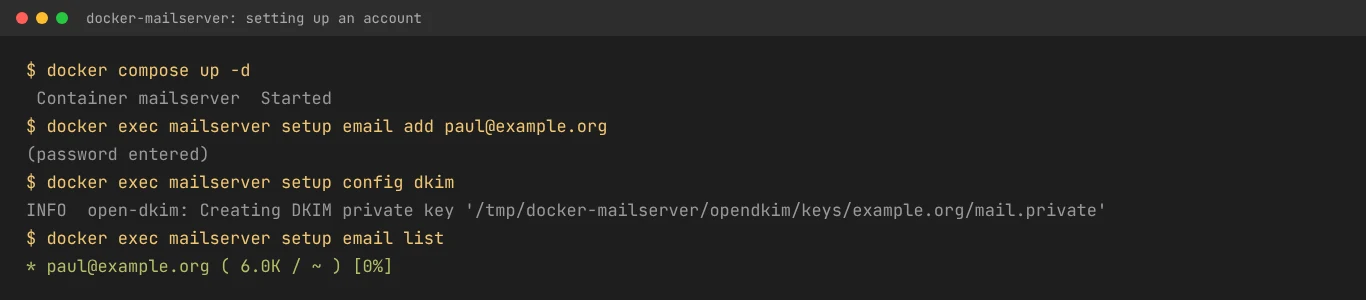
You download two files, the Compose file and mailserver.env, set your server name, and start the container. It then waits two minutes for you to create the first mailbox with setup email add, and shuts down if you don’t. A second command creates the DKIM key and prints the record to add to your DNS.
| What I checked | What happened |
|---|---|
| Starting up | Under a minute from docker compose up to a running server, once the image had downloaded |
| Mailbox and DKIM | One command each. The DKIM command printed the TXT record to publish |
| DNS help | None beyond the DKIM record. The docs explain SPF, DKIM and DMARC well, but you write the records yourself |
| Sending and receiving | Worked over SMTP and IMAP, with outgoing mail DKIM-signed. It is strict: a test message I sent without a Date header was bounced as invalid, which is correct |
| Spam filter, default settings | My fake PayPal email went straight to the inbox with no spam check at all, because no spam filter is switched on by default |
| Spam filter, Rspamd on | After switching to Rspamd as the docs recommend, the same email scored 17.7 against a reject limit of 11 and would have been refused. Rspamd spotted that the link said paypal.com but went somewhere else |
| Memory | About 170 MB with the defaults, and about 280 MB with Rspamd running |
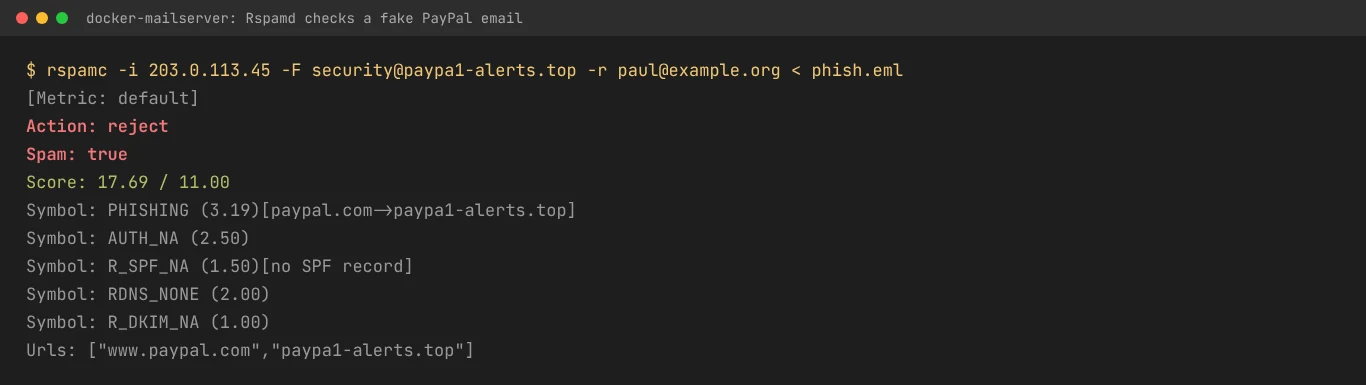
Switch on spam filtering: out of the box, docker-mailserver signs and checks DKIM and DMARC but doesn’t filter spam. The documentation recommends Rspamd, which takes a few lines in mailserver.env. Do it before you point your domain at the server.
Know the limits: there is no webmail, no admin web page, no calendars or contacts, no two-step sign-in and no API. Most people add Roundcube or SnappyMail as a separate container for webmail.
What It Takes to Run
| Requirement | Details |
|---|---|
| Memory | 1 vCPU and 2 GB recommended, with swap. 512 MB is possible without ClamAV. ClamAV alone needs around 850 MB |
| Software | Docker or Podman on Linux. Kubernetes is supported too |
| Network | A static IP address with matching reverse DNS, and port 25 open in both directions |
| Certificates | Let’s Encrypt (through a separate tool such as Certbot or a reverse proxy), your own certificate, or self-signed for testing |
| Updates | Pull the new image and recreate the container. Read the changelog first: version 16 moved to Debian 13 and Dovecot 2.4, which needs custom settings checked |
Your mail sits in ordinary maildir folders in a Docker volume, and your settings are text files. Backing up means copying those folders, which is about as simple as it gets.
Get the IP address and DNS right and docker-mailserver is pleasant to run. Get them wrong and your mail ends up in spam, however good the server is.
Security
| Feature | Details |
|---|---|
| Sender checks | SPF, DKIM and DMARC, through OpenDKIM and OpenDMARC or Rspamd. MTA-STS for outgoing mail is optional |
| Sign-in | Passwords, LDAP or OAuth2. No built-in two-step sign-in |
| Attack protection | Fail2ban and Postscreen, with Fail2ban off by default |
| Stored mail | Not encrypted on disk |
| Licence | MIT |
Who Is Behind It
docker-mailserver is a volunteer project on GitHub, with no company behind it and no paid support. It is actively maintained: version 16.0.0 arrived on 30 August 2026 and 16.0.1 on 4 September 2026. The maintainers ask that the issue tracker is used for bugs, not personal support.
docker-mailserver Pricing in 2026
It is free under the MIT licence, with no paid edition and no limit on mailboxes or domains. The only cost is your server: a VPS with 2 GB of memory from a provider that allows mail servers typically costs £5 to £10 a month.
Comparative Matrix: docker-mailserver vs. the Alternatives
| Feature | docker-mailserver | mailcow | Mox | Stalwart |
|---|---|---|---|---|
| How it’s set up | Text files and commands | Web admin panel | One command, then web admin | Web setup wizard |
| Recommended memory | 2 GB | 6 GB minimum | 512 MB | About 2 GB |
| Webmail | No (add your own) | Yes (SOGo) | Yes (built in) | Not yet |
| Calendars and contacts | No | Yes | No | Yes |
| Spam filter on by default | No | Yes | Yes (learns over time) | Yes |
| Full Review | You are here | Read the review | Read the review | Read the review |
Pros and Cons
| Strengths | Weaknesses |
|---|---|
| One container, plain files, no database | No webmail or admin web page |
| Easy to back up, version and rebuild | No spam filter until you switch one on |
| Built on Postfix and Dovecot, the industry standards | No calendars, contacts or two-step sign-in |
| Rspamd, ClamAV, Fail2ban and Sieve available | You write most DNS records yourself |
| LDAP and OAuth2 sign-in for businesses | Volunteer-run, with no paid support |
| Modest hardware needs | Major upgrades can need config changes |
Frequently Asked Questions
Is docker-mailserver free?
Yes. It is open source under the MIT licence, with no paid edition. You pay only for your server.
Does docker-mailserver include webmail?
No. It is a mail server only. Most people run Roundcube or SnappyMail in a second container and connect it over IMAP.
Is there a spam filter?
Yes, but it isn’t on by default. The project recommends switching on Rspamd, which caught my fake PayPal email easily. SpamAssassin is also available.
How much memory does docker-mailserver need?
The project recommends 2 GB with swap. It can run on 512 MB if you leave ClamAV off. My test used about 280 MB with Rspamd.
Can I move my old email into docker-mailserver?
Yes. Fetchmail or Getmail can pull mail from another server, or you can copy it across in a mail app. Because mail is stored as maildir folders, you can also copy existing maildirs in.
Final Verdict
docker-mailserver does one job and does it in the most transparent way possible: a standard mail server in one container, configured by files you can read, back up and keep in Git. If you are comfortable with Docker and a terminal, it is a reliable base that stays out of your way.
It asks more of you than its rivals. You switch on the spam filter, write the DNS records, and add webmail yourself if anyone wants it. If you would rather click than type, mailcow or Mox will suit you better. If you want email you never have to think about, your email is too important to run on goodwill, and a managed provider will serve you better.
Sources: docker-mailserver documentation, FAQ and system requirements, Rspamd guide, docker-mailserver on GitHub.
Note: This article contains no affiliate links. I have no connection with the docker-mailserver project. Tested and checked on 30 October 2026. Features may change.

Paul O'Brien
I've spent over 25 years working hands-on with email, DNS and cloud infrastructure. I test email providers and privacy tools for real, then tell you what they're good at and where they fall short.
More about meMore like this



You're subscribed. New articles come by email, as I publish or every Thursday. Change how often
Comments