
· 10 min read
mailcow Review (2026): The Self-Hosted Mail Server With Everything Included
mailcow bundles a mail server, webmail, calendars, spam and virus filtering into one Docker package with a friendly admin panel. Here is what you get, what it needs to run and who it suits.
Live facts
- Free plan
- Yes, open source
- Based in
- Germany
- Encryption
- Standard
- Own domain
- Yes
Jump to section
- At a Glance: Who mailcow Is (and Isn’t) For
- What mailcow Is
- What You Get in the Admin Panel
- Setting It Up: What I Found
- What It Takes to Run
- Security and Backups
- The Company Behind It
- mailcow Plans and Pricing in 2026
- Comparative Matrix: mailcow vs. the Alternatives
- Pros and Cons
- Frequently Asked Questions
- Final Verdict
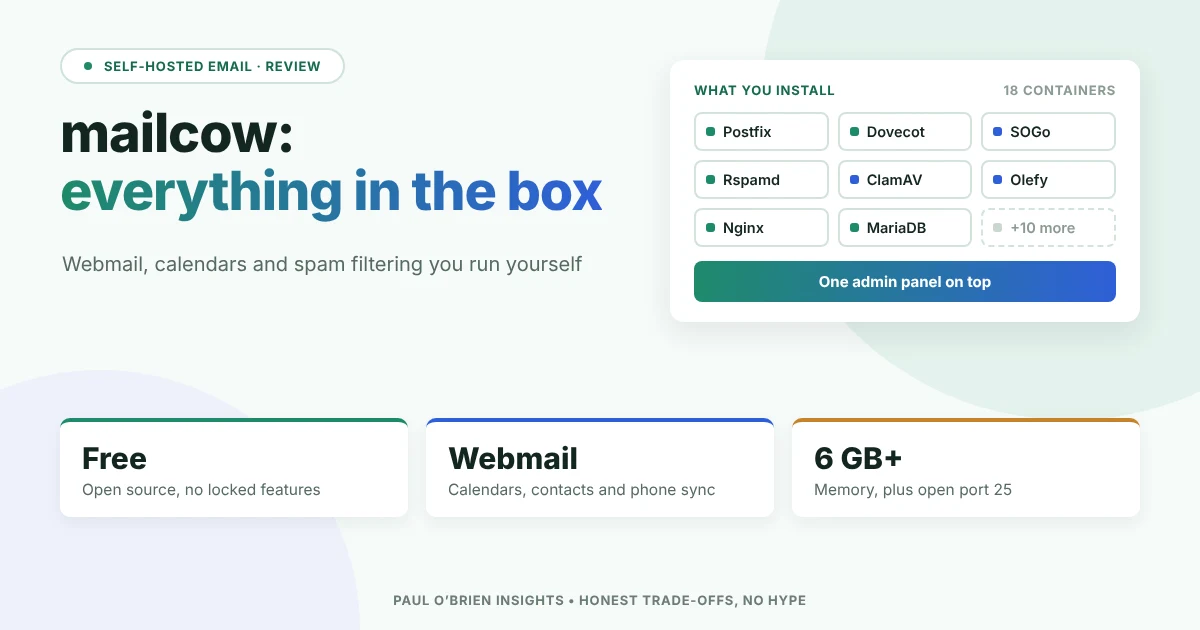
mailcow is a free, open-source email suite that you run on your own server. It takes the well-known parts of a self-hosted mail setup (Postfix, Dovecot, Rspamd, SOGo and more), packs each into its own Docker container and puts one friendly web admin panel on top. You get webmail, calendars, contacts, phone sync, spam and virus filtering out of the box. In return, it asks for a decent amount of memory and someone who is comfortable with Docker.
This review covers what mailcow includes, what it takes to run, what it costs and how it compares with Stalwart and other ways to host your own email. Features and requirements were checked against mailcow’s own documentation for the 2026-10 release on 30 October 2026.
Short answer: mailcow is the most complete “everything in the box” self-hosted email suite I know of. Webmail, calendars and contacts work from day one, which Stalwart still can’t say. It suits a small business or an IT person who wants Microsoft 365-style features on their own server and is happy to look after Docker. It is heavier than a single-program server and, like every self-hosted option, it can’t fix a poor IP address or a blocked port 25.
How I tested: I installed the 2026-10 release on a test Linux server on 30 October 2026, added a domain and a mailbox, sent and received mail over SMTP and IMAP, used the SOGo webmail and calendar, and ran a fake PayPal phishing email through the spam filter. The test server had no public address, so real-world delivery to Gmail or Outlook is covered from mailcow’s documentation, not tested. mailcow also runs a public demo at demo.mailcow.email if you want to click around yourself.
At a Glance: Who mailcow Is (and Isn’t) For
| User Profile | Best Fit? | Core Value Drivers / Key Trade-offs |
|---|---|---|
| Small business wanting mail, calendars and contacts in-house | Ideal | Webmail, shared calendars and phone sync from day one. Plan for at least 8 GB of memory for 5 to 10 people. |
| IT person or managed service provider | Strong fit | Domain administrators, mailbox templates, an API and single sign-on make it easy to run for several clients. |
| Sysadmin who already runs Docker | Strong fit | One update script for the whole stack. You still own deliverability, backups and the server itself. |
| Privacy-focused individual with one domain | Workable | Your mail on your own server, but 6 GB of memory is a lot of server for one mailbox. |
| Anyone on a small VPS, a NAS or a Raspberry Pi-style box | Partial fit | NAS boxes, LXC and OpenVZ aren’t supported. A single-program server such as Stalwart needs far less. |
| Non-technical user who just wants email that works | Alternative needed | A managed provider such as Fastmail or mailbox.org is far less work. |
What mailcow Is
mailcow (always with a small m, as the project points out) doesn’t write its own mail server. It takes proven open-source parts, runs each in its own container and ties them together with a web interface it calls the mailcow UI. The 2026-10 release starts eighteen containers.
| Job | What mailcow uses |
|---|---|
| Sending and receiving | Postfix, with MTA-STS and DANE checks on outgoing mail |
| Mailboxes (IMAP and POP3) | Dovecot, with full-text search and Sieve filters |
| Webmail, calendars and contacts | SOGo, including CalDAV, CardDAV and ActiveSync for phones |
| Spam | Rspamd, which learns from what users mark as spam |
| Viruses and dodgy attachments | ClamAV (optional) and Olefy, which checks Office files for harmful macros |
| Certificates | Free Let’s Encrypt certificates, renewed automatically |
| Protection | A built-in Fail2ban-style blocker, a quarantine for suspect mail and a watchdog that checks every container |
| Everything else | MariaDB, Redis, Memcached, Nginx and Unbound for DNSSEC checks |
The strength of this approach is that every part is mature and widely documented. The cost is that there are a lot of moving parts, and when something goes wrong you need to know which container to look at.
What You Get in the Admin Panel
The control panel is where mailcow really shines. Setting up a new domain or mailbox takes just a few clicks, and awkward jobs that usually mean editing text files on a server are turned into simple buttons.
| Area | What you can do |
|---|---|
| Domains and mailboxes | Add domains, mailboxes, aliases and catch-all addresses, with quotas and mailbox templates |
| Email authentication | Create DKIM keys and ARC signing from the panel, with a DNS check for each domain |
| Spam controls | Allow and block lists per domain and per user, spam scores per user, and temporary spam aliases users can create themselves |
| Moving mail in | Sync jobs (imapsync) that copy mail from any other IMAP account, once or on a schedule |
| Delegated admin | Domain administrators who can manage their own domain but not the rest of the server |
| Sign-in | Two-step sign-in with authenticator apps, YubiKey or WebAuthn security keys, plus Keycloak, LDAP or any OpenID Connect provider for single sign-on |
| Automation | A REST API, documented in the panel, for scripting accounts and settings |
Know the limits: ActiveSync no longer works with Outlook 2019 or later (including Microsoft 365 and the new Outlook), because Microsoft now requires a sign-in method mailcow doesn’t support. Outlook users connect over IMAP instead, and calendars need a separate add-on. Phones are fine.
Setting It Up: What I Found
On a supported Linux server with Docker already installed, the install is four steps:
- Download mailcow with
git clone. - Run
generate_config.sh, which asks for your mail server’s name and time zone. - Run
docker compose pullanddocker compose up -d. - Sign in at
/adminwith the default login, and change the password straight away.
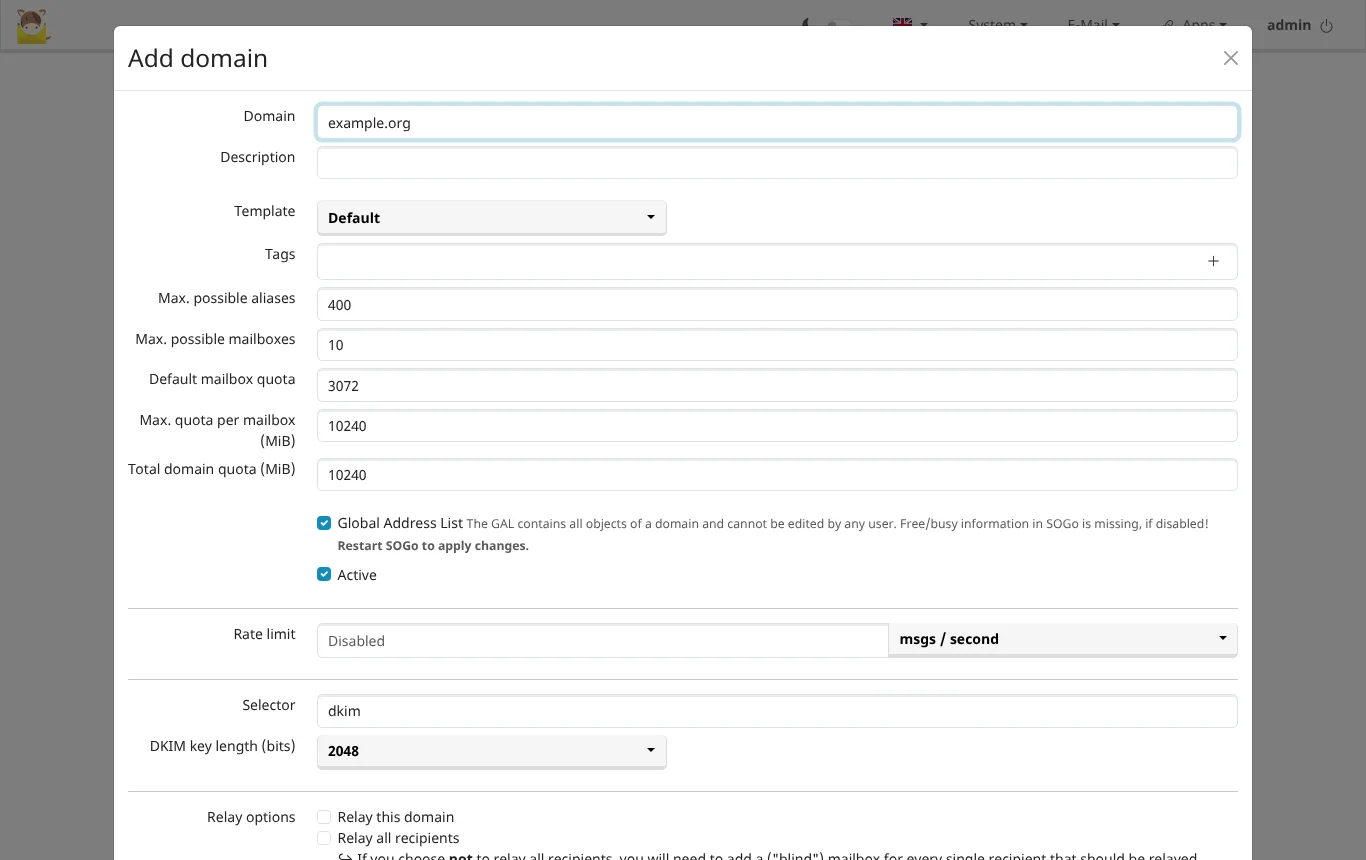
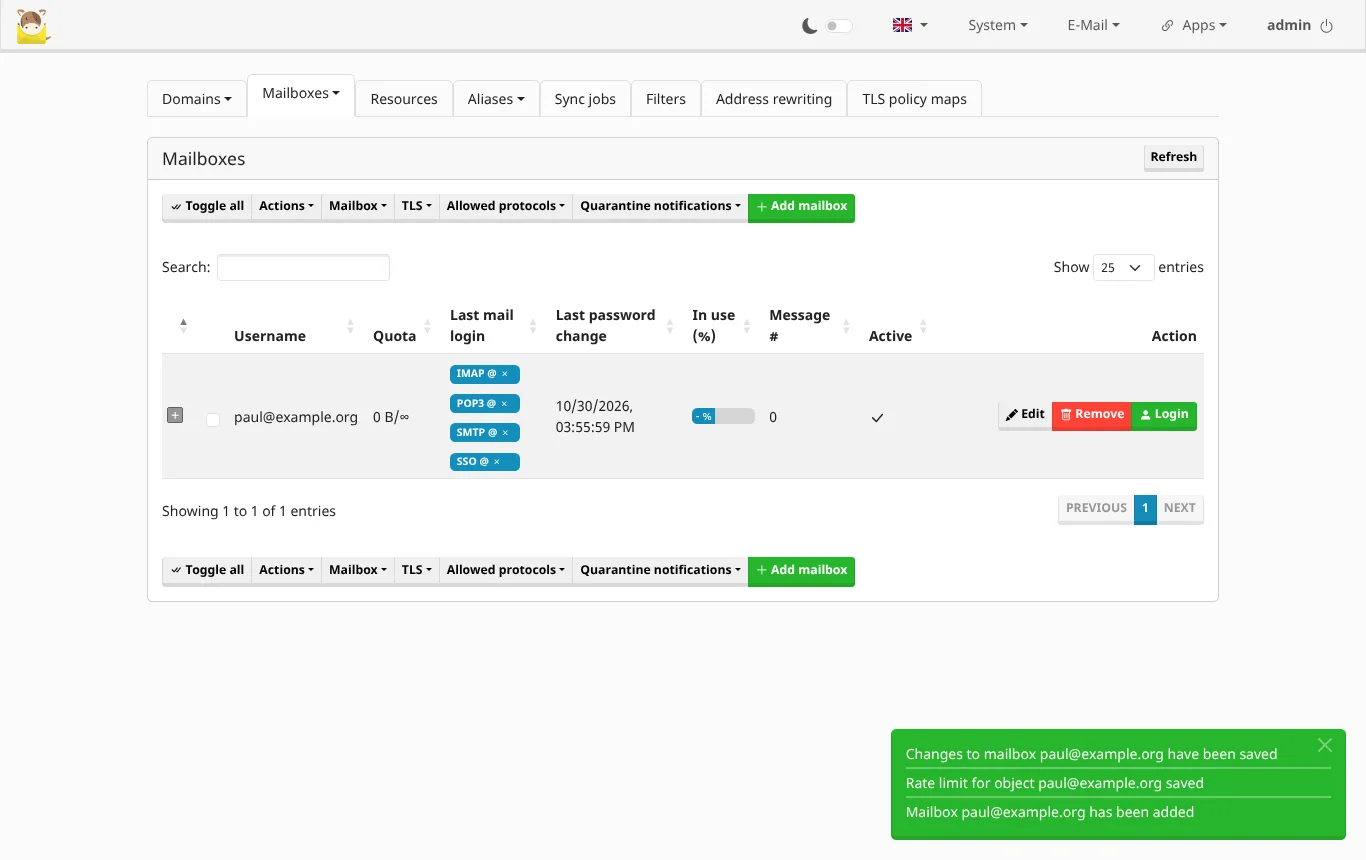
Downloading the eighteen containers is the slow part. Once they were running, adding a domain and a mailbox took a couple of minutes in the admin panel.
| What I checked | What happened |
|---|---|
| Admin panel | Clear tabs for domains, mailboxes, aliases, sync jobs and filters. The default admin password works until you change it, and nothing forces you to |
| Creating a mailbox | One form, with quotas, allowed protocols, spam handling and TLS settings for each mailbox |
| DNS records | A DNS button for each domain lists the records it needs and checks them. MX, autodiscover and the DKIM key are ready to copy; for SPF and DMARC it links to help pages rather than suggesting a record |
| Sending and receiving | Worked first time over SMTP and IMAP, with outgoing mail DKIM-signed automatically |
| Webmail | SOGo opened straight from the user’s login, with mail, calendar and contacts. A personal calendar was set up for the new user automatically |
| Spam filter | A fake PayPal email, run through Rspamd as if from an outside server, scored 13.8 out of 15 and was marked as spam, so it would go to Junk. Rspamd spotted that the link said paypal.com but went somewhere else |
| Memory | About 1.1 GB across all containers while idle with one mailbox, but ClamAV hadn’t loaded its virus database because the test server couldn’t download it. mailcow’s 6 GB minimum leaves room for ClamAV, search and busy days |
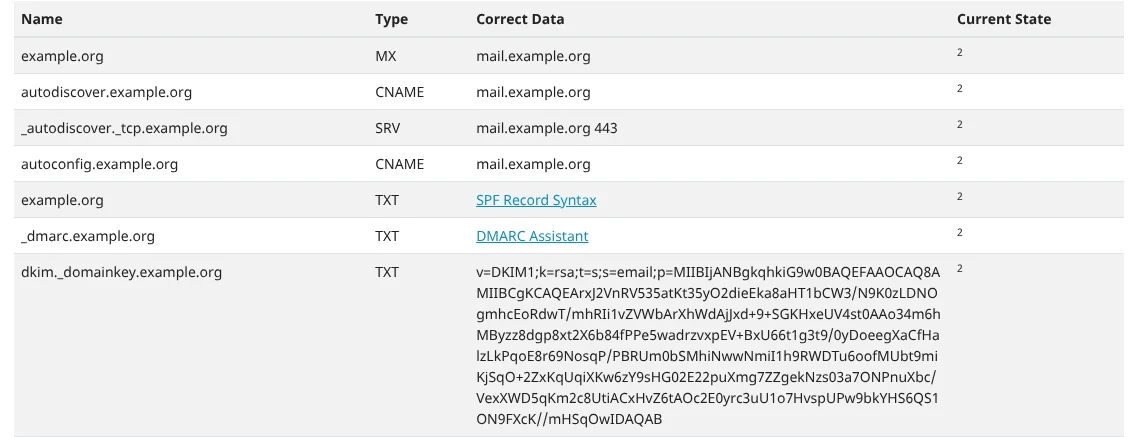
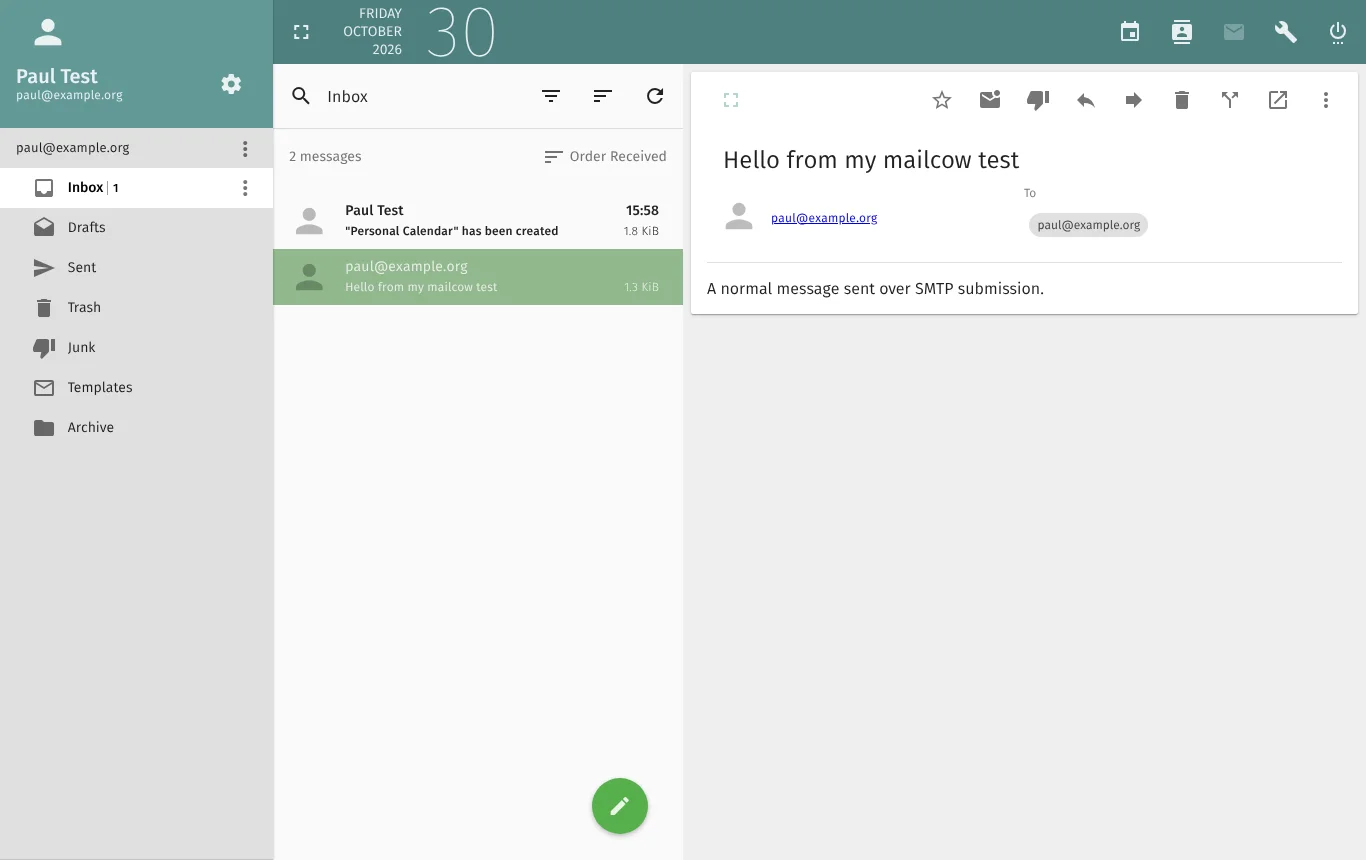
Before you can start sending and receiving real email, your domain needs a few key settings in place. You’ll need basic records pointing to your server (an A and an MX record), automatic setup records so phones and mail apps connect without fuss, and the three essential security checks (SPF, DKIM and DMARC) to prove your messages are genuine and keep them out of junk folders.
Updates are one command, ./update.sh, which fetches the latest release and restarts the containers. mailcow releases are named by month (this review covers 2026-10), with fixes in between.
What It Takes to Run
| Requirement | Details |
|---|---|
| Memory | 6 GB plus 1 GB of swap as a minimum, 8 GB for 5 to 10 users. mailcow’s example: 15 phones and about 50 IMAP connections need 16 GB |
| Disk | 20 GB before any mail |
| Server type | A full virtual machine or a dedicated server (x86_64 or ARM64). Not a NAS, LXC or OpenVZ container |
| Operating system | Debian 11 to 13, Ubuntu 22.04 or newer, Alma Linux 8 or 9, Rocky Linux 9 tested; Alpine with some changes |
| Network | A static IP address with reverse DNS that matches your server name, and port 25 open in both directions |
| Firewall | Docker manages its own firewall rules, so ufw and firewalld need care |
You can save memory by switching off ClamAV and full-text search, and the setup script offers to switch off ClamAV on servers with 2.5 GB or less. Even so, mailcow is a full groupware suite, and it is sized like one.
Get your IP address and domain settings sorted properly, and mailcow is a genuine pleasure to run. Get them wrong, and your emails will head straight for the junk folder, no matter how well the server itself is configured.
Security and Backups
| Feature | Details |
|---|---|
| Stored mail | Compressed and encrypted on disk. The keys sit on the same server, so this protects a stolen disk, not a hacked server |
| Two-step sign-in | Authenticator apps, YubiKey OTP and WebAuthn keys. App passwords for mail apps when single sign-on is on |
| Attack protection | Blocks IP addresses that keep failing to sign in |
| Backups | A built-in script backs up mail, the encryption keys, the database and settings, and can delete old backups |
| Licence | GPL-3.0, so anyone can read and check the code |
Back up the keys: because stored mail is encrypted, a backup of the mail without the encryption key volume is useless. mailcow’s own docs put it bluntly: no backup, no pity.
The Company Behind It
mailcow is developed by the team at Servercow, part of The Infrastructure Company GmbH in Germany, which owns the mailcow and Servercow trademarks. The project is funded by support contracts, GitHub sponsors and one-off donations. Servercow also sells managed mailcow hosting for people who want mailcow without running the server.
mailcow Plans and Pricing in 2026
| Option | Price | What you get |
|---|---|---|
| mailcow | Free (GPL-3.0) | Everything in this review, no limit on mailboxes or domains, community support through the forum and Telegram |
| Support contract | Monthly subscription from Servercow | Ticket, phone or remote help from the people who build mailcow, depending on the level |
| Stay-Awesome License | A one-off payment you choose | No extra features. A way to say thank you and fund development |
The software itself is completely free: there is no paid “pro” edition, and no features are locked behind an expensive licence. If you ever need commercial support, you can buy plans directly from Servercow via their mailcow page.
However, you will need to factor in the monthly cost of a server. mailcow is resource-heavy, needing at least 6 GB of RAM (8 GB for 5 to 10 users), so you will need a beefier virtual private server (VPS) than a lightweight, single-purpose setup. Expect to pay around £10 to £25 a month, making sure you pick a host that explicitly permits sending email.
Comparative Matrix: mailcow vs. the Alternatives
| Feature | mailcow | Stalwart | Mail-in-a-Box | Mailflare |
|---|---|---|---|---|
| How it’s built | Docker bundle of Postfix, Dovecot, Rspamd, SOGo and more | One program in Rust | Script that sets up a whole Ubuntu server | Runs on Cloudflare Workers, no server |
| Webmail | Yes (SOGo) | Not yet | Yes (Roundcube) | Yes |
| Calendars, contacts and phone sync | Yes, including ActiveSync | Yes (CalDAV, CardDAV, JMAP) | Yes (CalDAV, CardDAV) | No |
| Minimum memory | 6 GB | About 2 GB | 512 MB | None (Cloudflare) |
| Needs port 25 and a clean IP | Yes | Yes | Yes | No |
| Paid edition | None. Optional paid support | Enterprise from €2 per mailbox a year | None | One-off licences |
| Full Review | You are here | Read the review | Coming soon | Read the review |
Pros and Cons
| Strengths | Weaknesses |
|---|---|
| Webmail, calendars, contacts and phone sync out of the box | Needs at least 6 GB of memory |
| Friendly admin panel for nearly everything | Eighteen containers to understand when something breaks |
| Completely free, with no locked features | ActiveSync doesn’t work with current Outlook |
| Built on mature, well-known mail software | Docker firewall rules catch people out |
| Strong spam and virus filtering, including Office macro checks | No JMAP |
| One-command updates and a built-in backup script | You own deliverability, backups and the server |
| Single sign-on, domain admins and an API for businesses | Free users rely on community support |
Frequently Asked Questions
Is mailcow really free?
Yes. mailcow is open source under the GPL-3.0 licence, with no limit on mailboxes or domains and no paid edition. You pay only for your server, and for a support contract if you want one.
Does mailcow include webmail?
Yes. SOGo provides webmail, calendars and contacts in the browser. You can add Roundcube alongside it if you prefer its look.
Can I run mailcow on a Raspberry Pi or a NAS?
Not on a NAS such as Synology or QNAP, and not in LXC or OpenVZ containers. ARM64 is supported, but mailcow needs at least 6 GB of memory, so most small boards are out.
Does mailcow work with Outlook?
Yes, over IMAP. ActiveSync no longer works with Outlook 2019 or later, including Microsoft 365, so calendars and contacts in Outlook need an extra add-on. Phones can still use ActiveSync.
Can I move from Gmail or another provider to mailcow?
Yes. Sync jobs in the admin panel copy mail from any IMAP account, once or on a schedule, so you can move people over gradually.
Can I try mailcow before installing it?
Yes. mailcow runs a public demo at demo.mailcow.email, with the logins listed on its documentation home page.
Final Verdict
mailcow is the self-hosted email suite I would recommend to any small business wanting the full package: polished webmail, shared calendars, seamless phone syncing and serious spam protection, all managed from a single dashboard, with zero software fees. It has been around long enough to have answers for practically every quirk, and the web admin panel removes much of the friction from day-to-day maintenance.
However, it isn’t lightweight, and it certainly isn’t simple under the bonnet. You’ll need a capable server with plenty of RAM, a clean IP reputation, port 25 open in both directions and someone comfortable managing Docker containers. If that sounds like you, mailcow is an outstanding choice. If you’d prefer something leaner and built on modern protocols, take a look at Stalwart. But if you find yourself hesitating, remember that business email is far too critical to run on good intentions alone, and a managed provider will save you endless sleepless nights.
Sources: mailcow, mailcow documentation, system requirements, Outlook notes, mailcow on GitHub, Servercow.
Note: This article contains no affiliate links. I have no commercial relationship with mailcow or Servercow. Tested and checked on 30 October 2026. Features and requirements may change.

Paul O'Brien
I've spent over 25 years working hands-on with email, DNS and cloud infrastructure. I test email providers and privacy tools for real, then tell you what they're good at and where they fall short.
More about meMore like this

You're subscribed. New articles come by email, as I publish or every Thursday. Change how often
Comments