I’ll say it up front, because it’s the whole point of this piece: Fastmail is the best pure email service I’ve used. And yet, as I write this, my mail runs through Google Workspace. Both of those things are true, and the gap between them says more about how we work in 2026 than it does about either company.
I ran Fastmail as my primary email for a long stretch. Not as a weekend test, not as a review account I logged into twice, but as the place my real mail lived: my own domain, my contacts, my calendar, the receipts, the client threads, the lot. I’ve written about it before, in my deep dive into Fastmail’s privacy, security and sovereignty and in head-to-heads against Proton Mail and HEY. This one is different. It’s less a spec sheet and more an honest account of why I loved it, what I miss, and why I still left.
If you only want the short version: if email lived in a vacuum, I’d still be on Fastmail today. It doesn’t, and that’s the problem.
Reader offer: 10% off Fastmail. Try Fastmail free for up to 30 days, then get 10% off your first year on any plan through my referral link.
Claim 10% off Fastmail
Referral link: I may earn a commission, at no extra cost to you.
At a Glance: Who Fastmail Is (and Isn’t) For
Before I get into the story, here’s where I’ve landed on who should and shouldn’t use it. This is my opinion, shaped by living with it rather than reading a features page.
| User Profile | Best Fit? | Core Value Drivers / Key Trade-offs |
|---|
| Individuals leaving Gmail with their own domain | Ideal | Painless import, quick domain setup, no ads, and your domain stays portable if you ever move again. |
| Families and couples | Strong fit | Duo and Family plans share domains, calendars and contacts cleanly without anyone needing a Google account. |
| Privacy-conscious everyday users | Strong fit | Masked Email and image proxying cover the threats most of us actually face: breaches, spam and tracking pixels. |
| Power users who live in Apple Mail, Thunderbird or similar | Ideal | Standard IMAP, SMTP, CalDAV and CardDAV with no bridge app in the way. |
| Freelancers and small businesses that collaborate with clients | Partial fit | The email is excellent, but you’ll be bolting on docs, file sharing and video calls from somewhere else. |
| High-risk users (journalists, activists, sources) | Alternative needed | No end-to-end encryption by default; Fastmail holds the keys. Look at Proton or Tuta instead. |
Why I Moved to Fastmail in the First Place
Like most people, I’d drifted into Gmail years ago and never really chose it. It was free, it was everywhere, and it was good enough. But the longer I spent writing about email and privacy, the more uncomfortable I became with the idea that my primary inbox was a product designed around someone else’s business model.
What I wanted was simple. A paid service where I was the customer, not the inventory. Proper support for my own domain. Standards-based protocols so I could use whichever app I liked. And something fast, because if there’s one thing that wears me down over a working day it’s software that makes me wait.
Fastmail ticked every box on paper. What surprised me was how quickly it ticked them in practice.
Leaving Gmail Was Easier Than I Expected
Moving a primary domain feels like it should be a weekend-wrecking job. It wasn’t. I braced myself for broken threads and lost contacts, and mostly what I got was a progress bar.
| Migration Step | How It Went for Me |
|---|
| Mail and labels | You sign in to your old Google account from Fastmail’s import settings and it pulls everything across in the background. Years of mail arrived with my Gmail labels intact. |
| Contacts and calendars | Address books and calendars came across with recurring events and contact photos still in place, which is more than I can say for some migrations I’ve done. |
| Custom domain (MX, SPF, DKIM) | The setup wizard walks you through each DNS record. Mine was done in about ten minutes, and most of that was waiting for my DNS host to catch up. |
One small catch: Fastmail may ask for a mobile number to send an SMS code during the free trial. It’s an anti-spam measure, and until you verify, trial users can’t pull mail down over IMAP or POP. Trial accounts are also capped at 120 sent messages a day and can’t create forwarding rules, so it’s worth upgrading before you cut over a busy domain. Details are on Fastmail’s trial accounts help page.
The Thing Nobody Tells You: It’s Just So Fast
The name isn’t marketing. Fastmail is quicker than anything else I’ve used day to day, Gmail included, and after a while you stop noticing it, until you go back to something else and suddenly everything feels like it’s wading through treacle.
A big part of that is JMAP, the JSON Meta Application Protocol. Fastmail helped write the standard (it’s published as RFC 8620 and RFC 8621), and its own apps are built on it. Where IMAP dates back to the 1980s and was designed around long-lived connections, JMAP talks over ordinary HTTPS, batches requests together and only fetches what has changed. You don’t need to care about any of that to feel the result.
| What I Noticed | Why It Mattered to Me |
|---|
| Search | Searching an archive of tens of thousands of messages came back in well under a second. I stopped filing things carefully because finding them was trivial. |
| Mobile push | New mail arrived instantly on my phone without the app quietly eating my battery in the background. |
| No lock-in | When I wanted Apple Mail or Thunderbird, standard IMAP and SMTP just worked. No bridge app, no special client, no hoops. |
That last point matters more than people think. Several privacy-first providers make you run a desktop “bridge” to use a normal mail app. Fastmail never asked me to compromise on how I wanted to work, and I’ve come to see that as a form of respect.
Privacy for Real Life, Not for Spies
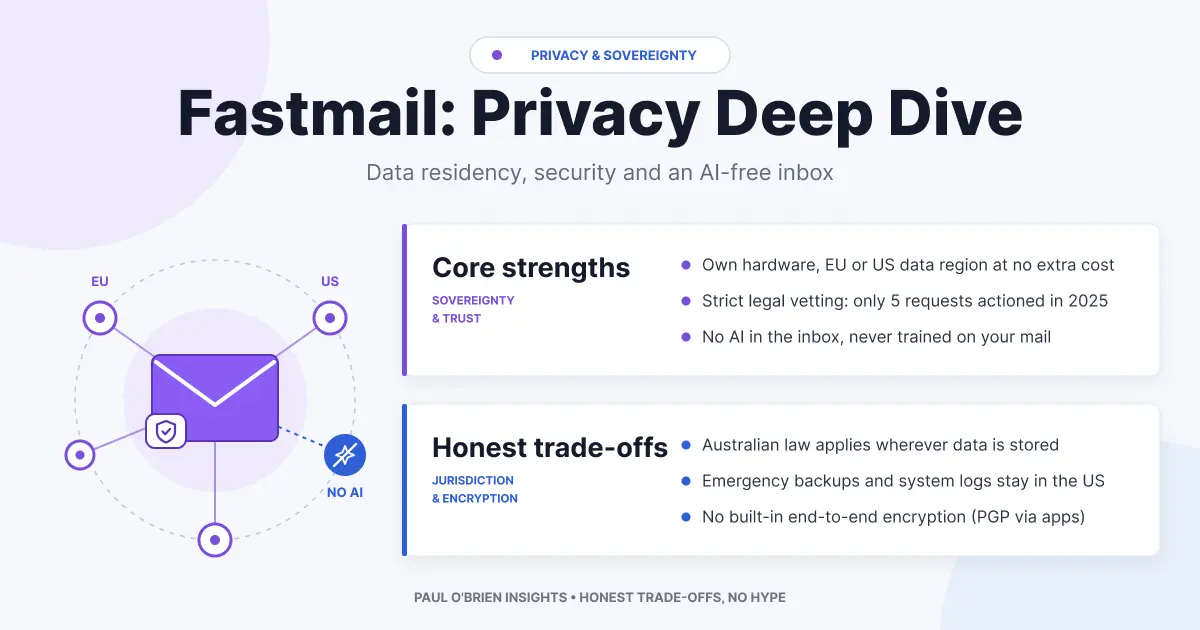
I want to be straight about this, because I think a lot of email reviews get it wrong in both directions. Fastmail is not a zero-knowledge, end-to-end encrypted service. Your mail is encrypted at rest on its servers, but Fastmail holds the keys. If your threat model involves state-level surveillance or legal compulsion, it isn’t the right tool, and I’d point you to my Proton Mail review or Tuta review instead.
But for the privacy problems most of us actually have, I think Fastmail is the most practical answer going. It sits in a pragmatist’s middle ground: no ads, no scanning your mail to sell you things, and a couple of features I genuinely used every single day.
| Feature | What It Does | My Take |
|---|
| Masked Email | Generates a random, unique address for each site you sign up to. It plugs straight into 1Password and Bitwarden, so you can create one from the sign-up form. | Easily my most-used feature. When a site got breached or started spamming me, I switched off that one address and my real inbox never knew. I wrote more about why in masked email vs disposable email. |
| Remote image proxying | Blocks remote images by default and, when you do load them, fetches them through Fastmail’s servers rather than your device. | Senders see Fastmail, not my IP address or rough location. It’s quiet, it’s automatic, and it neuters most tracking pixels. |
| Paid-only model | No free tier, no advertising. | I’m happy to pay for email. It means the incentives line up with mine. |
Know the limits: Fastmail is an Australian company. Since August 2026 you can choose to keep your primary data on its servers in Amsterdam, but a replica is still stored in the US, backups and logs are US-based, and connections fall back to US servers if the EU ones are unavailable (see Fastmail’s data residency help page). If data jurisdiction matters to you, read my Fastmail privacy and sovereignty deep dive before you commit.
So Why Did I Leave?
This is the bit I’ve thought about most, and the honest answer is a little deflating: I didn’t leave because of anything Fastmail did wrong. I left because email isn’t the centre of my working life any more. It’s the front door to everything else.
When I’m working with clients, external teams or co-authors, the work happens in a Google Doc, a shared Sheet, a Drive folder with permissions someone else set up, or a Meet call that lands in my calendar ten minutes before it starts. That’s not a preference anyone asks me about. It’s just how most of the people I work with operate.
For a while I did what plenty of Fastmail users do: Fastmail for mail, plus a separate Google account for the collaborative bits. It works. But running two identities for one business, juggling which account a document was shared with, which calendar a Meet invite landed in, and which login a client had added to a folder, slowly turned into a tax I was paying every week. None of it was dramatic. All of it added up.
Eventually, paying for Google Workspace became the pragmatic choice. One login, one domain, Docs, Drive and Meet all sitting under the same identity as my email. I gave up a better inbox to get a less fragmented working day, and on balance, for my work, that was the right trade.
Do I miss Fastmail? Yes. I miss the speed most. I miss Masked Email nearly as much. And I’ll admit that Gmail’s interface has never felt as calm or as respectful of my attention.
Fastmail Plans and Pricing in 2026
Prices below are as listed on Fastmail’s pricing page when I checked on 17 October 2026, before tax, in US dollars, with the annual-billing price first. Every plan comes with a free trial of up to 30 days.
| Plan | Price | Storage | Users | Custom Domain | Extras |
|---|
| Individual | $5/month billed annually ($60/year), or $6 monthly | 60 GB | 1 | Yes | Masked Email, calendars, contacts, files |
| Duo | $8/month billed annually ($96/year), or $10 monthly | 120 GB (60 GB each) | 2 | Yes | Shared domains, calendars and contacts |
| Family | $11/month billed annually ($132/year), or $14 monthly | Up to 360 GB (60 GB each) | Up to 6 | Yes | Everything in Duo for the whole household |
| Business Basic | $3/user/month billed annually, or $4 monthly | 6 GB per user | Scalable | No | Masked Email |
| Business Standard | $5/user/month billed annually, or $6 monthly | 60 GB per user | Scalable | Yes | Masked Email |
| Business Professional | $9/user/month billed annually, or $10 monthly | 150 GB per user | Scalable | Yes | Masked Email |
Comparative Matrix: Fastmail vs. the Alternatives
| Feature | Fastmail | Google Workspace | Proton Mail |
|---|
| Primary focus | Email, calendar and contacts done brilliantly | Full productivity and collaboration suite | End-to-end encrypted email and privacy suite |
| Protocols | JMAP, IMAP, SMTP, CalDAV, CardDAV natively | Web-first; IMAP and SMTP supported | Desktop Bridge needed for IMAP/SMTP clients |
| Encryption | Encrypted at rest; Fastmail holds the keys | Encrypted at rest; Google holds the keys | Zero-access encryption; Proton can’t read stored mail |
| Aliases | Masked Email with 1Password and Bitwarden integration | Aliases and catch-all on your domain | Hide-my-email aliases (plan-dependent) |
| Document collaboration | None beyond basic file storage | Docs, Sheets, Slides with real-time editing | Proton Docs and Drive |
| Video calls | Links to third-party services | Google Meet built in | Not core to the mail plans |
| Speed | The fastest I’ve used | Good, heavier | Slower, the cost of encryption |
| Full Review | You are here | Covered in this piece | Proton Mail review and Proton vs Fastmail |
| Try It | 10% off first year | Try Google Workspace | See Proton deals |
Pros and Cons
| Strengths | Weaknesses |
|---|
| Genuinely the fastest email service I’ve used, search included | No document editing, spreadsheets or native video calls |
| Masked Email built in, with password manager integration | Not end-to-end encrypted by default |
| Painless Gmail migration and custom domain setup | Trial restrictions can bite if you migrate a busy domain early |
| Open standards, no bridge app, no lock-in | Running it alongside Google for collaboration means two identities to manage |
| Paid-only, no ads, remote images proxied | Priced in US dollars, so UK costs move with the exchange rate |
Frequently Asked Questions
Is Fastmail better than Gmail?
As an email service, I think so. It’s faster, calmer, ad-free and better on everyday privacy. Gmail’s advantage is everything wrapped around it, especially if you’re on Google Workspace.
Why did you switch from Fastmail to Google Workspace?
Collaboration, not email. My clients and co-authors live in Docs, Drive and Meet, and running a separate Google identity next to Fastmail became more hassle than it was worth.
Can I use Fastmail and Google Docs together?
Yes. Plenty of people use Fastmail for mail and a free Google account for Docs and Meet. It works fine; it just means managing two accounts, which is what eventually wore me down.
Is Fastmail end-to-end encrypted?
No. Mail is encrypted at rest, but Fastmail holds the keys. If you need zero-access encryption, look at Proton Mail or Tuta.
Does Fastmail need a phone number?
It may ask for one during the trial to verify you by SMS. It’s there to stop spammers abusing free trials.
Would you go back to Fastmail?
In a heartbeat, if my work didn’t revolve around Google’s collaboration tools. For personal or family email, it’s still the service I recommend first.
The Bottom Line
Fastmail is what email should feel like: quick, quiet, respectful of your privacy and your attention, and built on open standards so you’re never trapped. If you want a pure email, calendar and contacts service on your own domain, I don’t think there’s a better one, and you can try Fastmail with 10% off your first year.
But be honest with yourself about how you work. If your days are spent in shared documents, spreadsheets and video calls, the pull of an all-in-one suite like Google Workspace is real, and I’m living proof that it eventually wins. I chose convenience over the better inbox. I’m not sure I’d make the same call if I were starting over for my personal mail, and that, more than anything, tells you how good Fastmail is.
Reader offer: 10% off Fastmail. Test Fastmail risk-free with a free trial of up to 30 days, then get 10% off your first year on any plan.
Claim 10% off Fastmail
Referral link: I may earn a commission, at no extra cost to you.
Disclosure: This article contains affiliate links for Fastmail, Google Workspace and Proton Mail. If you sign up through them, I may earn a commission at no extra cost to you. I only recommend services I personally use and trust.
Note: checked and updated 17 October 2026. Sources: Fastmail pricing, Fastmail 2024 pricing and plan updates, Fastmail storage limits, Fastmail trial accounts, Fastmail data residency, TechRadar Fastmail review.

Comments