
· 8 min read
Mox Review (2026): The Tiny, Modern Mail Server Built for One Person to Run
Mox is a free, open-source mail server in a single small program, with webmail, a learning spam filter and every modern email security standard switched on. Here is what it does well and what it leaves out.
Live facts
- Free plan
- Yes, open source
- Based in
- Netherlands
- Encryption
- Standard
- Own domain
- Yes
Jump to section
Mox is a free, open-source mail server that fits in one small program. It sends and receives mail, serves IMAP, includes its own webmail and spam filter, and switches on every modern email security standard by default. Its stated aim is to make running your own mail server “nearly effortless”. After testing it, I think it gets closer than anything else I have tried, as long as you only need email.
This review covers what Mox does, how setup went, what it leaves out and how it compares with Stalwart, mailcow and other ways to host your own email. Features were checked against Mox’s own website and documentation for version 0.0.17 on 30 October 2026.
Short answer: Mox is the lightest and most security-minded self-hosted mail server I know of. One command writes the whole configuration and every DNS record you need, and it ran in about 30 MB of memory. It suits someone who wants their own email and nothing else. There are no calendars, contacts, POP3, out-of-office replies or two-step sign-in yet, and it is still a 0.0.x release run largely by one developer.
How I tested: I built Mox 0.0.17 and installed it on a test Linux server on 30 October 2026, ran the quickstart, used the admin pages, delivered mail to it, read it in the webmail and sent it two fake PayPal phishing emails to see what the spam filter did. The test server had no public address, so real-world delivery to Gmail or Outlook is covered from Mox’s documentation, not tested.
At a Glance: Who Mox Is (and Isn’t) For
| Who it suits | How well | Why |
|---|---|---|
| Technical person who wants their own email on a small server | Ideal | Runs on 512 MB of memory, one program to update, everything security-related switched on for you. |
| Developer sending app or transactional email | Strong fit | A simple web API for sending, plus webhooks for deliveries and incoming mail. |
| Privacy-focused individual or family | Strong fit | Your mail on your own server with very little to maintain. Webmail is basic but works. |
| Small business needing shared calendars and contacts | Partial fit | Mox does email only. You would need a separate calendar server, or mailcow or Stalwart instead. |
| Anyone who needs two-step sign-in or single sign-on | Alternative needed | Neither is available yet. |
| Non-technical user who just wants email that works | Alternative needed | A managed provider such as Fastmail or mailbox.org is far less work. |
What Mox Is
Mox was written from scratch in Go by Dutch developer Mechiel Lukkien, with grants from the NLnet foundation and the European Commission’s Next Generation Internet programme. Rather than gluing together Postfix, Dovecot and a spam filter, it does every job itself, in one program with one configuration.
| Area | What Mox provides |
|---|---|
| Email protocols | SMTP for sending and receiving, IMAP for mail apps. No POP3 and no JMAP |
| Webmail | Built in, with threading, search, keyboard shortcuts and drag-and-drop |
| Spam | Learns from what each user marks as junk, tracks sender reputation, and slows down first-time senders |
| Security standards | SPF, DKIM, DMARC, DANE, MTA-STS, TLS reporting and DNSSEC checks, all set up by the quickstart |
| Certificates | Free Let’s Encrypt certificates, renewed automatically |
| Reports | Reads and sends DMARC and TLS reports, with summaries in the admin pages |
| Developers | A web API for sending mail and webhooks for delivery events and incoming messages |
| Extras | A built-in web server and reverse proxy, so the same machine can host a website |
Setting It Up: What I Found
Mox has the simplest start of any mail server I have tried. You download one file and run one command with your email address:
./mox quickstart you@example.com
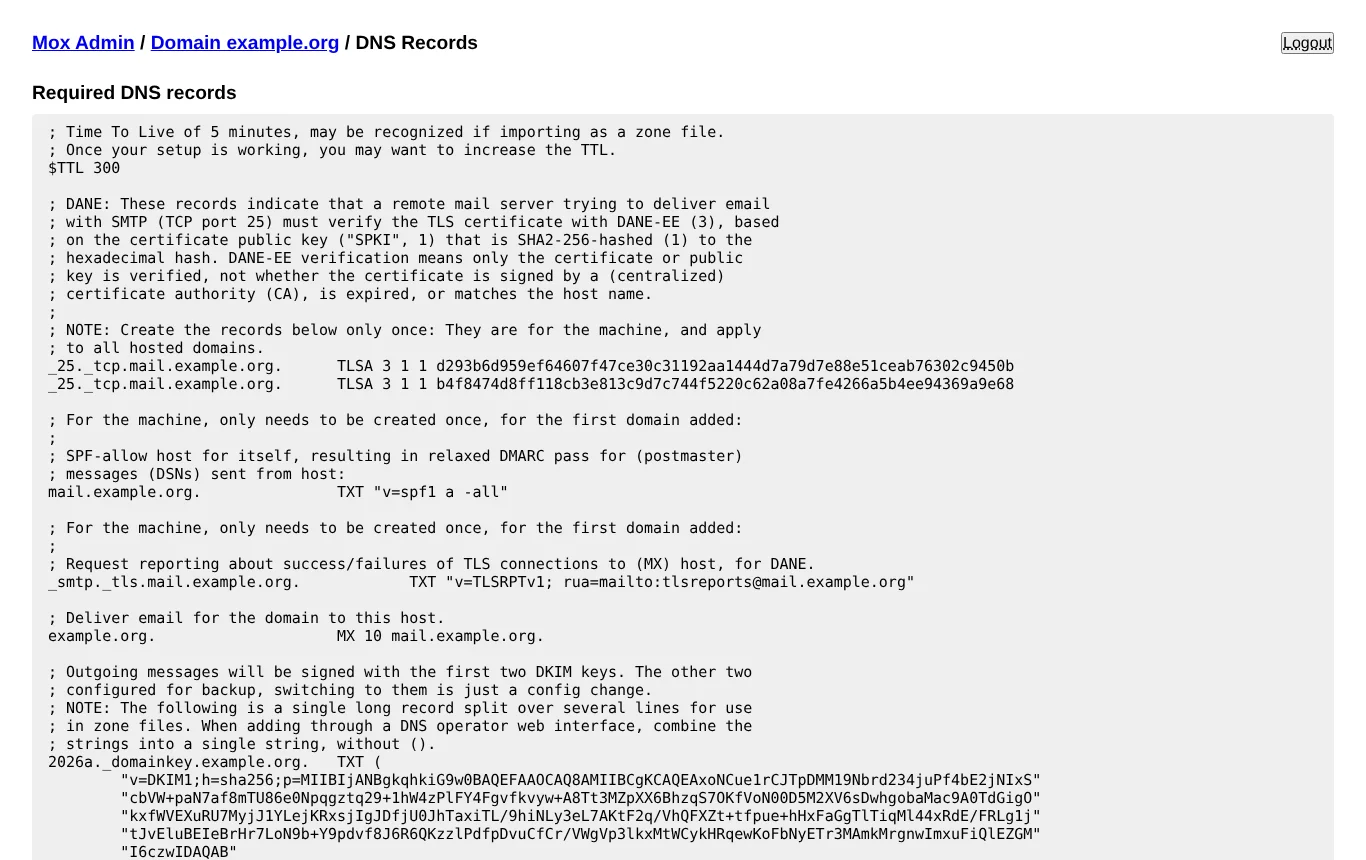
The quickstart checks your server’s DNS and reverse DNS, looks for your IP address on spam blocklists, writes the configuration, creates your account and admin passwords, and prints every DNS record you need, each with a comment explaining what it is for. Start it with ./mox serve and you are running.
| What I checked | What happened |
|---|---|
| Quickstart | One command, a few seconds, and a complete setup with clear next steps. It also checked my IP against popular blocklists |
| DNS records | Every record ready to copy, including SPF, two DKIM keys, DMARC set to reject, MTA-STS, TLS reporting and DANE |
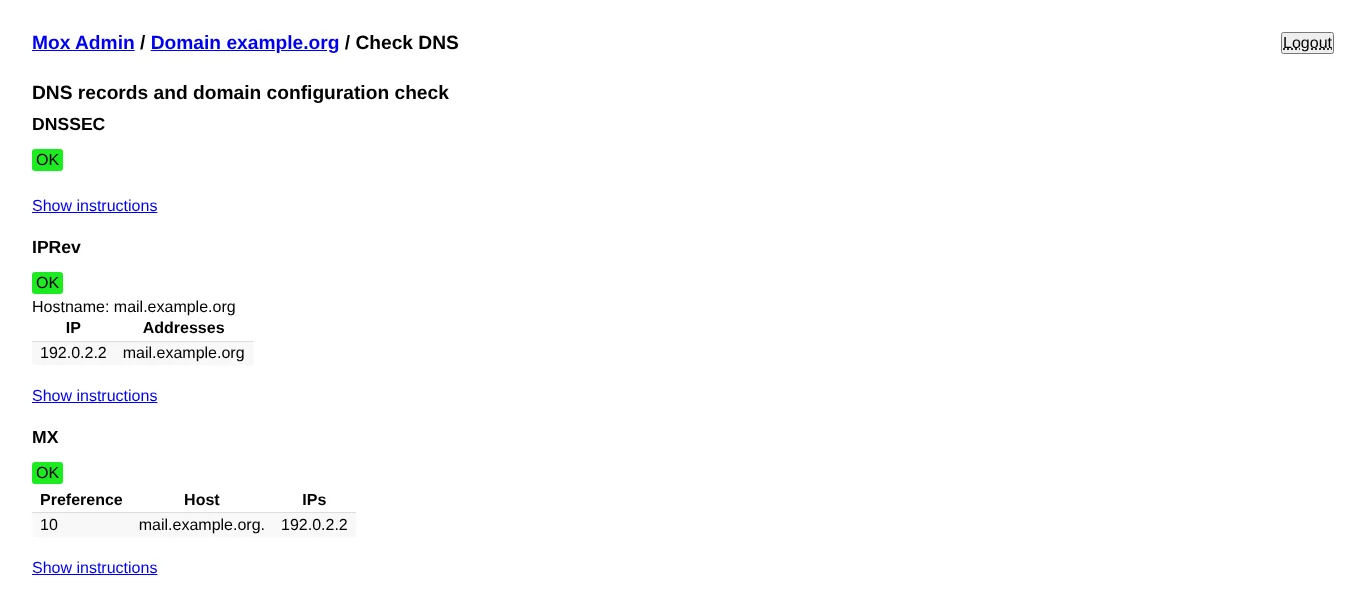
| DNS check | A page in the admin area checks each record and explains how to fix anything wrong |
| Admin pages | Plain but complete. A warning reminds you to switch on update checks, which are off by default |
| Receiving mail | Worked first time. Mail from senders it had never seen was held for 15 seconds before being accepted, which is how Mox slows down spammers |
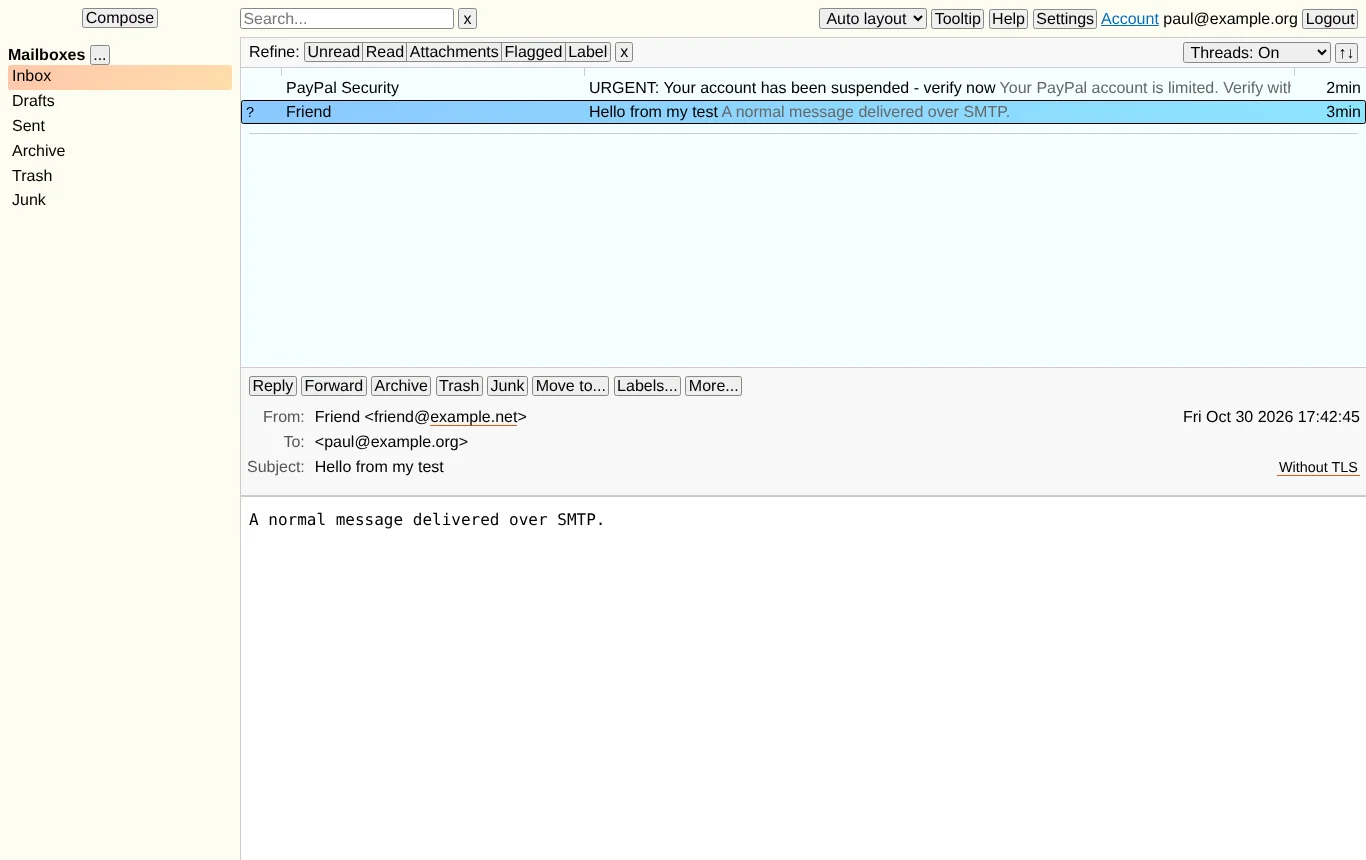
| Spam filter | On a brand new server my fake PayPal email went to the inbox: Mox learns from you, and it had nothing to learn from yet. After I marked it as junk, a second, similar email was rated almost certainly spam, though it still needed more examples before moving it automatically |
| Webmail | Fast and functional, but it looks like a tool rather than a product |
| Memory | About 30 MB while running with one account. That is not a typo |
Know the limits: Mox is email only. There are no calendars or contacts, no POP3, no out-of-office replies, no Sieve filters (it has its own simpler delivery rules instead) and no two-step sign-in. Calendars, Sieve, an autoresponder and single sign-on are on the project’s roadmap, without dates.
What It Takes to Run
- A small Linux or BSD server. Mox says 512 MB of memory is enough to start, and any processor will do. It doesn’t run as a server on Windows.
- A static IP address with a reverse DNS record that matches your server name, from a provider with a good reputation. Mox’s docs are frank that cheap or very large cloud providers often have poor IP reputations or block mail.
- Port 25 open in both directions, and ports 80 and 443 free for automatic certificates, unless you set it up behind an existing web server.
- A DNSSEC-checking resolver such as Unbound on the server is strongly recommended, so DANE can protect your outgoing mail.
- Storage for your mail plus about 15%. Mail isn’t compressed.
Updates mean swapping in the new program and restarting it. Mox can check for new versions once a day and email the changelog to your postmaster address, but you have to switch that on.
Get the IP address and DNS right and Mox is about as low-maintenance as a mail server gets. Get them wrong and your mail ends up in spam, however good the server is.
Security and Privacy
| Feature | Details |
|---|---|
| Secure by default | DANE, MTA-STS, DMARC set to reject and TLS reporting are all part of the standard setup, not optional extras |
| Sign-in | Passwords only, using modern SCRAM sign-in methods that never send the password itself. No two-step sign-in yet |
| Memory safety | Written in Go, which rules out the buffer bugs common in older C mail servers |
| Stored mail | Not encrypted on disk. Encrypted storage is on the roadmap |
| Licence | MIT, one of the most permissive open-source licences |
Who Is Behind It
Mox is a community project created by Mechiel Lukkien in the Netherlands, first released in 2023. It has been funded by NLnet grants in 2023, 2024 and 2025, and by the Dutch Ministry of the Interior. There is no company and no paid support. Releases are irregular: version 0.0.15 came out in April 2025, then 0.0.16 and 0.0.17 in August 2026. The 0.0.x numbering means it hasn’t declared itself finished.
Mox Pricing in 2026
Mox is free under the MIT licence, with no paid edition, no locked features and no limit on accounts or domains. The only cost is your server. Because Mox needs so little memory, a small VPS from a provider that allows mail servers will do, typically £4 to £6 a month.
Comparative Matrix: Mox vs. the Alternatives
| Feature | Mox | Stalwart | mailcow | Mail-in-a-Box |
|---|---|---|---|---|
| How it’s built | One small program in Go | One program in Rust | Docker bundle of 18 containers | Script that sets up a whole Ubuntu server |
| Minimum memory | 512 MB | About 2 GB | 6 GB | 512 MB |
| Webmail | Yes (built in) | Not yet | Yes (SOGo) | Yes (Roundcube) |
| Calendars and contacts | No | Yes | Yes | Yes |
| Two-step sign-in | No | Yes | Yes | Yes |
| DANE and MTA-STS by default | Yes | Yes | Partly | Yes |
| Full Review | You are here | Read the review | Read the review | Read the review |
Pros and Cons
| Strengths | Weaknesses |
|---|---|
| One command sets up everything, including DNS records | Email only: no calendars or contacts |
| Runs in tens of megabytes of memory | No two-step sign-in or single sign-on |
| Every modern security standard on by default | No out-of-office replies, POP3 or Sieve |
| Built-in webmail, web API and webhooks | Spam filter needs training before it does much |
| Free under a very permissive licence | Still a 0.0.x release, led by one developer |
| Honest, practical documentation | Update checks are off until you switch them on |
Frequently Asked Questions
Is Mox really free?
Yes. Mox is open source under the MIT licence, with no paid edition and no limit on accounts or domains. You pay only for your server.
Does Mox include webmail?
Yes. It has its own webmail, built in. It is plain to look at but fast, with threading and search.
Does Mox do calendars and contacts?
Not yet. CalDAV calendars are on the roadmap. For now you would need a separate server for them, or choose Stalwart or mailcow instead.
How much server does Mox need?
Very little. Mox says 512 MB of memory is enough to start, and my test server ran it in about 30 MB. The network matters far more: you need a clean IP address, matching reverse DNS and open port 25.
Why did a phishing email get through on my new Mox server?
Mox’s spam filter learns from each user. On a new server it has nothing to go on, so it relies on slowing down unknown senders. Mark junk as junk for the first few weeks and it quickly gets better.
Can I move my old email into Mox?
Yes. Users can import mail as maildir or mbox files from their account page, and export it the same way. You can also copy mail across in a mail app.
Final Verdict
Mox is the mail server I would recommend to a technical person who wants their own email and doesn’t want a second job. The quickstart is excellent, the security defaults are better than most paid providers, and it barely touches the server’s resources. It feels like it was designed by someone who has run mail servers and got tired of the hard parts.
It is also honest about being unfinished. There are no calendars, no two-step sign-in and no out-of-office replies, and the spam filter needs a few weeks of training. If you want a whole groupware suite, look at Stalwart or mailcow. If you want email that you never have to think about, your email is too important to run on goodwill, and a managed provider will serve you better.
Sources: Mox, Mox features, Mox on GitHub, NLnet project page.
Note: This article contains no affiliate links. I have no connection with the Mox project. Tested and checked on 30 October 2026. Features may change.

Paul O'Brien
I've spent over 25 years working hands-on with email, DNS and cloud infrastructure. I test email providers and privacy tools for real, then tell you what they're good at and where they fall short.
More about meMore like this



You're subscribed. New articles come by email, as I publish or every Thursday. Change how often
Comments