
· 9 min read
How to Use Proton Mail Through Tor (Its .onion Site, Step by Step)
What Tor is, why you might use it with Proton Mail, and how to reach Proton's official onion site on a computer, iPhone or Android without giving yourself away.
Jump to section
- What Is Tor?
- Why Use Tor With Proton Mail?
- What You Need Before You Start
- How to Open Proton Mail in Tor Browser (Windows, Mac and Linux)
- How to Use Proton Mail Through Tor on iPhone and iPad
- How to Use Proton Mail Through Tor on Android
- What to Consider
- How to Test It
- Alternatives
- Frequently Asked Questions
- The Bottom Line
Proton Mail already encrypts what you write. Tor hides something else: who you are and where you’re connecting from. This guide explains what Tor is in plain English, who actually needs it, and how to open Proton’s official onion site on a computer, an iPhone or an Android phone.
I’ve used Proton for years and written about where its privacy stops in my Proton Mail privacy and security guide. Tor is the piece that fills the biggest gap. You don’t need it for everyday email, but if you do need it, it’s worth setting up properly.
Short answer:
- Install Tor Browser from
torproject.org(or Onion Browser on iPhone). - Open it and select Connect.
- Go to Proton’s onion address:
protonmailrmez3lotccipshtkleegetolb73fuirgj7r4o4vfu7ozyd.onion - Check the address bar shows the onion address and a padlock, then sign in as normal.
- Leave the security level on Standard or Safer. Safest turns off JavaScript and Proton won’t load.
What Is Tor?
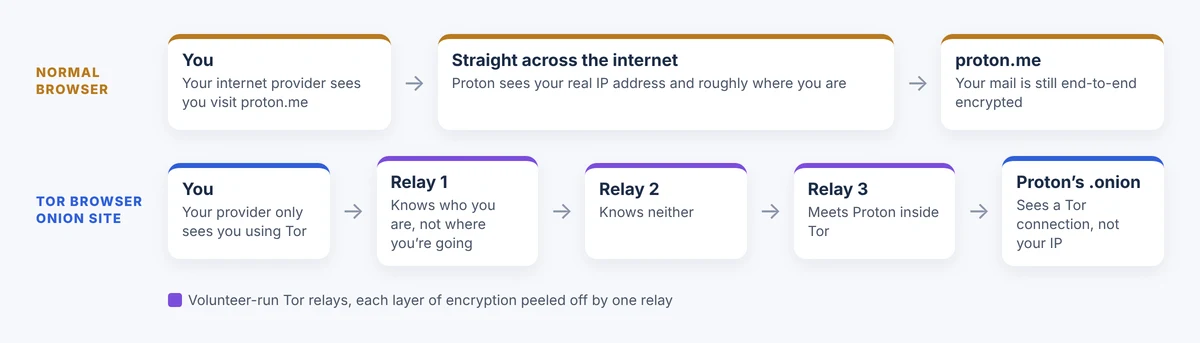
Tor, short for “The Onion Router”, is a free network run by thousands of volunteers around the world. Instead of your browser connecting straight to a website, Tor sends your traffic through three of these volunteer computers, called relays, one after another.
Before it leaves your device, your traffic is wrapped in three layers of encryption, one for each relay. Each relay peels off one layer, like the skin of an onion, which is where the name comes from. The result is that no single relay knows both who you are and what you’re visiting:
- The first relay sees your IP address but not where you’re going.
- The middle relay sees neither.
- The last relay sees where you’re going but not who you are.
Your internet provider, your employer’s Wi-Fi or a government watching the line only sees that you’re using Tor. They can’t see that you’re visiting Proton.
What is an onion site?
An onion site is a website that lives inside the Tor network. Its address ends in .onion instead of .com and only works in a Tor-enabled browser. The long jumble of letters isn’t random: it’s worked out from the site’s own encryption key, so the address itself proves you’re talking to the right server.
You can open the normal proton.me in Tor Browser too, but then the last relay passes your traffic out onto the open internet. With the onion site, your connection never leaves Tor at all. Proton says the onion site gives you Tor’s encryption all the way to its own servers.
Is Tor legal?
In the UK, the US and most of Europe, yes. Tor started life as a US Navy research project and is now run by a non-profit, the Tor Project. Journalists, campaigners, people escaping abusive partners and ordinary privacy-minded people use it every day. It’s the same with Proton’s onion site: Proton built it on purpose and links to it from its own website. A few countries block or restrict Tor, so check the rules where you are.
Why Use Tor With Proton Mail?
Proton’s encryption protects what’s inside your emails. It doesn’t hide the fact that you’re connecting to Proton, or where from. Tor covers that gap.
| What it protects | Proton on its own | Proton through Tor |
|---|---|---|
| What your emails say | Encrypted, Proton can’t read them | Encrypted, Proton can’t read them |
| Your IP address and rough location | Proton can see it, and can be ordered to log it | Hidden. Proton only sees a Tor connection |
| That you use Proton at all | Your internet provider and network can see it | Hidden. They only see Tor |
| Getting in where Proton is blocked | Blocked | Usually works, with a bridge if Tor is blocked too |
That second row matters more than people think. In 2021 a Swiss court ordered Proton to log the IP address of one user, a French climate activist, and Proton had to comply. Proton’s own advice since then is that anyone who needs anonymity, not just privacy, should use its onion site or a VPN.
Tor makes sense if you’re:
- a journalist, source or campaigner whose location or identity needs protecting
- in a country that blocks or watches Proton
- on a network you don’t trust, such as work or hotel Wi-Fi, and don’t want it to see you use Proton
- keeping a separate account that must never be linked to your real name
Good to know: most people don’t need Tor for email, and Proton says so itself. If you just want private email, Proton on its own is already excellent. Tor is for when hiding who and where you are matters as much as what you write.
What You Need Before You Start
Before you start:
- A Proton account, or a plan to make one (see the warning about sign-up checks below).
- Tor Browser on Windows, Mac, Linux or Android, or Onion Browser on iPhone and iPad. All free.
- Two-factor authentication switched on in your Proton account. Do this first, on your normal connection, if it isn’t already.
- About 10 minutes.
How to Open Proton Mail in Tor Browser (Windows, Mac and Linux)
Download Tor Browser from the official site
Go to torproject.org/download and choose your system. Only download it from there. Fake “Tor” apps and browser add-ons are a common way to spread malware.
Install it like any other app. On a Mac, drag it into Applications. On Windows, run the installer.
Connect to Tor
Open Tor Browser. You’ll see the Connect to Tor screen. Select Connect and wait a few seconds while it builds a path through the network. If you want it to connect without asking next time, switch on Always connect automatically.
If it won’t connect: your network or country may be blocking Tor. Select Configure Connection, then under Bridges choose a built-in bridge such as obfs4 or Snowflake. Bridges are unlisted entry points that are much harder to block.
Go to Proton’s onion address
Type or paste this into the address bar:
https://protonmailrmez3lotccipshtkleegetolb73fuirgj7r4o4vfu7ozyd.onion
Save it as a bookmark straight away so you never have to type it again. Tor Browser can also find it for you: if you visit proton.me, Proton tells Tor Browser about its onion site and a purple .onion available button appears in the address bar. Select it to switch over.
Watch out: fake onion addresses are a real risk, because nobody can remember 56 random characters. Only use the address from Proton’s own proton.me/tor page or the .onion available button. Never trust an onion link from a forum, search result or email. Compare the start and end of the address carefully: protonmailrmez3lot…vfu7ozyd.onion.
Check you’re in the right place
Before you type your password, look at the address bar. You should see the full onion address starting protonmailrmez3lot and a padlock or onion icon. Proton’s onion site uses a proper HTTPS certificate, so you shouldn’t see any security warning. If you do, stop.
Sign in as normal
Select Sign in and log in with your Proton details and two-factor code. Your inbox, folders, contacts and settings look exactly the same. Pages will load more slowly than you’re used to, because every click goes through three relays.
Pick the right security level
Select the shield icon next to the address bar, then Settings. You’ll see three levels:
| Level | What it does | Proton Mail |
|---|---|---|
| Standard | Everything works | Works |
| Safer | Turns off JavaScript on sites without HTTPS, makes video click-to-play and blocks some fonts | Works, as the onion site uses HTTPS |
| Safest | Turns off JavaScript everywhere | Won’t load. The Proton web app needs JavaScript |
I use Safer. It closes off a lot of risky features while keeping Proton working.
How to Use Proton Mail Through Tor on iPhone and iPad
There’s no official Tor Browser for iPhone. The Tor Project recommends Onion Browser, a free app by Mike Tigas, used together with Orbot, a free app from the Guardian Project that connects your phone to Tor.
Install Orbot and Onion Browser
In the App Store, install Orbot and Onion Browser. Check the developer names, as there are lots of look-alike “Tor browser” apps. Some are full of ads and some are worse.
Start Orbot
Open Orbot and tap Start. The first time, iOS asks to add a VPN configuration. Allow it: that’s how Orbot sends traffic through Tor. Wait until Orbot says it’s connected.
Open Proton in Onion Browser
Open Onion Browser and enter protonmailrmez3lotccipshtkleegetolb73fuirgj7r4o4vfu7ozyd.onion. Bookmark it, then sign in as normal. If the page is blank, tap the shield icon and drop the security level from Gold to Silver, which allows the JavaScript Proton needs.
Watch out: onion Browser is a good way round blocking, but it isn’t as private as Tor Browser on a computer. Apple makes every iPhone browser use its own web engine, so Onion Browser can’t include all of Tor Browser’s protections. If anonymity really matters, use Tor Browser on a computer.
How to Use Proton Mail Through Tor on Android
Install Tor Browser for Android from Google Play or torproject.org/download. Open it, tap Connect, then go to the onion address above and sign in. The steps and security levels are the same as on a computer.
What about the Proton Mail app? the Proton Mail apps don’t open onion sites themselves. On Android you can route the app through Tor with Orbot’s VPN mode, but it then talks to Proton’s normal servers through Tor rather than the onion site. For most people the browser route is simpler and safer.
What to Consider
- Signing up over Tor is harder than it was. Proton may ask you to solve a CAPTCHA or verify an email address or phone number, and Tor makes that more likely. If an account must never be linked to you, don’t verify it with your own phone number or main email address.
- Tor hides your connection, not your habits. If you sign in to your normal account, email your friends and sign off with your real name, Tor can’t make that anonymous. Keep an anonymous account separate in every way.
- Don’t mix the two. Signing in to the same account sometimes with Tor and sometimes without shows Proton your real IP on those occasions.
- Attachments can give you away. Photos can carry location data, and documents can carry your name. Open downloaded files offline, and strip details from anything you send.
- It’s slower. Expect a few seconds per click. Big attachments take a while.
- Proton calls the onion site experimental. It’s been running since 2017 and has been reliable in my use, but Proton says it may not be as dependable as the main site.
- Custom domains point back to you. If your Proton address uses your own domain, the domain’s owner details and DNS link it to you, whatever route you connect by.
How to Test It
1. Check Tor is working. In Tor Browser, visit check.torproject.org. It should say “Congratulations. This browser is configured to use Tor.”
2. Check you’re on the onion site. The address bar should show the full .onion address, not proton.me. Select the padlock or onion icon to see the connection details.
3. Check what Proton sees. In Proton, go to Settings > Security and privacy, and look at the session list. Your Tor session shouldn’t show your real location. If you’ve turned on Proton’s advanced security logs, the IP recorded for your Tor sign-ins won’t be yours.
If it didn’t work:
- The page won’t load: check you’re in Tor Browser, not your normal browser, and that the address is exact. Onion sites don’t open anywhere else.
- The page is blank or stuck: your security level is on Safest (or Gold on iPhone). Drop it to Safer (or Silver).
- Tor won’t connect: use a bridge, as in step 2.
- Constant CAPTCHAs or verification: that’s Proton’s abuse protection reacting to Tor. Complete it, or select New Tor circuit for this site from the menu to try a different route.
Alternatives
| Option | Hides your IP from Proton | Hides Proton from your network | Best for |
|---|---|---|---|
| Proton’s onion site in Tor Browser | Yes | Yes | Anonymity that matters |
| A trustworthy VPN, such as Proton VPN | Yes, but the VPN company sees it | Yes | Everyday privacy, faster than Tor |
| Proton VPN’s “Tor over VPN” servers | Yes | Yes | Paid Proton VPN users who want onion sites in a normal browser |
| Tails, a whole operating system that runs everything through Tor | Yes | Yes | The highest-risk situations |
A VPN is the easier choice for most people. The catch is that you’re moving your trust from your internet provider to the VPN company. Tor doesn’t ask you to trust anyone in particular, which is why it’s the better pick when anonymity really matters.
Don’t have Proton yet? Proton Mail has a free plan, and paid plans add more storage, custom domains and Proton VPN. Everything in this guide works on the free plan.
Try Proton MailFrequently Asked Questions
What is Proton Mail’s onion address?
https://protonmailrmez3lotccipshtkleegetolb73fuirgj7r4o4vfu7ozyd.onion. Always check it against Proton’s own proton.me/tor page.
Do I need a paid Proton plan to use the onion site?
No. It works with free and paid accounts.
Is using Tor illegal?
Not in the UK, the US or most of Europe. Some countries block or restrict it, so check where you are.
Is Tor the same as the dark web?
Onion sites are sometimes called the dark web, but that just means sites you can only reach through Tor. Plenty are legitimate, including Proton, the BBC, the New York Times and DuckDuckGo.
Can I use the Proton Mail app with Tor?
Not with the onion site. On Android you can push the app through Orbot, but it then uses Proton’s normal servers through Tor. Tor Browser is the simpler, safer route.
Does Tor make me completely anonymous?
No. It hides your connection. You can still give yourself away through what you write, who you email, files you send or by signing in without Tor. If your safety depends on it, get advice from a digital-security specialist too.
The Bottom Line
Proton’s onion site takes ten minutes to set up and closes the one gap Proton’s encryption can’t: who you are and where you’re connecting from. Most people won’t need it. If you’re a journalist, a campaigner, somewhere Proton is blocked or keeping an account that must stay unlinked, install Tor Browser, bookmark the onion address and leave the security level on Safer. Then keep your habits as careful as your connection.
Sources: Proton’s Tor page, Proton’s onion site announcement, Proton’s Tor setup guide, Tor Browser manual: security settings, Tor Project: Tor on mobile.
Disclosure: This article contains an affiliate link to Proton. If you sign up through it, I may earn a commission at no extra cost to you. Onion address and steps checked against Proton’s own pages on 2 November 2026.

Paul O'Brien
I've spent over 25 years working hands-on with email, DNS and cloud infrastructure. I test email providers and privacy tools for real, then tell you what they're good at and where they fall short.
More about meMore like this
You're subscribed. New articles come by email, as I publish or every Thursday. Change how often
Comments