
Tuta Mail (Tutanota) Review 2026: Privacy vs Convenience
Tuta Mail, formerly Tutanota, encrypts subjects, contacts and search but drops IMAP. Here is what it protects, what it costs, and how it compares with Proton and StartMail.
Live facts
- Free plan
- Yes, 1 GB
- Based in
- Germany
- Encryption
- End to end
- Mail apps
- Its own apps only
- Own domain
- Yes
Jump to section
- At a glance: who Tuta Mail is (and isn't) for
- What is Tuta Mail (formerly Tutanota)?
- Security through limitation
- Encryption and metadata boundaries
- The closed security model
- Comparative matrix: Tuta vs. Proton vs. StartMail
- Tuta Mail plans and pricing in 2026
- Pros and cons
- Frequently asked questions
- The bottom line
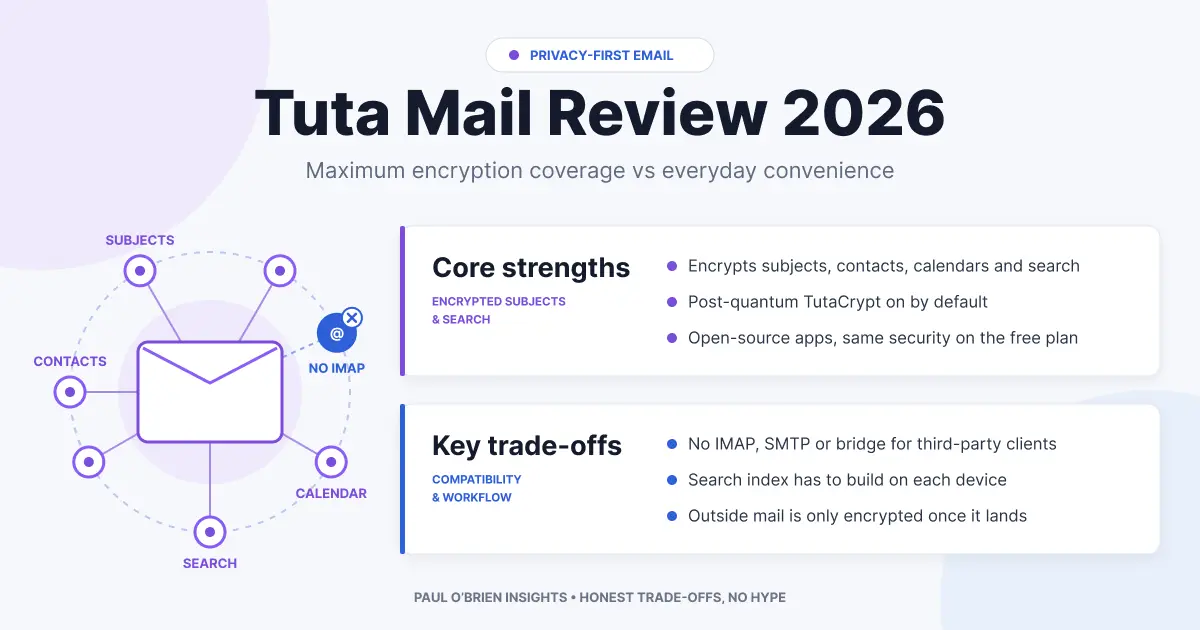
Tuta Mail, formerly Tutanota, is one of the most uncompromising private email services you can use. It encrypts more than most rivals, including subject lines, contacts, calendars and even the search index, and it gets there by dropping IMAP and living entirely inside its own apps. If you value minimal data exposure over convenience, it is excellent. If you rely on Apple Mail, Outlook or Thunderbird over standard protocols, it is not for you.
I looked at Tuta alongside Proton Mail and StartMail, because they are the services most people weigh against it. The aim is to explain what Tuta protects, what it deliberately gives up, and who should pay for it. Prices and features were rechecked against Tuta’s own pages on 8 October 2026. If you are new to the vocabulary, my guide to what “secure email” actually means sets out the terms I use below.
Short answer: Tuta is worth it if you want end-to-end encryption by default, encrypted subjects and calendars, a free tier that is genuinely usable and a German EU base, and you are happy with Tuta’s own web, desktop and mobile apps. It is a poor fit if you need IMAP or SMTP, an Apple Mail or Outlook workflow, or easy mixed-provider encryption.
Try it: Sign up for Tuta’s free plan (1 GB, no card needed to start). This is a plain link, not an affiliate link.
At a glance: who Tuta Mail is (and isn’t) for
| User Profile | Best Fit? | Core Value Drivers / Key Trade-offs |
|---|---|---|
| Privacy-first individual who mostly emails other Tuta or password-protected contacts | Ideal | End-to-end encryption by default, encrypted subjects and local encrypted search. Mail to other providers is not end-to-end encrypted. |
| Someone who wants a free, ad-free encrypted mailbox | Strong fit | The free plan gives 1 GB, one calendar and three labels. It lacks custom domains and aliases, and inactive accounts are deleted. |
| Journalist, activist or other higher-risk user | Strong fit | Less readable data on the server than most services. Sender, recipient and timing information is still visible. |
| Small team or founder on a custom domain | Workable | Custom domains, a family option and shared mailboxes exist, but there is no IMAP and fewer integrations. |
| Heavy Apple Mail, Outlook or Thunderbird user | Alternative needed | No IMAP, SMTP or POP3, and no bridge. You use Tuta’s apps. |
| Someone who wants one inbox for several accounts | Alternative needed | Tuta is a closed system and does not collect other providers’ mail through standard protocols. |
What is Tuta Mail (formerly Tutanota)?
Tuta is an encrypted email and calendar service from Germany. It started as Tutanota and now trades as Tuta, so you will see both names in search results and older reviews. They are the same service. It is built around its own open-source apps for web, desktop (Windows, macOS and Linux), iOS and Android, not around standard email protocols, which explains both its strengths and its limits.
| Question | Answer |
|---|---|
| Is Tuta the same as Tutanota? | Yes. Tutanota was the original name |
| Where is it based? | Germany, so it operates under EU law and GDPR |
| Is there a free plan? | Yes: 1 GB, one calendar and three labels |
| Does it support IMAP? | No. You use Tuta’s own apps |
| Is the code open source? | Yes. Tuta publishes its code on GitHub |
| Does it use ads or tracking? | Tuta describes its plans as “fully encrypted, no tracking” |
Security through limitation
Many of Tuta’s strengths come from what it refuses to support. Every shortcut it declines removes a place where plaintext could be exposed.
| What Tuta refuses | Why that helps | What it costs you |
|---|---|---|
| Legacy protocols (IMAP, SMTP, POP3) | There is no bridge or third-party client that needs to hold decrypted mail | No Apple Mail, Outlook or Thunderbird access over standard protocols |
| Ecosystem integration | Fewer connectors that need to read your mail | Fewer integrations with CRMs, assistants and other tools |
| Server-side visibility of content | Search, contacts and calendar data are encrypted, and search runs on your device | Searching a new device takes time while it builds a local index |
Tuta’s Thunderbird add-ons, released in February 2026, do not change this. They open the Tuta web app inside a Thunderbird tab and do not use IMAP.
Encryption and metadata boundaries
| Data | Protected? | Notes |
|---|---|---|
| Message bodies and attachments | Yes, end-to-end between Tuta users | Mail from other providers is encrypted when it reaches Tuta’s servers, not before |
| Subject lines | Yes | Tuta encrypts subjects. Proton encrypts them with zero-access encryption but not end-to-end, because they sit in the OpenPGP header |
| Contacts and calendar | Yes | Event fields such as title, location, times and attendees are encrypted, and reminders are handled on your device |
| Search index | Yes | Search runs against an encrypted local index |
| Sender and recipient addresses | No | Routing needs them |
| Dates and times of messages | No | Routing needs them |
Under the hood, Tuta uses AES-256 for symmetric encryption and RSA-2048 or x25519 elliptic-curve keys for asymmetric encryption. Since March 2024 it has been rolling out TutaCrypt, a hybrid protocol that adds the post-quantum Kyber-1024 algorithm alongside the classical ones, so mail captured today is harder to decrypt with a future quantum computer. Your password is processed with Argon2 and the server stores only a hash of the verifier, with the private key encrypted by a key derived from your password.
Encrypted search
Because the servers cannot read your mail, search happens on your device, against an encrypted index. That keeps search private, and it also means a new device needs time to build its index before search is fast.
Minimal metadata
Tuta keeps less readable data than most providers, but it cannot hide who writes to whom or when, because routing needs those details. If metadata matters to you, my piece on Proton Mail privacy: what it protects and what it doesn’t covers the same limit from the Proton side.
Know the limits: end-to-end encryption applies between Tuta users. Mail to or from other providers is not end-to-end encrypted unless you use a password-protected message, in which case Tuta encrypts the message with a password you share once per contact.
The closed security model
The easiest way to see Tuta’s trade-off is to follow how mail gets from the server to your screen.
| Setup | How your mail reaches the screen | Where plaintext exists |
|---|---|---|
| Traditional provider | The server holds mail and any client connects over IMAP | On the server and in every client |
| Bridge-based (Proton) | A local bridge app decrypts mail and offers IMAP to your client | On your device, inside the bridge and the client |
| Tuta | Tuta’s own apps decrypt mail locally | Only inside Tuta’s app on your device |
That is why Tuta says no to IMAP: a standard client cannot read encrypted mail without something decrypting it first. Proton solves this with Bridge on paid plans. Tuta decided not to. Both are legitimate. They differ in how much convenience you keep and how many places decrypted mail can live. For the wider picture of where zero-access and end-to-end designs help and where they do not, see zero-access encryption: what it really means and who zero-access email is actually for.
Comparative matrix: Tuta vs. Proton vs. StartMail
| Feature | Tuta Mail | Proton Mail | StartMail |
|---|---|---|---|
| Jurisdiction | Germany (EU, GDPR) | Switzerland | Netherlands (EU, GDPR) |
| Encryption approach | Own scheme: AES-256, RSA-2048 or x25519, TutaCrypt hybrid | OpenPGP | OpenPGP |
| Post-quantum protection | On by default for new accounts | Opt-in, rolling out to all plans from May 2026 | None |
| Search | On your device, encrypted index | Subject and sender search is server-side | Server-side |
| IMAP and SMTP | No | Yes, via Bridge on paid plans | Yes, natively |
| Open-source apps | Yes (GPLv3) | Yes | See my review |
| Free plan | Yes, 1 GB | Yes | No, 7-day trial |
| Entry paid price | €3 a month, billed yearly (Revolutionary) | From £3.19 a month, billed annually (Mail Plus, at the time of writing) | $4.99 a month billed annually, or $59.88 a year (Personal) |
| Storage on the entry paid plan | 20 GB | 15 GB | 20 GB |
| Custom domains on the entry paid plan | 3 | 1 | 1 (plus a StartMail domain) |
| Aliases | 15 extra addresses | 10 addresses, plus hide-my-email aliases | Unlimited aliases |
| Full Review | You are here | Proton Mail review | StartMail review |
| Try It | Tuta Mail (free plan) | Proton Mail | StartMail (50% off, 7-day trial) |
For how the three countries compare, my Swiss vs German email privacy analysis goes deeper on the jurisdiction row.
Tuta Mail plans and pricing in 2026
| Plan | Price (billed yearly, taxes included) | Storage | Domains | Extra addresses | Extras |
|---|---|---|---|---|---|
| Free | €0 | 1 GB | None | None | One calendar, three labels. Inactive accounts are deleted after six months without a login |
| Revolutionary | €3 a month | 20 GB | 3 | 15 | Unlimited calendars and labels, email support, family option on request, exclusive @tuta.com domain |
| Legend | €8 a month | 500 GB | 10 | 30 | Everything in Revolutionary, with priority email support |
Prices are as listed on Tuta’s pricing page on 8 October 2026. Tuta shows the yearly saving as €7.20 on Revolutionary and €19.20 on Legend, so monthly billing costs more. Calendar sharing, event invitations, the autoresponder and email import are paid features. Every plan uses the same encryption. Business plans are priced separately, and family members and shared mailboxes are available on request.
Pros and cons
| Strengths | Weaknesses |
|---|---|
| Encrypts subjects, contacts, calendars and the search index, not just message bodies | No IMAP, SMTP or POP3, so no Apple Mail, Outlook or Thunderbird access |
| Post-quantum hybrid encryption on by default for new accounts | Sender, recipient and timing details are not encrypted |
| Open-source apps and a usable free plan | End-to-end only applies between Tuta users, or with password-protected messages |
| Three custom domains and 15 extra addresses on the entry paid plan | Fewer integrations, and local search needs time to index on a new device |
| German EU jurisdiction and no ad-based business model | Free accounts are deleted after six months of inactivity |
Frequently asked questions
Is Tuta Mail the same as Tutanota?
Yes. Tutanota is the service’s earlier name. It now uses the name Tuta, with the same product and the same encryption approach.
Does Tuta Mail support IMAP or SMTP?
No. Tuta does not offer IMAP, SMTP or POP3, and it has no bridge. You use its web, desktop and mobile apps. That is a deliberate security choice, and it is the main reason people leave.
Is Tuta more private than Proton Mail?
On content, it is stricter: Tuta encrypts subject lines and search end-to-end, and it keeps decrypted mail inside its own apps. Proton gives you more flexibility, including OpenPGP compatibility and Bridge for standard clients. Neither hides sender, recipient and timing information. It depends on whether you want strictness or flexibility.
Are emails to Gmail or Outlook users encrypted?
Not end-to-end. Mail to and from other providers is encrypted in transit where both sides support it, and then encrypted at rest once it reaches Tuta. To protect a message to someone outside Tuta, use a password-protected email.
Is the free plan enough?
For light personal use, yes. You get 1 GB, one calendar and three labels. You will want a paid plan for custom domains, extra addresses, unlimited labels and calendars, or sharing. Log in at least every six months, because inactive free accounts are deleted.
Where is Tuta Mail based?
In Germany, so it operates under EU law and GDPR. For how that compares with Switzerland, see my Swiss vs German email privacy comparison.
Is Tuta Mail safe to use?
Its design is strong: end-to-end encryption between Tuta users, encrypted subject lines, contacts and calendars, post-quantum protection and open-source apps. The limits are the ones above: metadata stays visible, and mail to other providers is not end-to-end encrypted by default.
Can I move my old email into Tuta?
The desktop apps can import mail from other providers and keep your folder structure. Email import is a paid feature, so check the plan before you plan a move. My guide to how free email makes money covers what you are really paying for in each case.
The bottom line
Tuta is one of the most uncompromising private email services available, and it makes that clear by what it leaves out. If you want your subject lines, contacts, calendar and search kept private, you are happy inside Tuta’s apps and your contacts can use password-protected messages when they are not on Tuta, it is excellent value from €3 a month, and Tuta’s free plan lets you try it first. If you need a standard client, choose Proton Mail for the balance of privacy and ecosystem, or StartMail for privacy with full protocol compatibility.
Disclosure: This article contains affiliate links for Proton Mail and StartMail. If you sign up through them, I may earn a commission at no extra cost to you. The Tuta links are ordinary links, because I have no affiliate arrangement with Tuta.
Note: checked and updated 17 October 2026. Sources: Tuta, Tuta support, Proton: introducing post-quantum encryption, StartMail trial account features.

Paul O'Brien
I've spent over 25 years working hands-on with email, DNS and cloud infrastructure. I test email providers and privacy tools for real, then tell you what they're good at and where they fall short.
More about meMore like this
You're subscribed. New articles come by email, as I publish or every Thursday. Change how often
Comments