
Zero-Access Email Encryption: Who Is It Really For?
Zero-access email suits lawyers, journalists and privacy-minded teams, but costs you easy recovery and search. Here is who it fits, who should skip it, and the trade-offs.

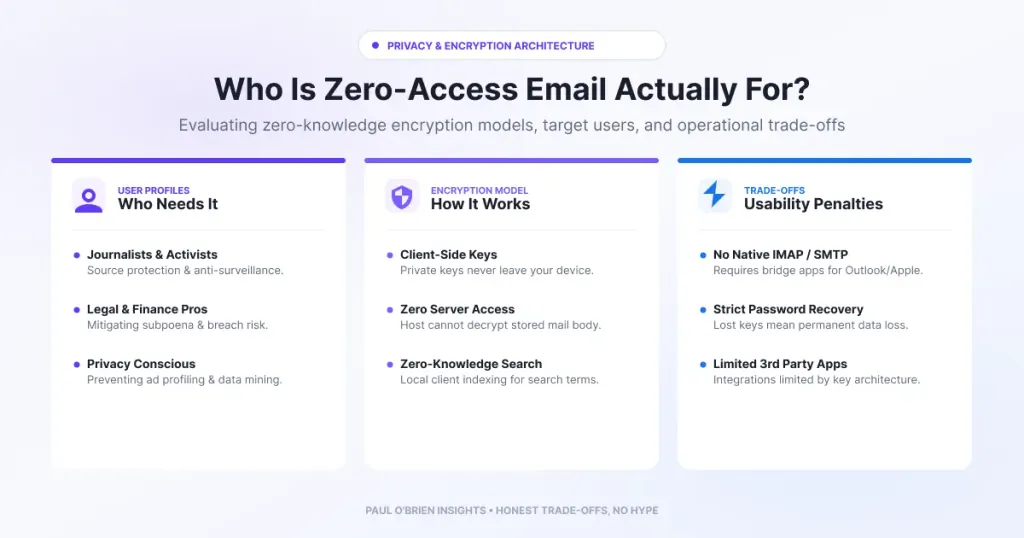
Zero-access email is worth having if the real risk to you is the provider, a subpoena, a server breach or a seized disk. It is a poor fit if you need deep search across a large archive, easy admin recovery or tight integrations. The protection is real, and it comes with a bill: your password and recovery method now carry the weight your provider used to carry.
Zero-access encryption means your stored mail is locked with keys the provider cannot use, so it holds data it cannot read. My piece on what zero-access encryption really means covers the mechanics, and what “secure email” actually means places it among the other kinds of protection. This article answers the practical question: who actually benefits, and who would be better off without it?
Short answer: zero-access suits lawyers, clinicians and others handling privileged information, people who are likely targets of legal or technical pressure, privacy-minded individuals, and small teams that want fewer vendors able to read their data. It suits organisations that rely on shared mailboxes, central search, CRM integrations or admin-led password recovery much less well.
At a Glance: Who Zero-Access Email Is (and Isn’t) For
| User Profile | Best Fit? | Core Value Drivers / Key Trade-offs |
|---|---|---|
| Regulated professionals (law, health, finance, advisory) | Ideal | Removes the provider from the confidentiality chain and reduces insider risk. You still need a policy for retention and recovery. |
| Journalists and others at elevated risk | Ideal | A seized server or legal demand yields little readable content. Metadata and your own devices remain exposed. |
| Privacy-minded individuals | Strong fit | No mailbox mining for ads or AI training. You give up some convenience and ecosystem features. |
| Small businesses and founders protecting IP | Strong fit | Fewer parties able to read sensitive threads. Shared inboxes, integrations and admin recovery are weaker. |
| Large organisations with heavy search, CRM or compliance archives | Alternative needed | Central discovery, archiving and integrations usually assume the provider can read mail. |
| People who forget passwords and skip recovery steps | Alternative needed | Lose the password and the recovery method, and the data can be gone for good. |
What You Actually Get
With zero-access encryption the provider cannot read your stored messages, even under pressure, because it does not hold the keys in usable form. Your privacy rests on cryptography and not on a privacy policy. For a sense of how this plays out at one provider, my Proton Mail review sets out what is protected and what is not.
Know the limits: zero-access protects stored content. It does not hide who you wrote to or when, it does not stop phishing, and it does not protect a compromised device. Mail sent to people on other providers is usually protected in transit only, unless you use password-protected messages or PGP.
Who Benefits Most
1. Regulated professionals and privileged communicators
Solicitors, doctors, therapists, accountants and advisers hold information their clients expect to stay private. A provider that cannot read mail removes one party from the confidentiality chain and shrinks the damage of a breach or a rogue employee. It does not replace your regulator’s rules on retention, access and disclosure, so check those before you switch.
2. Journalists and high-risk targets
If someone could realistically compel a provider to hand data over, or compromise its servers, zero-access limits what they get. It is one layer. Sources can still be exposed by metadata, devices and behaviour, so it works best alongside a hardware security key and good account hygiene.
3. Privacy technologists and data minimalists
If you want your mailbox kept out of ad profiles, analytics and AI training, zero-access is the strongest technical answer. For the economics behind the alternative, see free vs paid email: what you really pay with.
4. Security-conscious small businesses and founders
For a small team, zero-access means fewer vendors who can read contracts, financial discussions and product plans, and a simpler answer when a customer asks about vendor risk. One use that suits it particularly well is a small, isolated stack for crisis communication, which I describe in the zero-access command hub.
The Trade-offs You Take On
| Area | What changes | What to do about it |
|---|---|---|
| Password recovery | The provider cannot read your data, so it cannot simply reset access to it. Proton, for example, keeps encrypted mail locked after a password reset until you use a recovery phrase or file | Set up and test recovery before you need it, and store the phrase offline |
| Search | Searching message bodies has to happen on your device, not on the provider’s servers | Expect slower or more limited search on large archives |
| Integrations | Tools that need to read mail on a server, such as CRMs and some archiving products, work less well or need a bridge | Check your must-have integrations before moving |
| Admin control | Central recovery and discovery are limited by design | Decide who holds recovery material, and write it down |
| Messages to other providers | Usually protected in transit only | Use password-protected messages or PGP when it matters |
| Metadata | Sender, recipient and timing information is generally not covered | Do not assume zero-access means anonymous |
Who Else Zero-Access Attracts
The properties that protect whistleblowers also limit what a provider can see of abusive use. Zero-access providers cannot scan stored mail for abuse the way ordinary providers can, so they rely on controls at the edge, such as sender reputation and sending-pattern monitoring. That dual-use tension is real, and it is part of the debate about these services.
| Legitimate safeguards | Misuse risk |
|---|---|
| Protects whistleblowers and sources | Makes it harder to investigate wrongdoing from stored mail |
| Shields privileged legal and medical advice | Can be used to hide extortion or ransom conversations |
| Limits unauthorised or over-broad access to your data | Complicates abuse detection for phishing infrastructure |
Comparative Matrix: Zero-Access Approaches
| Feature | Standard provider | Proton Mail | Tuta Mail | Mailfence |
|---|---|---|---|---|
| Provider can read stored content | Yes, in principle | No, for message content | No, for message content | Depends on whether you encrypt each message |
| Best for | Convenience and ecosystem | Zero-access with wide compatibility | Encryption built into its own system | OpenPGP users |
| Main trade-off | Provider can read mail | Metadata exposed, recovery responsibility | Less interoperability with other tools | Encryption is not automatic |
| Full Review | Fastmail review | Proton Mail review | Tuta Mail review | Mailfence review |
| Try It | Fastmail | Proton Mail | No affiliate link | No affiliate link |
A Quick Checklist: Is Zero-Access Right for You?
- Do you handle information that would cause real harm if your provider or a breach exposed it?
- Are you comfortable keeping a recovery phrase somewhere safe and offline?
- Can you live with slower search and fewer integrations?
- Do you already use strong, unique passwords and two-factor authentication?
- Does your sector’s regulator allow it, and will it allow your retention approach?
If you answered yes to most of these, zero-access is likely a good fit. If you answered no to the third or fifth, talk to whoever owns compliance or integrations before moving.
Frequently Asked Questions
What is zero-access encryption?
It is a design where the provider stores your mail locked with keys it cannot use to read it. Only you, through your password, can unlock it.
Is zero-access the same as end-to-end encryption?
No. Zero-access protects stored mail from the provider. End-to-end encryption protects a message from the sender’s device to the recipient’s. Some services offer both between their own users. My guide to what secure email actually means compares them.
Is zero-access the same as zero trust?
No. Zero trust is a network security approach in which no user or device is trusted by default and every access request is verified. Zero-access is about the provider being unable to read your stored data. They solve different problems.
What happens if I forget my password?
You need your recovery method. Proton, for example, says that after a password reset, encrypted data stays locked until you use a recovery phrase or recovery file. Without one, you can lose access permanently.
Can a zero-access provider hand over my emails to the authorities?
It can only hand over what it holds in readable form. Message content stored under zero-access is not readable to it, but account details and metadata may still be available under legal process. The details depend on the provider and its jurisdiction.
Is zero-access email worth paying for?
If your risk is the provider or a breach, yes. If your main risks are phishing and weak passwords, a good standard provider with two-factor authentication gives you more for less.
The Bottom Line
Zero-access is for people who want the provider out of their trust boundary and are willing to take on the responsibility that comes with it. If that is you, Proton Mail is the best-known place to start, and my reviews of Tuta and Mailfence cover the alternatives. If you mainly want strong everyday email with good privacy practices, Fastmail may suit you better, and there is no shame in that. There is no short answer. It depends on your threat model and how much responsibility you want.
Disclosure: This article contains affiliate links for Proton Mail and Fastmail. If you sign up through them, I may earn a commission or credit at no extra cost to you. I only recommend services I personally use and trust.

