
· 9 min read
iCloud Mail With Your Own Domain: My Review After Setting It Up
I set up iCloud Mail on my own domain from scratch, with Cloudflare adding the DNS records, and tested it with Gmail and Outlook. It took about ten minutes and passed every check, but I still wouldn't trust it with a domain that matters.
Live facts
- Free plan
- Yes, 5 GB, no own domain
- Based in
- United States
- Encryption
- Standard
- Mail apps
- Any mail app (IMAP)
- Own domain
- Yes
Jump to section
If you pay for iCloud+, you can already use your own domain with iCloud Mail at no extra cost. I set it up from scratch on a spare domain, tested it with Gmail and Outlook and took screenshots of every step. Setup was quick and painless. Whether I’d trust it with a domain that matters is another question.
I’ll be honest from the start. My previous experience of iCloud with custom domains was awful: missing emails, non delivery, all sorts. So this was a second chance. If you’re still deciding whether your own domain is worth it at all, read why using your own email domain makes sense first. Prices and limits were checked on Apple’s own pages on 16 November 2026.
Short answer: if you already pay for iCloud+ and want a personal address on your own domain, iCloud Mail is the cheapest and quickest way to get one. Setup took me about ten minutes, Cloudflare added the DNS records with one click, and SPF, DKIM and DMARC all passed. But my test from Outlook went straight to Junk, and after past problems with missing mail and a junk filter that even binned messages from my wife, my verdict is simple: it’s OK for family use, but 100% not for business.
How I tested: I used my own iCloud+ 200 GB plan on a MacBook and a spare domain, smallbusinesshelp.co.uk, whose DNS is on Cloudflare. On 16 November 2026 I added the domain at icloud.com, created one address, sent mail in from Gmail and Outlook, replied from Apple Mail and sent a message to an address that doesn’t exist. It’s too early to say how it holds up over weeks, so I’ll update this review if anything goes missing.
At a Glance: Who iCloud Mail on Your Own Domain Is (and Isn’t) For
| Who it suits | How well | Why |
|---|---|---|
| Someone who already pays for iCloud+ and wants a personal address | Strong fit | No extra cost, quick setup and it works in Mail on every Apple device. |
| A family on Family Sharing | Strong fit | You can share the domain, and each person gets their own addresses. |
| Someone with Android or Windows devices | Partial fit | Setup needs an Apple device or icloud.com, and the experience is built around Apple’s apps. |
| A small business | Alternative needed | Apple says iCloud Mail is designed primarily for personal use, with daily sending limits and no admin console. See Fastmail with your own domain. |
| Anyone who can’t afford to miss an email | Alternative needed | My Outlook test went to Junk, and the junk filter has caught real mail for me before. |
What You Need Before You Start
You need an iCloud+ plan, which is any paid iCloud storage plan. Apple also asks for two-factor authentication on your Apple Account and iCloud Mail switched on. And you need a domain you own, or you can buy one through Apple, which sells them through Cloudflare.
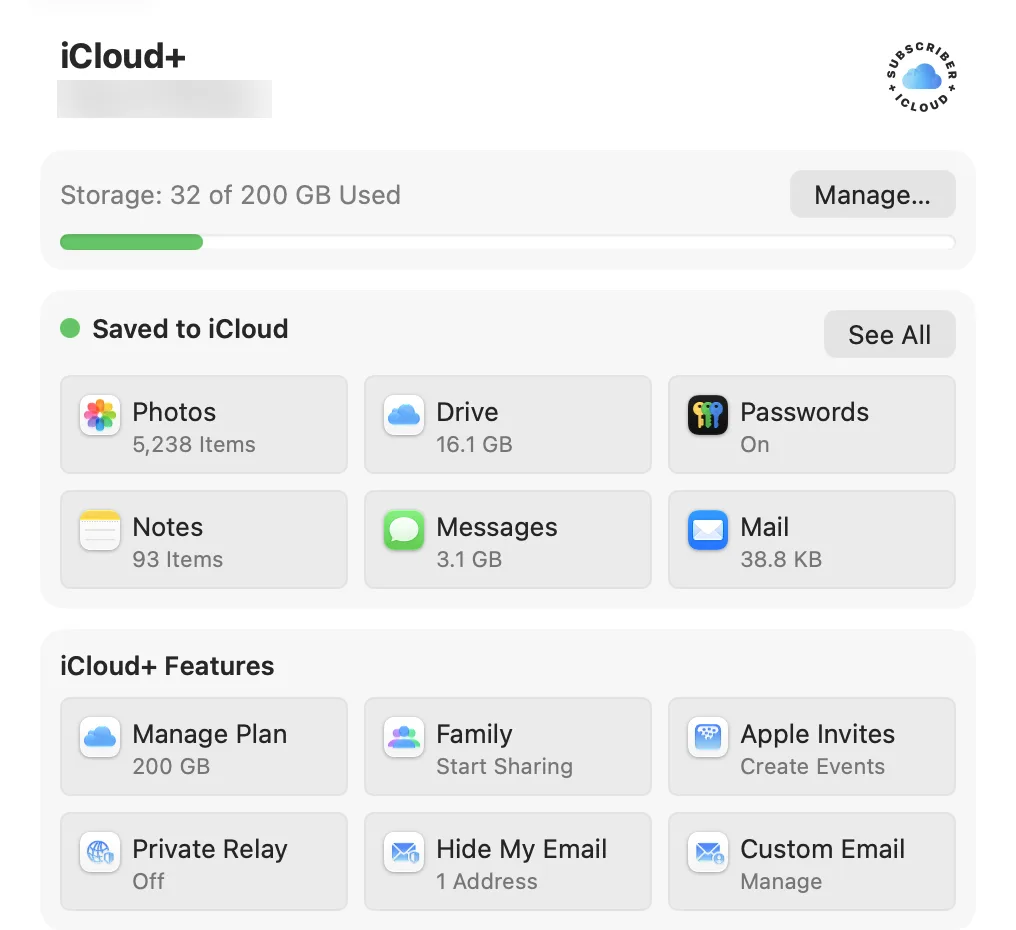
One thing caught me out straight away. The Custom Email button in the Mac’s settings doesn’t set anything up. It asks you to continue on icloud.com, so you may as well start there.
Setting It Up, Step by Step
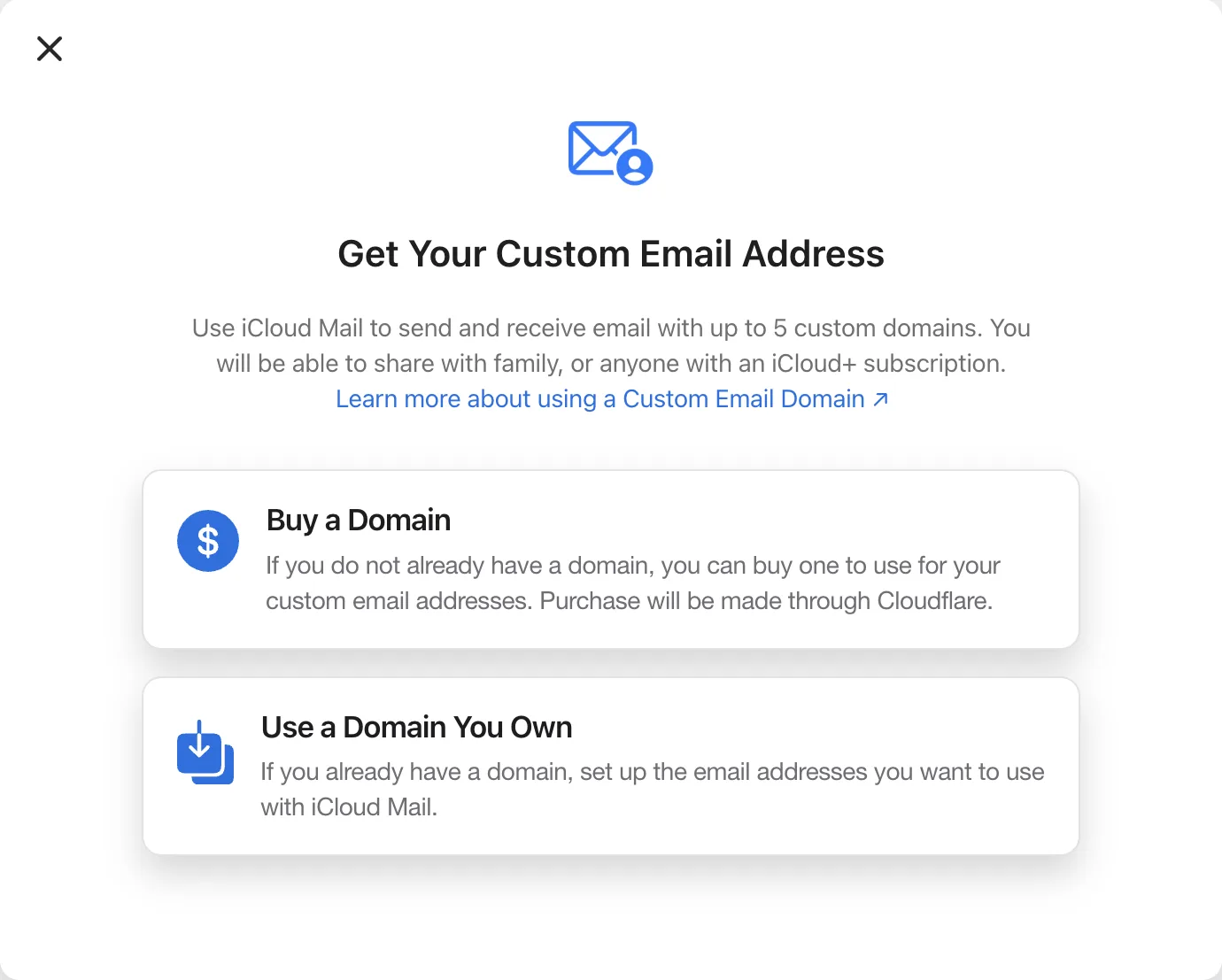
I started at 4:35pm. Go to icloud.com, sign in, open iCloud+ Features and choose Custom Email Domain. Apple offers two routes: buy a new domain or use one you own.
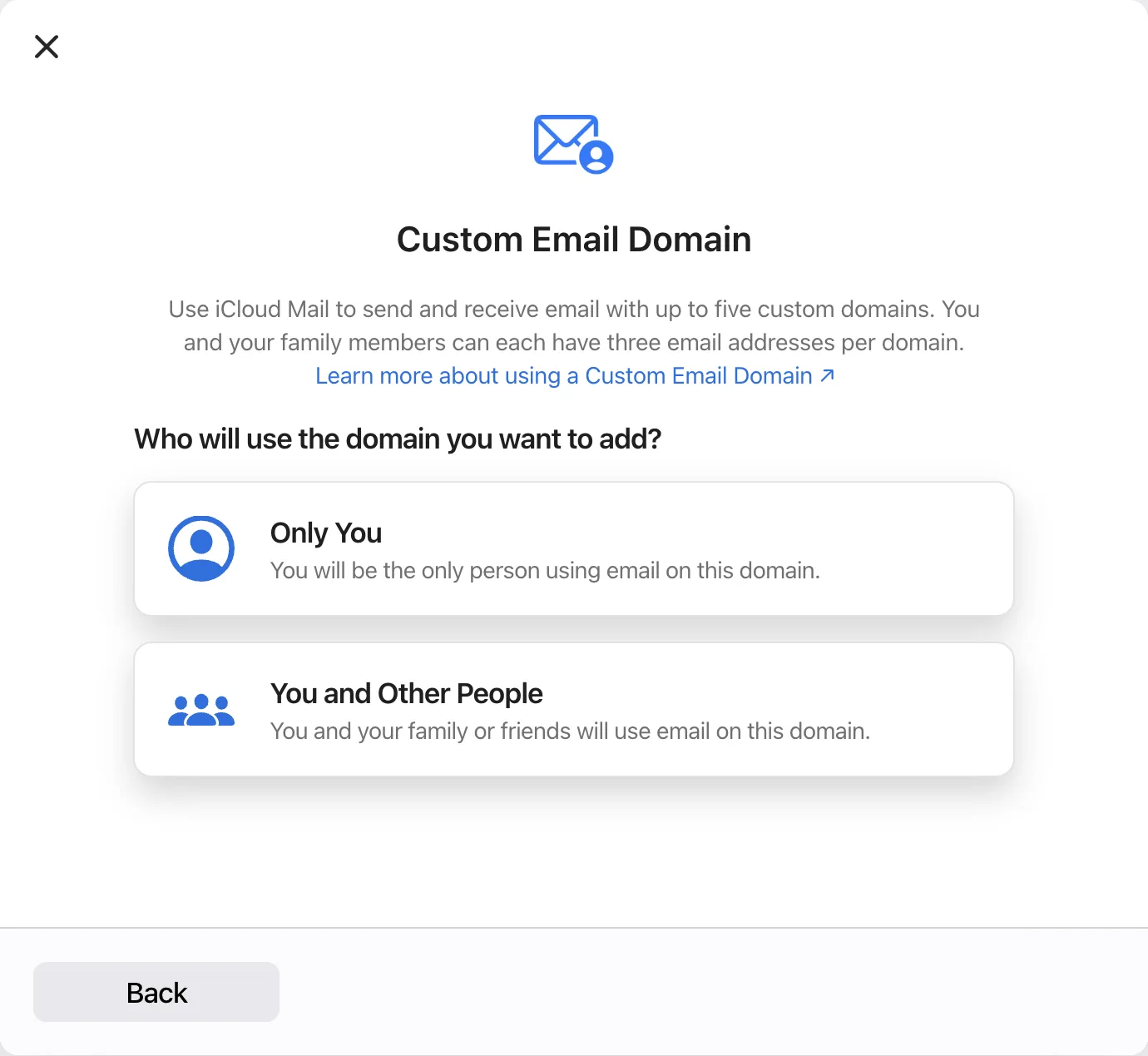
Next it asks who will use the domain: only you, or you and other people. I picked Only You, then typed in my domain.
Then comes the screen that confused me. Step 2 says “Add existing email addresses”. You could easily read this as adding new alias names, as you would with most providers. It isn’t. It’s only for addresses that already exist and already receive mail, because Apple sends a confirmation email to each one. My domain had never been used for email, so I skipped it and went straight to step 3. You add new addresses at the end.
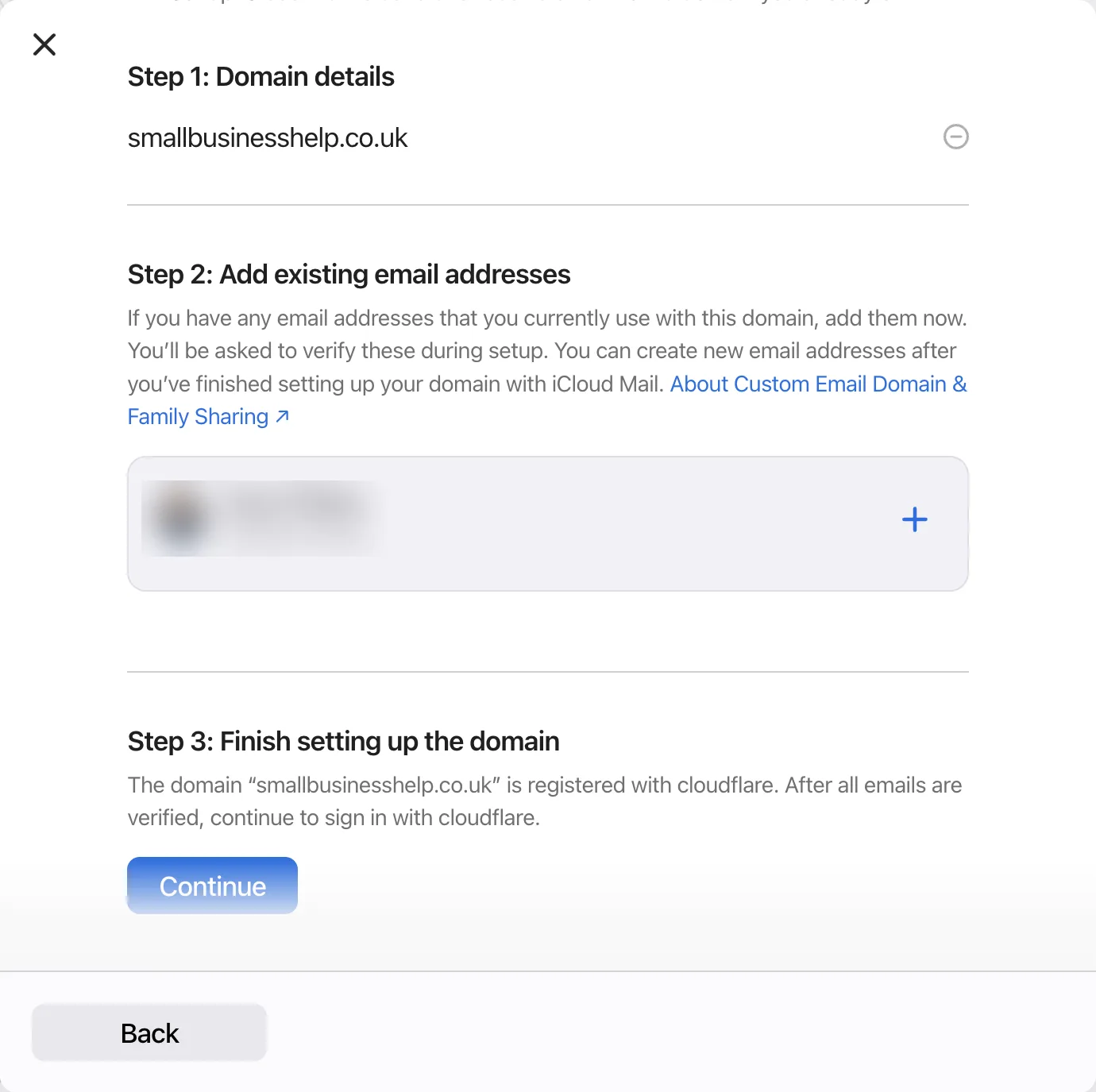
Tip: only use step 2 if you’re moving addresses that already work, for example from another provider. Each one has to receive Apple’s confirmation email. If your domain is new to email, skip it and create your addresses once the domain is verified.
The DNS records
This is where iCloud impressed me. It saw my domain was on Cloudflare and offered to add the records for me. Pressing Continue opened Cloudflare with the records already filled in, and I just had to authorise them. Cloudflare says it’s a one-time authorisation that doesn’t let iCloud make changes later.
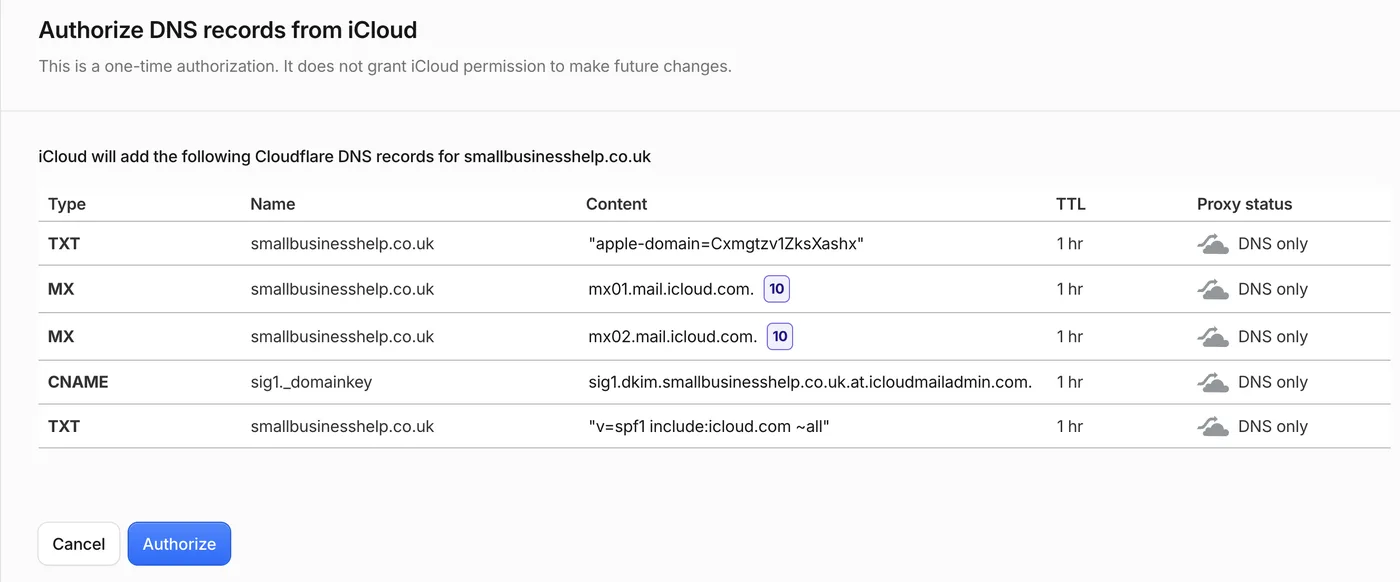
| Type | Name | Content | What it does |
|---|---|---|---|
| TXT | your domain | apple-domain=… (unique to you) | Proves you own the domain |
| MX | your domain | mx01.mail.icloud.com, priority 10 | Sends your mail to iCloud |
| MX | your domain | mx02.mail.icloud.com, priority 10 | Second mail server |
| CNAME | sig1._domainkey | sig1.dkim.yourdomain.at.icloudmailadmin.com | DKIM signing |
| TXT | your domain | v=spf1 include:icloud.com ~all | SPF |
Know the limits: iCloud doesn’t add a DMARC record. I already had DMARC set up through Cloudflare, which is why my tests passed DMARC. If you don’t, add one yourself; my Cloudflare DMARC guide shows how. If your domain isn’t on Cloudflare, Apple shows the records for you to copy into your DNS by hand, and you should remove any old MX or SPF records first.
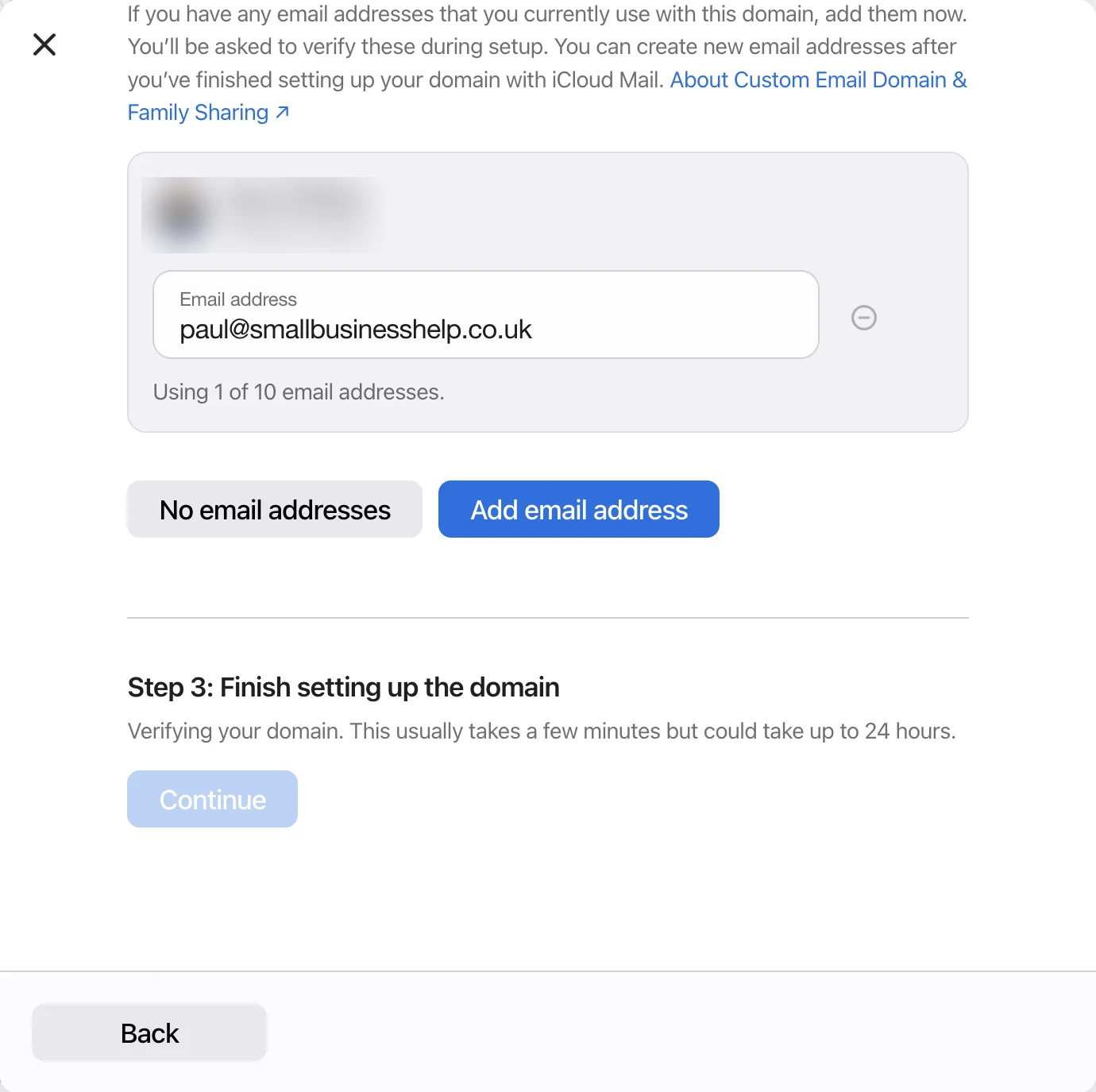
Back in iCloud, it said verifying usually takes a few minutes but could take up to 24 hours. Mine was ready in minutes, and an email from Apple confirmed it at 4:44pm.
Addresses and the catch-all
Once verified, you add your addresses. Apple’s support page says you can have up to 10 per domain, and my screen agreed with “Using 1 of 10 email addresses”. One of the setup screens says three per domain, so Apple contradicts itself, but 10 is what I was given.
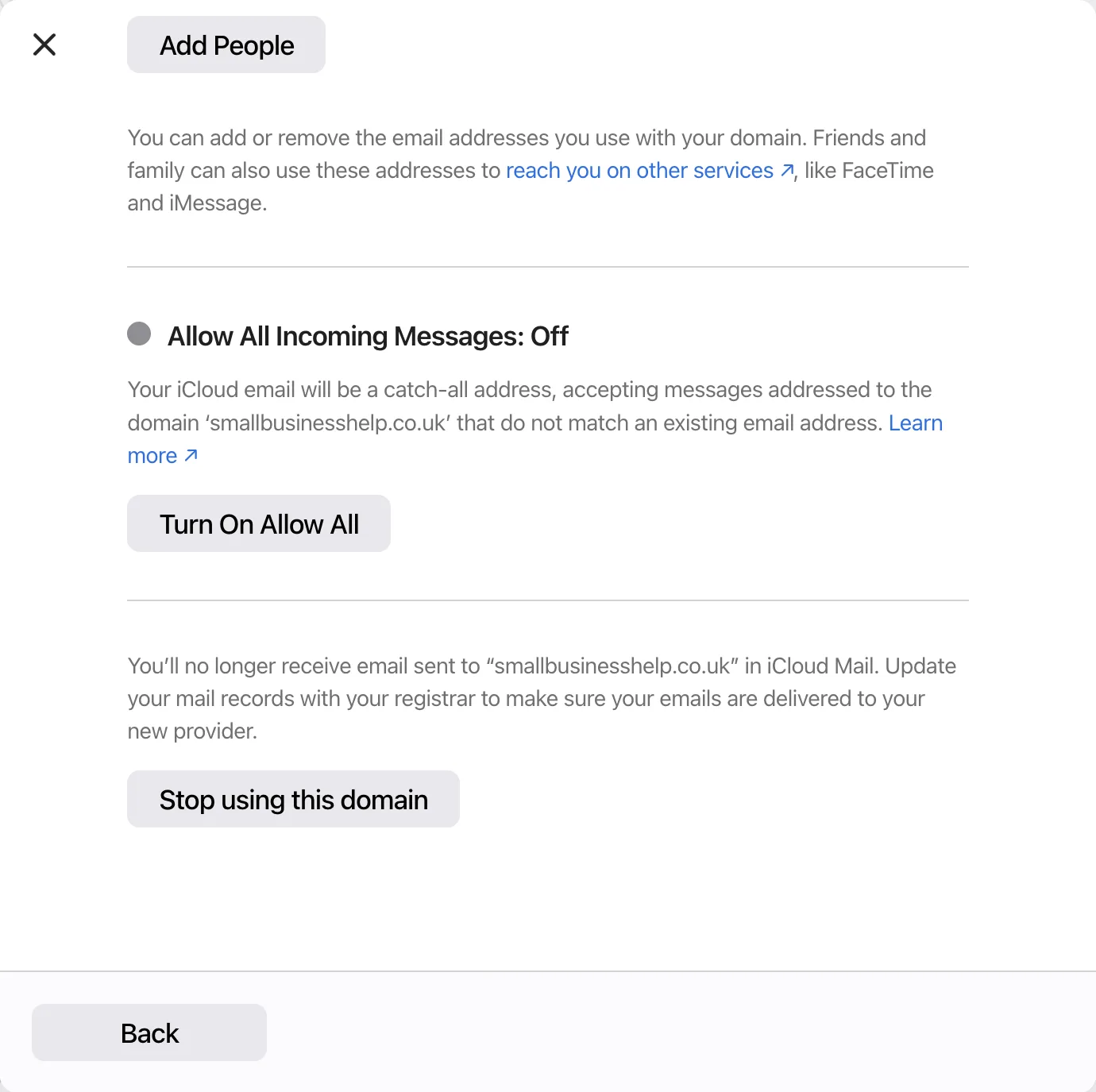
There’s also a catch-all, which Apple calls Allow All Incoming Messages. It’s off by default, so mail to an address you haven’t created bounces. That’s the safer default, as a catch-all collects a lot of spam.
From starting at 4:35pm, the domain was set up by 4:46pm, and I had working mail about ten minutes after that.
My Tests
| Test | Result |
|---|---|
| Email in from Gmail | Arrived in the iCloud inbox |
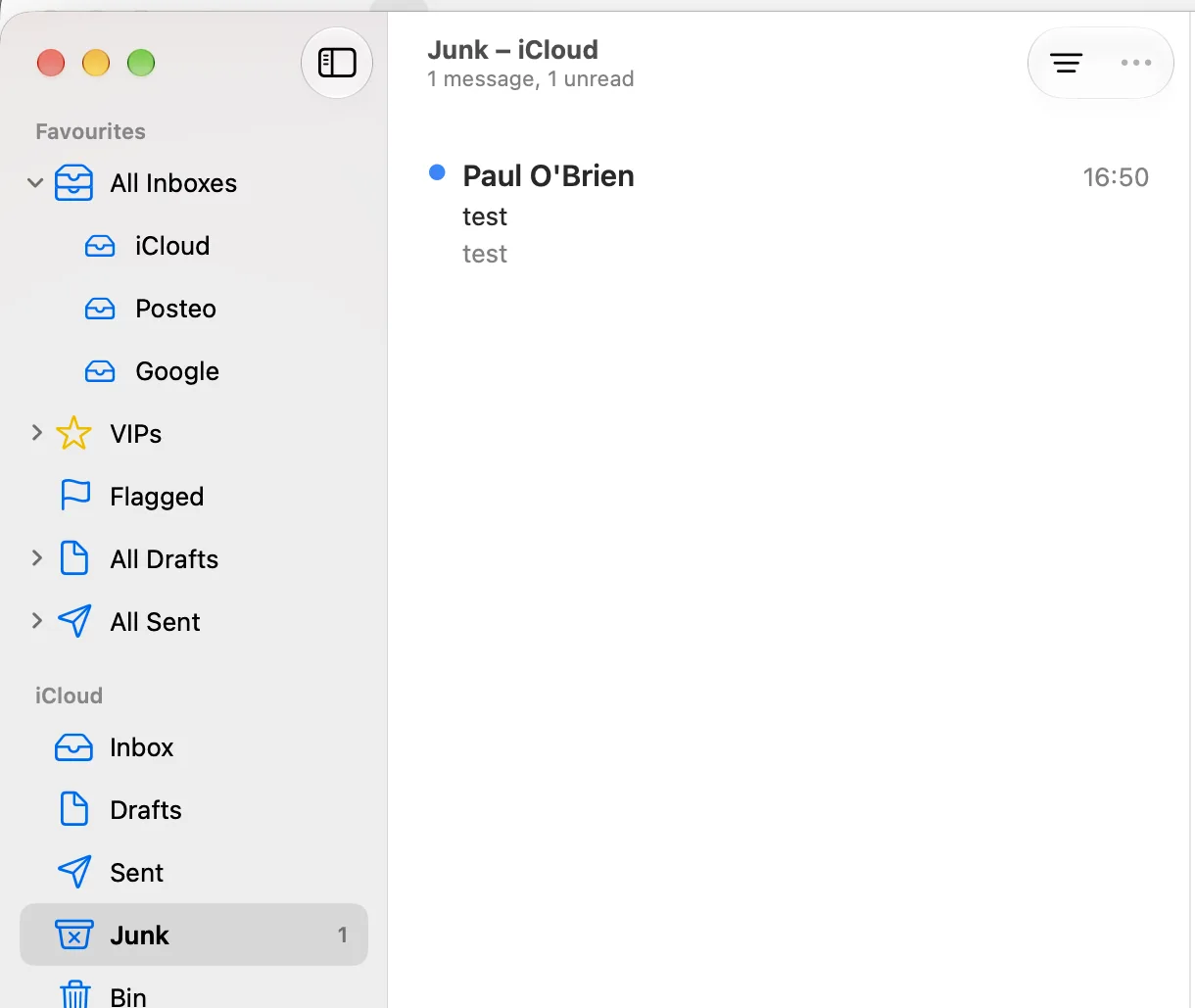
| Email in from Outlook | Went straight to Junk |
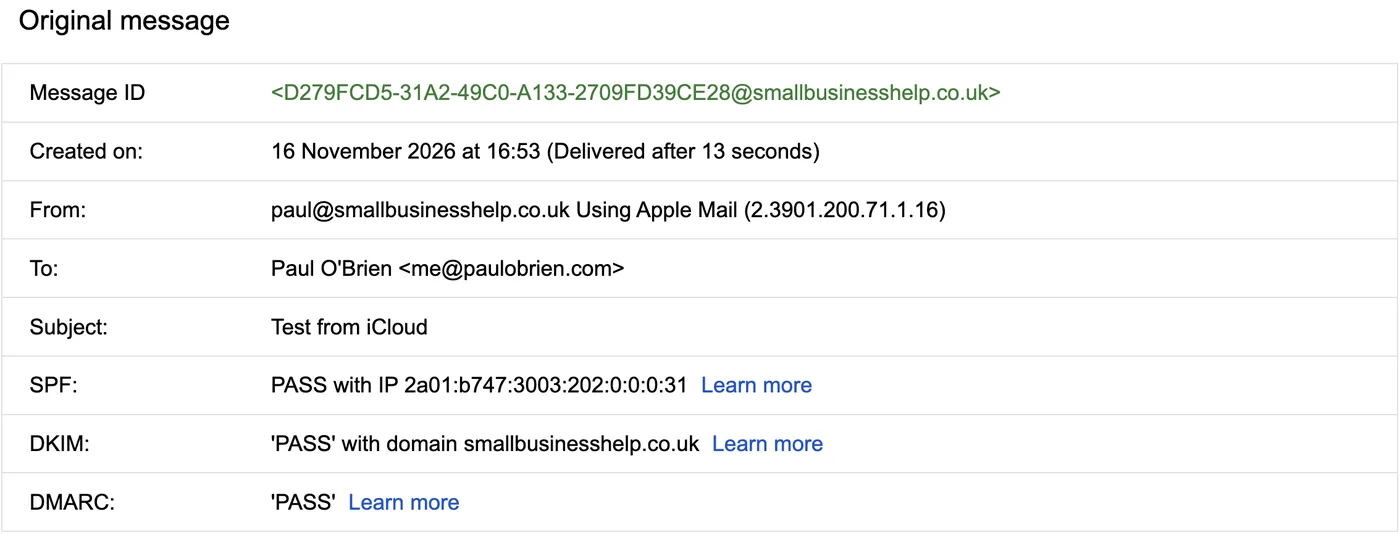
| Reply from Apple Mail to Gmail | Delivered after 13 seconds. SPF, DKIM and DMARC all passed |
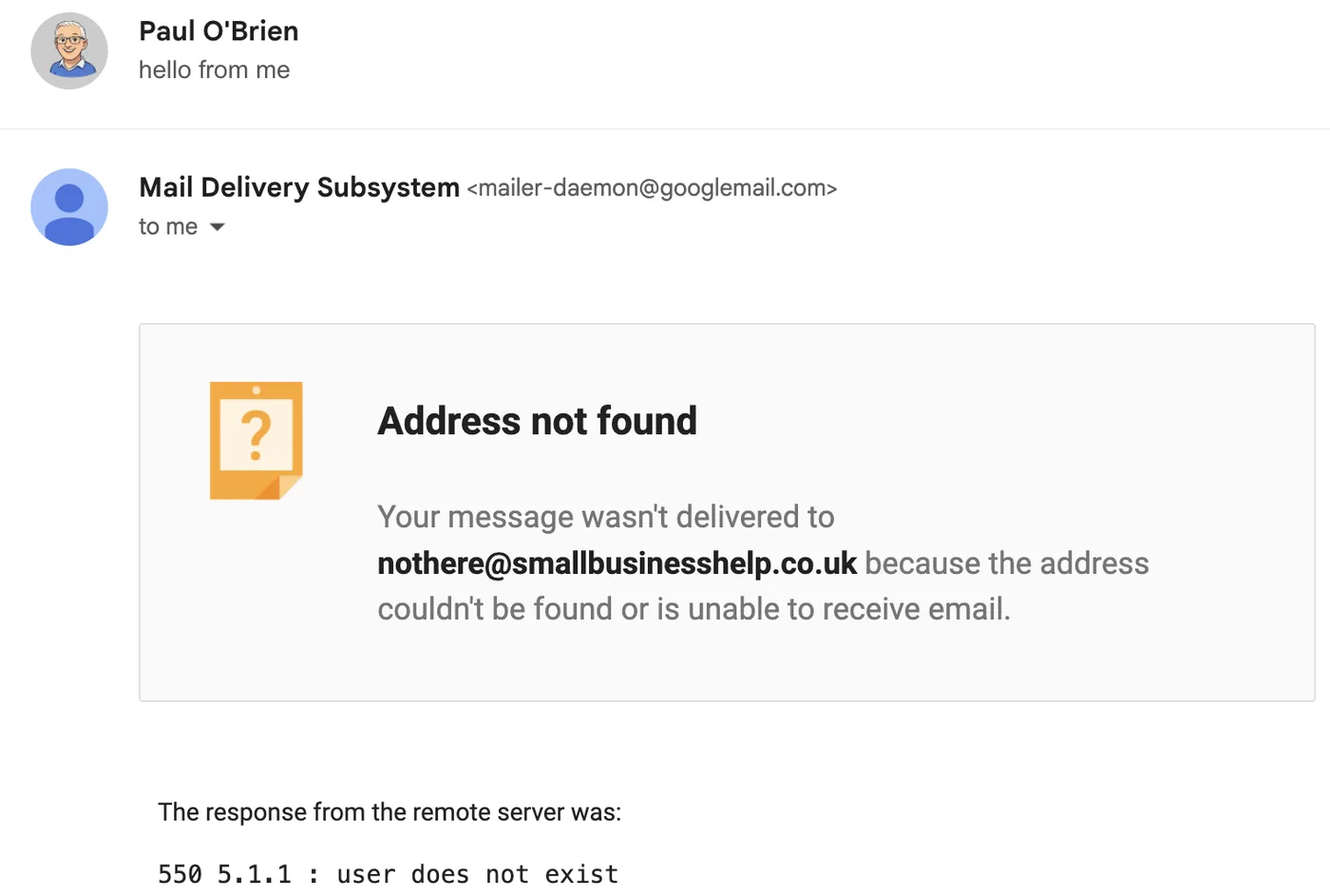
| Email to an address that doesn’t exist | Bounced straight away: “550 5.1.1 user does not exist” |
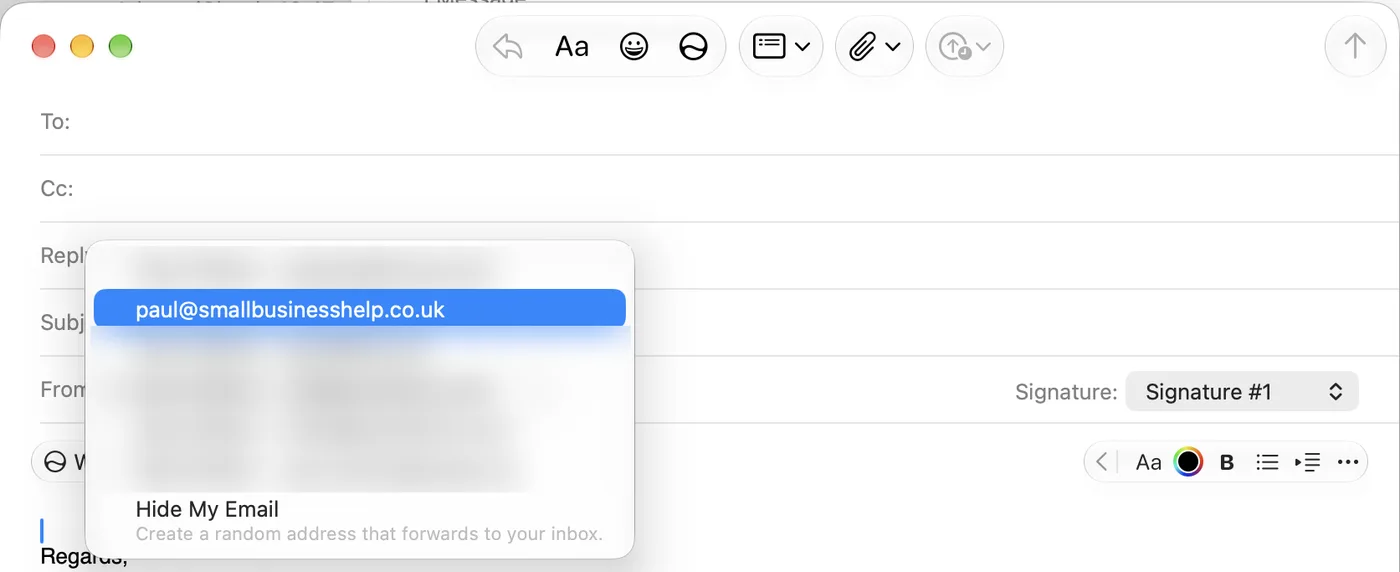
| New address in Apple Mail | Showed up in the From menu on the Mac without any extra setup |
Gmail arrived where it should. The Outlook test didn’t. It landed in Junk, on a brand new address, from a plain test message. That’s exactly the sort of thing that went wrong for me before.
Sending was much better. My reply from Apple Mail reached Gmail in 13 seconds, signed with my own domain, and passed all three checks. If those three words mean nothing to you, my guide to SPF, DKIM and DMARC explains them.
One nice touch: once I’d finished all the steps, iMessage popped up asking if I wanted to receive messages at paul@smallbusinesshelp.co.uk too. Apple lets you use your own domain address for iMessage and FaceTime as well as email.
Limits and Prices
Custom Email Domain comes with every iCloud+ plan, so the price is just your storage plan. These are Apple’s UK prices as listed on its iCloud+ page in November 2026.
| Plan | Price | Custom domains |
|---|---|---|
| iCloud (free) | £0, 5 GB | No |
| iCloud+ 50 GB | £0.99 a month | Yes |
| iCloud+ 200 GB | £2.99 a month | Yes |
| iCloud+ 2 TB | £8.99 a month | Yes |
| iCloud+ 6 TB | £26.99 a month | Yes |
| iCloud+ 12 TB | £54.99 a month | Yes |
| Limit | What Apple allows |
|---|---|
| Custom domains | Up to 5 |
| Addresses | Up to 10 per domain for each person |
| Sharing | Your Family Sharing group, or up to five other people |
| Messages sent a day | 1,000 |
| Recipients a day | 1,000, and no more than 500 on one message |
| Message size | 20 MB, or up to 5 GB with Mail Drop |
Personal use only: Apple says iCloud Mail is designed primarily for personal use. There’s no admin console, no shared mailboxes and no business support, so it isn’t a replacement for proper business email.
Compared With the Alternatives
| iCloud Mail | Fastmail | Zoho Mail | |
|---|---|---|---|
| Cost for your own domain | Included with iCloud+ from £0.99 a month | Paid plans | Paid plans, or a free plan in some regions |
| Built for | Personal use on Apple devices | Personal and business email | Business email |
| DNS setup | One click on Cloudflare | Guided, with automatic setup for some DNS hosts | Manual |
| Catch-all | Yes, off by default | Yes | Yes |
| Full review | You are here | Fastmail with your own domain | Zoho Mail review |
Pros and Cons
| Strengths | Weaknesses |
|---|---|
| No extra cost if you already have iCloud+ | My Outlook test went straight to Junk |
| One click DNS setup on Cloudflare | No DMARC record added for you |
| Working in about ten minutes | Step 2 is easy to misread |
| SPF, DKIM and DMARC all pass when sending | Designed for personal use, with daily sending limits |
| Proper bounces and an optional catch-all | Setup can’t be done from the Mac’s settings |
Frequently Asked Questions
Is a custom domain free with iCloud?
It’s included with every iCloud+ plan, from £0.99 a month in the UK. The free 5 GB iCloud plan doesn’t include it, and you still pay for the domain itself.
How long does iCloud custom domain setup take?
About ten minutes for me, with Cloudflare adding the DNS records. Apple says verifying the domain can take up to 24 hours, but mine was ready in a few minutes.
Does iCloud add a DMARC record?
No. It adds the MX, SPF, DKIM and verification records, but you need to add DMARC yourself.
How many addresses can I have on my domain?
Apple’s support page says up to 10 per domain, for up to five domains, and my setup showed 10.
Why did my test email go to Junk?
I can’t tell you why iCloud put my Outlook test in Junk. Check your Junk folder often in the first few weeks and mark anything real as not junk.
Can I use it for my business?
Apple says iCloud Mail is designed primarily for personal use, and there’s no admin console. For a business, I’d use a provider built for it, such as Fastmail.
The Bottom Line
Setting up iCloud Mail on my own domain was the easiest custom domain setup I’ve done. Cloudflare added the records with one click, sending passed every check and wrong addresses bounce properly. If you already pay for iCloud+ and want a personal address on your own domain, it costs nothing extra to try.
Would I use it for a domain that matters? No. I’d say it’s OK for family use, but 100% not for business. My Outlook test went straight to Junk, and in the past I’ve had missing emails and a junk filter that even dumped messages from my wife, who uses iCloud and is on our family account. It’s too early to say whether that has changed, so I’ll keep this domain running and update this review. For anything important, I’d put my domain on Fastmail instead.
Sources: Apple: Use Custom Email Domain with iCloud Mail; Apple: iCloud Mail limits; Apple: iCloud+ plans. Checked 16 November 2026. There are no affiliate links in this review.

Paul O'Brien
I've spent over 25 years working hands-on with email, DNS and cloud infrastructure. I test email providers and privacy tools for real, then tell you what they're good at and where they fall short.
More about meMore like this


You're subscribed. New articles come by email, as I publish or every Thursday. Change how often
Comments