
Is Your Email Provider a Single Point of Failure?
What happens when your email provider goes down? Usually less than you fear, as long as you’ve dealt with the quieter single points of failure: your domain, your account recovery and your data. Here’s the continuity plan I’d use.

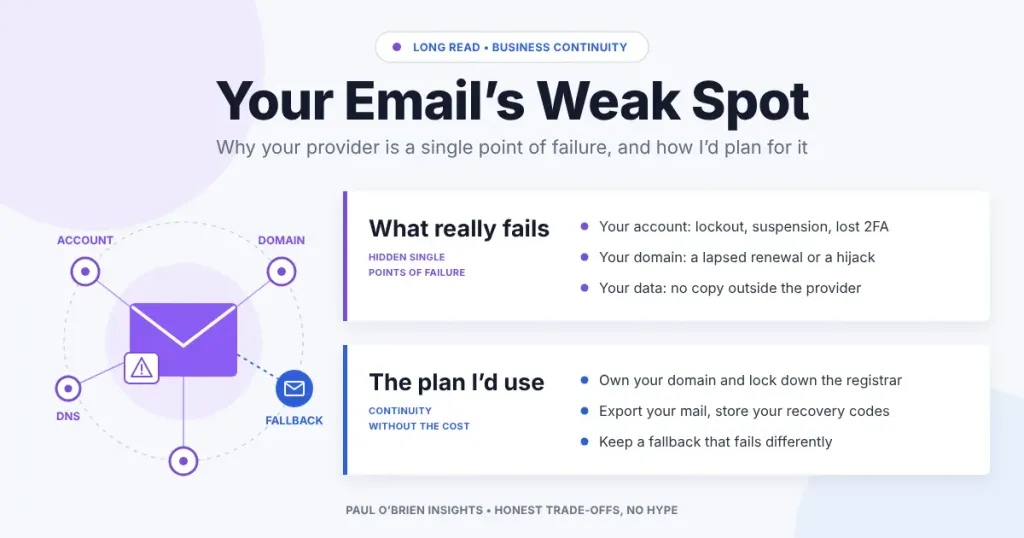
Ask most people what happens if their email provider goes down and you get a shrug. It’s Google, or Microsoft, or Fastmail. They don’t go down. Except they all have, and when they do, you find out very quickly how much of your life hangs off a single inbox.
I spend a lot of my time thinking about resilience. I hold the CBCI, the Business Continuity Institute’s certificate, and the habit it leaves you with is looking at any system and asking one question: what is the one thing that, if it broke, would take everything else down with it? That’s a single point of failure. Once you start looking for them, you see them everywhere. And for most individuals and small businesses, the biggest one isn’t the server in the cupboard or the broadband line. It’s the email account.
Think about what your inbox actually does. It’s where invoices arrive and where clients reply. It’s the recovery address for your bank, your domain registrar, your accounting software and probably your password manager. If you can’t get into it, you can’t reset anything else. This post is about how I’d plan for that, and why the obvious fix (“just add a backup”) is often an illusion.
Reader offer: 10% off Fastmail. Try Fastmail free for up to 30 days, then get 10% off your first year on any plan through my referral link. It’s the fallback I’d pick for a Google or Microsoft setup.
At a Glance: Who Needs an Email Continuity Plan
Everyone benefits from a few of the steps below, but how much effort it’s worth depends on how exposed you are. This is my view, not a formula.
| User Profile | How Exposed? | What Matters Most |
|---|---|---|
| Personal user on a free @gmail.com or @outlook.com address | High | You don’t own the address. Lose the account and the address goes with it, along with every password reset tied to it. |
| Personal user on their own domain | Moderate | You can move providers, but only if the registrar login, DNS and an export of your mail are all in hand. |
| Freelancers and sole traders | High | Lost email means lost invoices and missed client replies. A second way to send from your own domain is worth a lot. |
| Small businesses on Google Workspace or Microsoft 365 | High | Email, documents, calendar and sign-in all sit on one identity platform. When that fails, everything fails together. |
| Larger organisations with an IT team | Partial fit | You probably have a continuity plan. Check that it covers the identity provider and that leadership has an out-of-band way to talk. |
Two of Everything Isn’t Resilience
When people think about redundancy, they usually think about hardware: two servers, two data centres, automatic failover. That’s sensible, but it’s not the whole story. Some of the most disruptive outages of the last few years happened in organisations that had exactly that kind of redundancy, and it didn’t help.
In August 2023 the UK’s air traffic control provider, NATS, received a flight plan containing two waypoints with the same name. The flight plan processing system couldn’t reconcile it and dropped into a fail-safe state to protect the data. The backup system then received the same flight plan, ran the same logic and did exactly the same thing. Two systems, one shared flaw. Controllers fell back to manual processing and thousands of flights were cancelled over a bank holiday weekend.
In July 2024 a faulty content update to CrowdStrike’s Falcon sensor crashed Windows machines around the world. Microsoft estimated that 8.5 million devices were affected. Organisations with beautifully redundant infrastructure discovered that every one of their redundant machines was running the same agent, with the same update, at the same time.
And NATS isn’t a closed chapter. On 8 September 2026 a fault in its flight data processing system disrupted UK airspace again, with Cirium counting at least 2,000 cancelled flights and the CAA asked to run an independent review. NATS says the cause was different from 2023, and the full root cause hasn’t been published yet.
The lesson I take from all three is the same. A backup that shares the same logic, data or supplier as the primary isn’t a backup. It’s a second copy of the same failure. Which brings me to email.
Where the Single Points of Failure Hide in Your Email
Most people think of “my email” as one thing. It’s actually a stack of things, and each layer can fail on its own. Here’s how I break it down.
| Layer | What Can Go Wrong | What It Costs You |
|---|---|---|
| The provider’s platform | Network faults, bad deployments, authentication failures | No access for minutes or hours. Usually recoverable, usually not your fault. |
| Your account | Suspension, a failed payment, a compromised password, a lost 2FA device | Potentially permanent. This is the one that keeps me up at night. |
| Your domain | An expired registration, a locked-out registrar account, a hijack | Mail stops arriving anywhere, and you may not get the domain back. |
| Your DNS | DNS host outage, an accidental record change | Mail can’t find your provider, even though the provider is fine. |
| Your data | No local copy, no export, everything only on the provider’s servers | Years of correspondence gone if the account goes. |
| You | The only person who knows the registrar login, the DNS setup and where the recovery codes are | Nobody else can fix it while you’re ill, away or unreachable. |
Notice that only the first row is about your provider having a bad day. The other five are things you control, and they’re far more likely to cause you lasting harm.
What Actually Happens When an Email Provider Goes Down
Every major provider has had outages. That isn’t a criticism. Anything run by people at scale will break eventually. What matters is how it breaks and what you can do about it. A few examples, all from the providers’ own reports or reliable coverage:
| Provider | When | What Happened | The Single Point of Failure |
|---|---|---|---|
| Fastmail | 30 June 2023 | About 19 hours of partial disruption, with Fastmail estimating 3–5% of customers directly affected. Outbound traffic to parts of the internet failed and mail was delayed. | In Fastmail’s own words, it had “a single path for traffic out to the internet”. It has since added a second transit connection. |
| 14 December 2020 | Gmail, YouTube, Docs and more were unavailable for about 45 minutes worldwide. | Google’s User ID service, which every login depends on, was wrongly told it had no capacity left by an old quota system. One identity service, everything behind it. | |
| Proton | 9 January 2025 | Proton Mail, Calendar, Drive, Pass and VPN were disrupted for roughly three and a half hours, according to BleepingComputer. | Proton cited “intermittent network issues”. Every Proton service went down together because they share the same platform. |
| Microsoft | 11 September 2025 | Users in North America couldn’t reach Exchange Online mailboxes by any connection method for several hours. | Microsoft hasn’t published a detailed cause. The mailbox infrastructure itself was the bottleneck. |
I find the Fastmail one the most interesting, and I say that as someone who rates Fastmail very highly. It’s a textbook single point of failure, found and fixed, and written up honestly in public. I’d take that over a provider that pretends nothing ever goes wrong.
Here’s the reassuring part. Email was designed for unreliable networks. When a sending server can’t reach your provider, it doesn’t throw the message away. It queues it and tries again. The standard that governs email, RFC 5321, says the give-up time should generally be at least four to five days. So in a short outage, most incoming mail simply arrives late.
Know the limits: that retry window is a standard, not a promise. Well-run mail servers honour it. Some automated systems (one-time codes, booking confirmations, alerts) are less patient, and a code that arrives four hours late is useless anyway. The real damage in an outage is rarely lost mail. It’s that you can’t read, can’t send and can’t log in to anything that emails you a code.
Why I Wouldn’t Bother With a Backup MX
The classic answer to “what if my mail server goes down?” is a backup MX: a second mail server, run by someone else, that accepts your mail when the main one is unreachable and passes it on later. It made sense in the 1990s, when a small business might run its own mail server on one internet line.
Today I think it causes more problems than it solves. Spammers deliberately target backup MX servers because they tend to have weaker filtering. And the big providers don’t want them. Fastmail’s domain setup guide asks for two MX records, both its own, and says plainly that “these should be the only two MX records listed for your domain.”
Look closely and those two records are a small example of the redundancy illusion: two servers, one provider. But here that’s fine, because the real backup is the sender’s queue I described above. You don’t need a second inbox catching mail during a three-hour outage. You need a way to keep working during one, and a way to leave if the account itself is lost. Those are different problems.
The Email Continuity Plan I’d Actually Use
None of this is expensive or complicated. Most of it takes an afternoon. Here’s what I’d do, in the order I’d do it.
1. Own your address
If your email address ends in @gmail.com or @outlook.com, the provider owns it. If they close your account, there’s no appeal that gets the address back on your terms. Using your own email domain is the single biggest step you can take, because it means you can point your mail somewhere else in minutes. Every other step on this list depends on it.
2. Treat your domain registrar as critical infrastructure
Once you own your domain, the registrar becomes the new single point of failure. Turn on auto-renew, keep a valid card on file, enable registrar lock and use strong two-factor authentication on the account. And this one matters: don’t make the registrar’s contact email an address on the same domain. If the domain lapses, the renewal reminders go to an inbox that no longer exists.
3. Know where your DNS lives
DNS is the signpost that tells the world where to deliver your mail. When it fails, your provider can be running perfectly and nobody will find it. That isn’t theoretical: in October 2016 an attack on the DNS provider Dyn made large parts of the web unreachable for hours. Use a solid DNS host (I’ve written about what Cloudflare’s free tier gets you), keep a note of your current records somewhere offline, and get your SPF, DKIM and DMARC right so a move doesn’t send your mail to spam.
4. Keep your own copy of your mail
An account you can’t get into is an account whose contents you’ve lost, unless you have a copy. Every serious provider lets you take one:
| Provider | How to Export | What You Get |
|---|---|---|
| Fastmail | Settings → Migration → Export, or any IMAP client | A .zip per folder, one folder at a time, up to 4 GB per export (Fastmail help) |
| Proton Mail | The Proton Mail Export Tool for Windows, macOS and Linux | Decrypted EML files with JSON metadata, which Thunderbird or Outlook can import |
| Google Workspace / Gmail | Google Takeout (admins can also use the Workspace data export) | An MBOX file of your mail |
Personally, I like a desktop client set to keep a full offline copy, because it stays up to date without me remembering to do anything. A quarterly export to an encrypted drive on top of that is belt and braces.
5. Make sure you can always get back in
Account lockout is the failure that does lasting damage, so this is where I’d spend the most care. Print or securely store your recovery codes. Register more than one second factor; a pair of hardware security keys is ideal, one on your keyring and one in a drawer. Set the recovery email for your main account to an address with a different provider. And assume that, sooner or later, someone will try to get into your email.
6. Have a second provider you can switch to
This is the step most people skip, and it’s where the NATS lesson really bites. A fallback only helps if it doesn’t share the primary’s weak spot. A second Google account doesn’t protect you from a Google identity outage. A second mailbox in the same Microsoft tenant won’t help when that tenant is locked by ransomware.
For a business, I’ve argued before for a small, separate out-of-band command hub: a handful of accounts on an entirely different provider, so leadership can still talk when the main platform is down or compromised. For an individual it can be as simple as a paid account elsewhere with your domain already verified, ready to take over if you change the MX records.
7. Write it down, then test it
The NATS failure is a reminder that a fail-safe you’ve never tested may not behave the way you expect. Write a one-page runbook: where the domain is registered, where DNS lives, which records to change, where the recovery codes are, and who else can act if you can’t. Then once a year, actually log in to the registrar, sign in to the fallback account and open last quarter’s export. If any of that fails, better to find out on a quiet Tuesday.
| Step | Effort | What It Protects Against |
|---|---|---|
| Own your address | An afternoon, once | Losing your address along with your account |
| Lock down the registrar | Thirty minutes | Domain expiry and hijack |
| Know your DNS | Thirty minutes | Mail going nowhere when something changes |
| Keep a copy of your mail | An hour, then automatic | Permanent loss of your correspondence |
| Secure account recovery | An hour | Lockout, compromise, a lost phone |
| Second provider | An afternoon | Long outages and account loss at your main provider |
| Runbook and annual test | An hour a year | Finding out the plan doesn’t work during the emergency |
Choosing a Fallback That Doesn’t Share Your Weak Spot
The right fallback is the one that fails differently from your primary. Here’s how I’d pair them. I’ve used all of these as my main inbox at one point or another, from Gmail to Proton, then Fastmail, and today Google Workspace.
| If Your Primary Is… | A Sensible Fallback | Why |
|---|---|---|
| Google Workspace | Fastmail or Proton Mail | Separate identity, separate infrastructure, and both handle custom domains well. |
| Microsoft 365 | Fastmail or Proton Mail | Gets you out of the Microsoft identity stack entirely. |
| Fastmail | Proton Mail or Google Workspace | Different companies, different jurisdictions, different platforms. |
| Proton Mail | Fastmail | Standard IMAP with no bridge app, so it works with any client in a hurry. |
If you want a deeper comparison before choosing, I’ve put Proton Mail and Fastmail head to head, and my Fastmail review explains why it’s still the best pure email service I’ve used.
One caveat on fallbacks: switching your MX records moves new mail. It doesn’t move your history, your calendar or your contacts, and DNS changes take time to spread. A fallback gets you working again. It isn’t an instant mirror of everything you had.
Frequently Asked Questions
What is a single point of failure in email?
It’s any one component whose failure stops your email working entirely. For most people that’s the account itself, followed by the domain, the DNS and the lack of any copy of their mail.
Do I lose emails if my email provider goes down?
Usually not. Sending servers queue messages and keep retrying, and the email standard says they should generally keep trying for at least four to five days. Short outages normally mean delayed mail, not lost mail. Some automated senders give up sooner, though.
Should I set up a backup MX record?
For most people on a hosted provider, no. Providers such as Fastmail ask you to list only their own MX records, and third-party backup MX servers attract spam. The sender’s retry queue already covers short outages.
How do I back up my email?
Use your provider’s export tool (Fastmail’s Migration settings, the Proton Mail Export Tool or Google Takeout), or set up a desktop client that keeps a full offline copy. Store the result somewhere encrypted and away from the account itself.
Is it worth paying for a second email provider?
If email is how you earn a living, yes. The cost is small next to a day or more without email, and a fallback on a different platform is the only thing that helps if your main account is suspended or compromised.
What should I do right now if my email is down?
Check the provider’s status page (Fastmail, Proton, Google Workspace) before changing anything. If it’s a short platform outage, wait: your incoming mail is queued. Only move MX records if you’re facing a long outage or you’ve lost the account.
The Bottom Line
I don’t think the answer to provider outages is anxiety, or running your own mail server, or buying two of everything. The big providers are, on the whole, remarkably reliable, and email itself is more forgiving of short failures than people realise.
The real risk is quieter. It’s the domain that lapses because the reminder went to a dead inbox, the account you can’t recover because the only second factor was on a phone that’s now at the bottom of a lake, or the “backup” that turns out to share everything with the thing it was meant to back up. Those are the single points of failure worth fixing, and almost all of them are in your hands.
Own your domain, keep a copy of your mail, protect your way back in, and have somewhere else to go that fails differently. If you want that somewhere else to be good in its own right, Fastmail is where I’d start.
Reader offer: 10% off Fastmail. Try Fastmail free for up to 30 days, then get 10% off your first year on any plan through my referral link. It makes an excellent fallback for a Google or Microsoft setup.
Disclosure: This article contains affiliate links, including for Fastmail. If you sign up through them, I may earn a commission at no extra cost to you. I only recommend services I personally use and trust.

