
HEY vs Fastmail: Which Email Provider Is Right for You?
HEY wants to reinvent how you handle email, while Fastmail wants to fit however you already work. After six months inside HEY and years of writing about Fastmail, here's an honest, fact-checked comparison of pricing, features, privacy and the trade-offs that matter day to day.

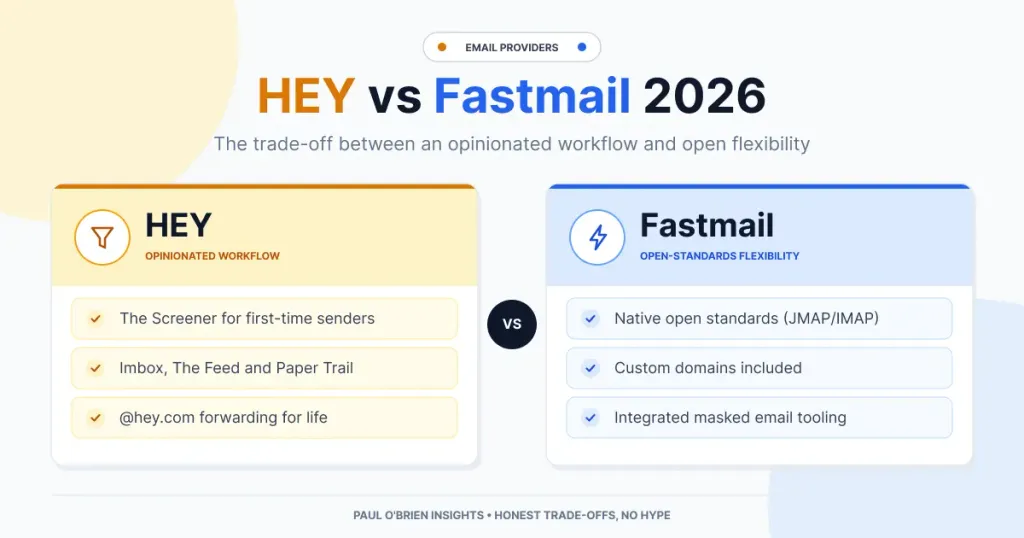
Prices and features checked 5 October 2026
Disclosure: I'm a member of Fastmail's partner programme, so some Fastmail links on this site may earn me a commission at no extra cost to you. HEY doesn't pay me anything. Neither company has seen or approved this article, and the partnership hasn't changed my verdict: the facts below are backed by the sources listed at the end.
If you are ready to walk away from Big Tech's ad-driven models, such as Gmail or Outlook, and pay for a modern, privacy-focused email provider, two names quickly float to the surface: HEY and Fastmail.
Both platforms charge subscription fees, keep your data away from advertisers, and put a fresh spin on what paid email should feel like. Beneath the surface, though, they are built on opposite software philosophies.
- HEY is an opinionated workflow platform. Created by 37signals (the team behind Basecamp) and launched in June 2020, HEY discards traditional email mechanics and steers you into a specific, structured way of processing messages.
- Fastmail is an open-standards power tool. Founded in 1999 and based in Melbourne, Fastmail is built for flexibility, custom rules and deep protocol support (IMAP, JMAP, CalDAV and CardDAV), giving you a clean canvas to build your own setup.
Having spent extended time inside both ecosystems, I've found that choosing between them isn't just about comparing feature checklists. It's about deciding how you want to interact with email every single day.
HEY vs Fastmail at a glance
The two services solve different problems: HEY is built to change how you handle email, Fastmail is built to fit however you already work.
| Feature / Dimension | HEY | Fastmail |
|---|---|---|
| Core Philosophy | Opinionated: one workflow, designed for you | Flexible: build your own workflow |
| Personal Plan | $99/year HEY for You, annual billing only | $60/year Individual, or $6 month to month |
| Custom Domains | From $10/month Separate HEY for Domains plan; $12/month per extra user | Included Individual, Duo, Family, Standard and Professional plans |
| Storage | 100 GB per user | 60 GB on Individual 150 GB per user on Professional |
| Protocols | No IMAP or POP HEY's own apps only | JMAP, IMAP, SMTP, CardDAV, CalDAV |
| Sorting | Screener, Imbox, The Feed, Paper Trail Set per sender | Folders or labels Plus a powerful rules engine |
| Aliases | Email aliases HEY for Domains only | Masked Email 1Password and Bitwarden integrations |
| Calendar | HEY Calendar included | Fastmail calendar included Syncs via CalDAV |
| Tracking Protection | Spy-pixel blocking | Remote images blocked by default |
| Built-in AI | None Bring your own agent via the HEY CLI | None Bring your own assistant via the MCP server |
| Leaving | MBOX and vCard export @hey.com forwarding for life after one paid year | Standard IMAP export Your custom domain moves with you |
| Data Location | United States | United States or EU (Amsterdam) |
| Free Option | Free trial, no card required | 30-day free trial |
| Headquarters | United States | Australia |
1. HEY: High Expectations Met by Real-World Friction
Like many who jumped on the HEY wagon early on, I was among the eager crowd waiting for an invite code at launch. As a long-time user of Basecamp's other products, my expectations were high.
I gave HEY a genuinely fair trial. I started with a personal @hey.com handle and eventually tested custom domains. Early-trial optimism carried me past the initial setup friction. I committed to using HEY as my primary inbox (the Imbox) and persevered with it for a solid six months.
Over time, small friction points began to accumulate:
- The visual and professional gap. What initially felt fresh began to look toy-like. For serious professional communication, the UI lacked the clean, polished feel I wanted. That is a matter of taste, and plenty of people love HEY's playful design, but it never stopped bothering me.
- The "no native access" dealbreaker. Webmail as a default isn't an issue for everyone; in fact, webmail is my standard setup. But HEY deliberately doesn't support IMAP or POP, so you cannot use it inside Apple Mail, Outlook or any other client. It can send as an external address over SMTP, but it won't fetch mail from other accounts. You live in HEY's own apps or not at all. Combined with its proprietary UI, that closed environment became a major drag on my day-to-day productivity.
- The sorting overhead. HEY's sorting isn't automatic in the way Gmail's tabs are: every new sender is a decision you make by hand, and the per-message tools (Reply Later, Set Aside, Bubble Up) add their own steps. For me, rather than saving time, that layer of manual triage created extra clicks between me and my actual work. As I put it in my full review, HEY makes the pile look prettier, but it doesn't shorten the time you spend typing.
My full review can be read here: HEY Email: Brilliant Reinvention or Overpriced Experiment?
To be fair to HEY, its stance on AI deserves a mention. There is no AI drafting, summarising or algorithmic sorting in the inbox. In September 2026, 37signals launched a HEY CLI that lets you connect an AI agent you already use (such as Claude Code or Codex) to your account, but that is opt-in and bring-your-own. If you are wary of AI reading your mail, HEY's default is reassuring. Fastmail has taken almost exactly the same position: no AI in the inbox, plus an optional MCP server, launched in April 2026, for connecting the assistant of your choice. On AI, the two are level.
That suits me. As much as I'm an AI fan, I'm not a fan of AI in email. My inbox holds some of the most personal and commercially sensitive material I have, and I don't want a provider's model reading it in the background or a chatbot bolted onto the side. What I do want is the choice: if I decide an assistant should triage my calendar or draft a reply, I'll connect the tool I already trust, on my terms, with the permissions I pick. Fastmail's approach is exactly that, with read-only, write and send access granted separately. I'd much rather be handed the keys than have someone else's AI forced down my throat. Credit to HEY for landing in the same place.
What HEY gets right
I don't want this to read as a hatchet job. Several of HEY's ideas are genuinely good:
- The Screener solves the cold-outreach problem better than any spam filter. A stranger's first email waits until you say yes or no, and a "no" means you never hear from them again.
- Spy-pixel blocking tells you when a sender tried to track you, not just that it was blocked.
- HEY Calendar, included in the price, along with a pile of thoughtful extras: Clips, Collections, Merge Threads, Sticky Notes and Workflows.
- HEY World, the built-in blogging platform on personal plans, is refreshingly simple.
The one standout policy HEY gets right
There is one policy HEY offers that is truly unique and worthy of praise. If you pay for at least your first year of HEY and later close your account, you can forward any email sent to your @hey.com address to another address, free, for life.
They preserve the address so no one else can claim it, and they forward incoming mail indefinitely. It's a customer-first policy that I wish other providers would follow. Note that it covers @hey.com addresses; on HEY for Domains you own the domain, so you simply point it elsewhere.
2. Fastmail: The Unbeatable All-Rounder
Having written a lot about Fastmail over the years, until proven wrong I still believe it is the best all-round email provider currently available.
In the interests of honesty: earlier this year my own day-to-day work moved to Google Workspace. That wasn't because Fastmail's email fell short. It was because I needed shared documents, spreadsheets and video calls in one suite, which no standalone email provider offers. I explain that decision in Fastmail Review (2026): Why I Loved It, and Why Google Workspace Won Out. As a pure email service, Fastmail remains my benchmark.
Where HEY builds high walls around an opinionated workflow, Fastmail focuses on performance, reliability and flexibility.
Why Fastmail wins
- An unrivalled feature set. From nested folders (or Gmail-style labels, if you prefer) to complex rules and automated sorting, Fastmail lets you craft almost any workflow without imposing a rigid structure.
- Custom domains and Masked Email. Adding a custom domain on Fastmail is effortless; it took me under ten minutes. Masked Email is built into Fastmail and integrates with 1Password (and Bitwarden), so you can generate a unique, disposable-style alias for every site you sign up to without leaving the sign-up form. It was the feature I used most. I explain why it beats throwaway inboxes in Why Masked Email Beats Disposable Email for Most People.
- Speed, polish and support. Fastmail's web interface is built on JMAP, the open protocol Fastmail helped create, and it is very fast. A March 2026 update added multi-window compose, inline replies, a reading pane that can sit below the message list, and finer control over signatures. Searching tens of thousands of emails returns results in under a second, and performance from here in the UK has always been excellent. In my experience its support team has been prompt and effective when I've needed it.
- Value for money. Fastmail's Individual plan costs about 40% less than HEY for You ($60 vs $99 a year), and it includes custom domains, which on HEY require a separate plan at $120 a year or more. You also get full access to open standards and the freedom to use whatever email app you like.
- Privacy and data residency. Fastmail blocks remote images by default, supports passkeys and two-factor authentication, and since August 2026 offers an EU data region in Amsterdam, running on its own servers rather than rented cloud space, at no extra cost. To its credit, Fastmail is upfront that this is not an EU-only guarantee: emergency backups and system logs remain in the US, and the company is still subject to Australian law. I go deeper in Fastmail Review: A Deep Dive into Privacy, Security, and Sovereignty.
Where Fastmail falls short
Fairness cuts both ways. Fastmail has no equivalent of HEY's Screener out of the box, so you'll need rules to get close. Even after this year's refresh, its interface is clean and functional rather than delightful. Personal plans offer less storage than HEY (60 GB versus 100 GB). And if your privacy priority is end-to-end encryption rather than productivity, Fastmail isn't built for that; I compare it with a provider that is in Proton Mail vs Fastmail 2026: Privacy or Productivity?.
3. Workflow Philosophy: Opinionated Box vs Swiss Army Knife
HEY: email re-engineered
HEY tears down the traditional inbox model and replaces it with sender-based categorisation:
- The Screener: first-time senders are held until you explicitly click "Yes" or "No".
- The Imbox: important messages from approved senders land here.
- The Feed: newsletters and promotional updates are presented as a continuous, scrollable magazine-style feed.
- Paper Trail: receipts and transactional emails are filed quietly in their own space.
The catch: you do decide where each sender goes, and you can change your mind later, but you can't swap HEY's model for a traditional inbox-and-folders setup. The Screener, Imbox, Feed and Paper Trail are the product. Broadly, you adapt to HEY; HEY doesn't adapt to you. If the method clicks, that's a feature. If it doesn't, there's no escape hatch, not even a third-party mail app.
Fastmail: total customisation
Fastmail assumes you know how to organise your work best. It provides:
- A rules engine that can approximate much of HEY's workflow without locking you into a proprietary layout, for example auto-filing newsletters and receipts into their own folders, or routing mail from senders not in your contacts into a "to review" folder.
- Full support for third-party email apps (Apple Mail, Outlook, Spark, Thunderbird and others) via IMAP and SMTP, alongside Fastmail's own JMAP-powered web and mobile apps.
- Calendar and contact sync via CalDAV and CardDAV, which work natively on Apple devices and in most desktop clients, and on Android through Fastmail's app or a sync tool such as DAVx⁵.
4. Pricing and Value Breakdown
All prices below are in US dollars, as listed on each provider's pricing page on 5 October 2026.
Personal use
| Plan | HEY | Fastmail |
|---|---|---|
| One person, provider's address | $99/year HEY for You · 100 GB · annual only | $60/year Individual · 60 GB · or $6 monthly |
| One person, custom domain | $120/year HEY for Domains · $10/month · monthly only | $60/year Individual · domain included |
| Two people | $179/year HEY Family · up to 5 people | $96/year Duo · 60 GB each |
| A family | $179/year HEY Family · up to 5 people | $132/year Family · up to 6 people |
| Short vanity address | $349/year 3-character · $999/year for 2-character | Not applicable Use your own domain |
Business and teams
| Plan | HEY for Domains | Fastmail |
|---|---|---|
| Price per user | $12/month $10 for the first user · monthly billing | From $3/month Basic $3 · Standard $5 · Professional $9 · billed annually |
| Storage per user | 100 GB | 6 / 60 / 150 GB Basic / Standard / Professional |
| Custom domains | Yes | Standard and Professional Not available on Basic |
| Team extras | Shared threads, private comments Group addresses via Extensions | Shared folders, calendars and contacts Email retention archive on Professional |
Fastmail also offers discounts for two- and three-year terms (for example, Individual drops to $4.67/month on a 36-month plan).
The bottom line on value: Fastmail provides a significantly lower barrier to entry, and the gap widens once custom domains are involved. A solo user with their own domain pays roughly half as much on Fastmail as on HEY. HEY's genuine advantages are its larger storage allowance, an included calendar and blog, and the forwarding-for-life promise on @hey.com addresses. Whether HEY's workflow is worth the premium is a personal call; on raw value for money, Fastmail wins comfortably.
Final Verdict: Which Should You Choose?
Choose HEY if:
- You are deeply burnt out on traditional email and want an opinionated app to shape your workflow for you.
- You're happy to live entirely in HEY's own apps and don't need standard email clients or CRM integrations.
- Cold outreach is your biggest pain, and the Screener sounds like bliss.
- You value the forwarding-for-life policy and want to try a radically different approach to newsletters and receipts.
Choose Fastmail if:
- You want the most reliable, flexible and feature-rich standalone email provider available.
- You prefer third-party email clients (Apple Mail, Outlook, Spark) or need open IMAP, CalDAV and CardDAV standards.
- You manage custom domains and want deep alias control through Masked Email and 1Password.
- You need clean, professional webmail that scales with serious business use, at a lower price.
For me, the answer is Fastmail. HEY asked good questions about what email should be, and some of its answers (the Screener, forwarding for life) are brilliant. But email is a tool I need to bend to my work, not the other way round, and Fastmail bends further, costs less and never locks the door behind you.
Try Fastmail and save 10% on your first year
If you're ready to take back control of your inbox, you can try Fastmail risk-free with a 30-day trial. If you decide to stay, signing up through my referral link gives you 10% off your subscription for your entire first year.
Start your free Fastmail trial
Affiliate disclosure: this is a referral link. If you sign up through it, I may earn a commission at no extra cost to you. In this article I have tried to include Fastmail's weaknesses as well as its strengths.
Further reading and sources
More from me: HEY review · Fastmail review 2026 · Privacy and security deep dive · Masked vs disposable email · Proton Mail vs Fastmail
Sources
- Hey (email service), Wikipedia
- Features, HEY
- Pricing, Fastmail
- Fastmail, Wikipedia
- Pricing, HEY
- FAQs, HEY
- Send from an external address, HEY
- Using AI agents with HEY, HEY Help
- An MCP server for Fastmail, Fastmail, Apr 2026
- The Screener, HEY
- Masked Email, Fastmail
- Masked Email in Fastmail, 1Password Support
- Using Bitwarden with Fastmail, Fastmail Help
- Multi-window support, Fastmail, Mar 2026
- EU data region, Fastmail, Aug 2026
- How HEY works, HEY

