What “Zero-Access” Really Means (And Why Email Providers Use It)
Zero-access architecture changes who can read your email by design. This piece explains what it really means, how it differs from standard encryption, and why the trade-offs matter long term.

“Zero-access” is one of those phrases that sounds reassuring, technical, and slightly opaque all at once. It’s often used as shorthand for privacy, security, or trust — usually without much explanation of what it actually means in practice. For something that makes a strong claim about who can read your email, that vagueness matters.
At its core, zero-access architecture describes a system where the service provider cannot read the contents of your messages, even if it wanted to. The keys needed to decrypt your email aren’t available to the company running the service. They exist only on your devices and with the people you communicate with. From the provider’s perspective, your inbox is data they store, route, and protect — but not something they can inspect.
That distinction is easy to gloss over, because most email services already talk about encryption. Messages are “secured”, connections are “protected”, and data is “encrypted in transit”. But those protections usually apply only while email is moving between servers. Once it arrives, the provider can still read, process, scan, or analyse the contents as part of how the service works.
Zero-access architecture is different. It shifts the boundary of trust. Instead of asking users to trust that a provider will handle their email responsibly, it designs the system so the provider simply doesn’t have the ability to read it at all. That choice has consequences — not just for privacy, but for how email behaves, what features are possible, and which trade-offs users end up living with over time.
This shift in trust boundaries connects closely to the incentives behind different email business models — something I explore more directly in Free vs Paid Email: What You’re Really Paying With.
What your provider can still see
Zero-access architecture doesn’t mean invisibility.
Even when a provider can’t read the contents of your messages, it still has to run an email service. That means certain information remains visible by necessity. Metadata — things like sender and recipient addresses, timestamps, message size, and routing information — is still processed in order for email to function at all.
Your provider also sees patterns of use. How often you log in, which devices you use, and whether messages are successfully delivered are all part of operating a reliable service. None of this reveals what you’ve written, but it does mean zero-access isn’t the same as anonymity.
What changes is where the boundary sits.
In a traditional email system, message contents are accessible to the provider once delivery is complete. That access enables features like server-side search, automated categorisation, ad targeting, and large-scale analysis. It also means messages can be scanned in response to policy enforcement, legal requests, or internal moderation systems.
With zero-access architecture, that layer disappears. The provider still handles transport and storage, but the message body itself remains opaque. There’s no central point where contents can be inspected, indexed, or reprocessed later.
This doesn’t eliminate trust entirely — you’re still trusting the provider to secure infrastructure, deliver messages reliably, and handle metadata responsibly. But it does narrow the scope of that trust. Instead of relying on policy and promises, you’re relying on architectural limits.
And that difference becomes more important the longer an email account is used, and the more of someone’s digital life passes through it.
How this differs from standard email encryption
Most email providers already use encryption, which is why the distinction can feel confusing. Messages are typically encrypted while they’re being sent between servers, protecting them from being intercepted in transit. This is now standard practice and an important baseline for modern email.
This transport-level protection is enforced through authentication and policy systems like SPF, DKIM, and DMARC — which help prevent impersonation and abuse, but do not limit what a provider can read once a message is delivered.
But that kind of encryption only applies while messages are moving.
Once an email reaches the provider’s servers, it’s usually decrypted so the service can process it. That access enables features people expect — searching your inbox, filtering messages, detecting spam, scanning for malware, or categorising mail automatically. It also means the provider can read message contents as part of how the system operates.
Independent security organisations like the Electronic Frontier Foundation have long pointed out that encryption in transit doesn’t prevent providers themselves from accessing stored messages.
This server-centric model is largely a product of how email evolved over decades — something I cover in more detail in The History of Email: From ARPANET to the Modern Inbox.
Zero-access architecture moves that boundary. Instead of decrypting messages on the server, the content remains encrypted at rest and can only be decrypted on the user’s devices. The provider never holds the keys needed to read the message body, which means there’s no point in the system where contents become visible to the service itself.
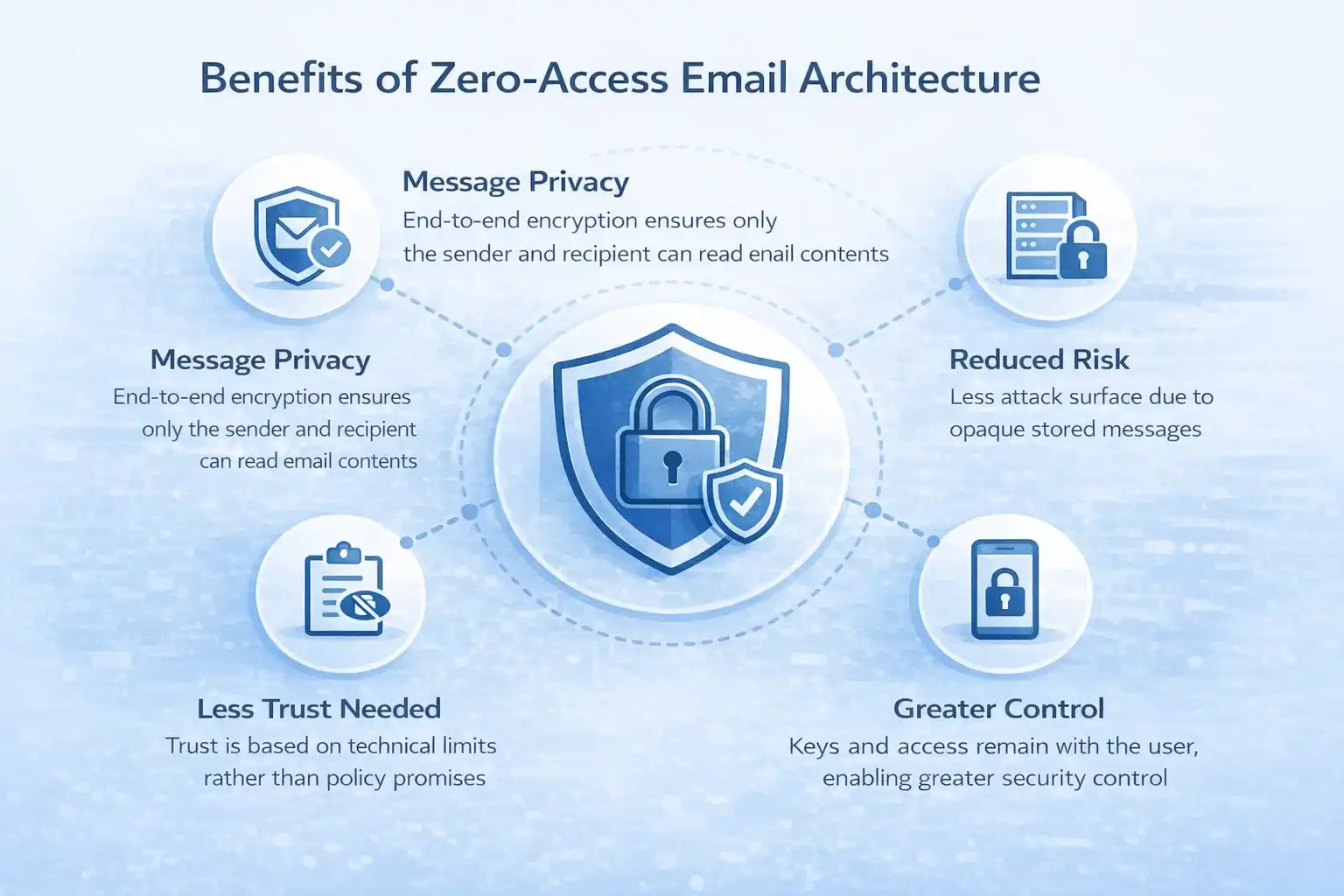
This isn’t a moral distinction — it’s a structural one. Traditional encryption protects messages from third parties. Zero-access architecture limits what the provider can do by design. It removes the option to read or scan content, rather than relying on restraint or policy.
That difference often gets lost in marketing language. “Encrypted” can mean many things, and most services are technically telling the truth when they use the term. Zero-access is more specific. It describes a system where access to content is not just discouraged or restricted, but intentionally unavailable.
And that choice has knock-on effects for everything that comes next — from features and usability to support, recovery, and long-term trust.
The trade-offs zero-access introduces
Zero-access architecture isn’t a free upgrade. By design, it removes certain capabilities from the provider — and some of those capabilities are things users have come to expect from modern email services.
Search is one of the most obvious trade-offs. When message contents can’t be indexed on the server, full-text search becomes harder or slower, or has to be handled locally on a user’s devices. That can work well for smaller inboxes or single-device use, but it can feel limiting when someone relies on web access or switches between devices frequently.
Account recovery is another area affected. If a provider doesn’t have access to message contents or encryption keys, it also has fewer options when something goes wrong. Forgotten passwords, lost devices, or corrupted key material can lead to permanent loss of access. This isn’t negligence — it’s the direct consequence of designing a system where even the provider can’t step in.
This changes how risk is distributed when something goes wrong — a dynamic I explore further in It’s Not If Your Email Provider Gets Hacked — It’s When.
Support changes too. In a zero-access system, support teams can’t inspect messages to diagnose delivery issues, investigate abuse claims, or verify account activity in the same way. This can matter when you’re trying to trace a delivery issue. That can make problem resolution slower or less flexible, especially in edge cases where human intervention would otherwise help.
Some features simply don’t exist at all. Server-side categorisation, behavioural analysis, and certain automation tools depend on being able to read content centrally. Zero-access systems tend to favour simpler, more predictable behaviour over clever optimisation.
These trade-offs don’t make zero-access “better” or “worse” in absolute terms. They make it different. The question isn’t whether these compromises exist — they do — but whether they align with how someone uses email and what they value most over time.
For people who prioritise convenience, deep automation, or seamless recovery, traditional models may feel more forgiving. For those who care more about control, boundaries, and reducing unnecessary trust, the limitations can be an acceptable price.
What matters is that the choice is real, and that the trade-offs are understood — not hidden behind reassuring labels.
Why zero-access shows up mostly in paid services
Zero-access architecture isn’t rare because it’s mysterious or experimental. It’s rare because it doesn’t align well with the economics of large, free email platforms.
Running an email service at global scale is expensive. Storage, delivery, abuse prevention, security, compliance, and support all cost money. When users aren’t paying directly, providers have to recover those costs in other ways — through advertising, data analysis, or tight integration with broader ecosystems.
Zero-access architecture limits those options.
If a provider can’t read message contents, it can’t scan them for behavioural signals, extract insights at scale, or build features that depend on centralised analysis. That doesn’t make those practices unethical by default — but it does make them incompatible with a system designed to keep content inaccessible.
Paid services operate under different incentives. When revenue comes from subscriptions rather than attention or data, there’s less pressure to extract additional value from message contents. Architectural choices that prioritise user boundaries become viable, even if they introduce friction or reduce feature scope.
This also explains why zero-access tends to appear alongside clearer expectations about support, limits, and responsibility. If a provider can’t read your email, it can’t fix everything for you — and paid services are generally more explicit about those constraints. The relationship is more direct: you’re paying for a defined service, with defined boundaries, rather than an open-ended platform.
None of this implies that paid services are automatically more trustworthy, or that free services are acting in bad faith. It does explain why certain design choices cluster together. Architecture follows incentives, and incentives shape what’s practical to offer at scale.
This incentive mismatch is the same reason free and paid email diverge so sharply over time — a theme I unpack in Free vs Paid Email: What You’re Really Paying With.
Understanding that connection makes it easier to evaluate claims about privacy. It shifts the question from “Do I trust this provider?” to “Does this provider’s business model support the boundaries it claims to enforce?”
What zero-access means under legal pressure
One of the less discussed implications of zero-access architecture is how it behaves when a provider is compelled to hand over data.
Email providers operate under the laws of the countries they’re based in. That means they can be subject to court orders, warrants, or other legal demands requiring them to disclose user data. Zero-access architecture doesn’t remove those obligations — but it does change what compliance actually looks like.
In a zero-access system, the provider does not possess the keys required to decrypt stored message content. Even if legally compelled, the company cannot hand over readable emails because it never had the ability to access them in the first place. What can be provided is limited to what the system is designed to see: metadata such as account identifiers, timestamps, IP logs, and delivery records.
This distinction matters because it shifts the outcome of legal pressure from a question of trust to a question of capability. Instead of relying on a provider’s restraint or promises, zero-access systems enforce limits through design. Even physical possession of servers does not change that constraint if the encryption keys are not present.
This doesn’t make zero-access a shield against investigation, nor does it eliminate lawful access entirely. Metadata can still be revealing, and legal processes still apply. What changes is the ceiling of exposure. The contents of messages — often the most sensitive part of an account — remain unavailable by default.
That boundary can be especially relevant for people whose work or circumstances make content exposure particularly risky: journalists protecting sources, researchers working in sensitive fields, activists operating under repressive regimes, or whistleblowers communicating about wrongdoing. For these users, the difference between “the provider promises not to read your mail” and “the provider cannot read your mail” is not theoretical.
For most people, this may never come into play. But zero-access architecture is ultimately about worst-case scenarios rather than everyday convenience. It’s designed for moments when incentives, policies, or external pressure no longer align with user interests — and to ensure that, even then, certain limits remain in place.
Example providers using (or approximating) zero-access architecture
Zero-access architecture isn’t hypothetical. A small number of providers have built systems where message contents are intentionally inaccessible to the service itself — with clear trade-offs.
Proton (Proton Mail)
Proton Mail is the most widely known example of a zero-access email service. Messages are encrypted end-to-end between users, and Proton does not hold the keys required to read stored email. This design limits server-side scanning and content-based features, but allows Proton to state — credibly — that it cannot read user mail.
Proton describes this model as “zero-access encryption” in its own documentation, meaning the company does not hold the keys required to read stored email.
I’ve written in more detail about how these architectural choices affect day-to-day use in my Proton Mail Deep Dive.
Tutanota
Tutanota implements a similar model, encrypting email contents and subject lines with keys unavailable to the provider. It places stronger limits on interoperability with traditional email, but in return keeps more of the message opaque to the service itself.
Skiff
Skiff (before its acquisition) extended zero-access ideas beyond email into documents and collaboration, using client-side encryption to keep content inaccessible to the provider. It demonstrated how architectural choices ripple outward into product design and usability.
Why architecture matters more than promises
Most conversations about email privacy eventually come down to trust. Do you trust a provider to handle your data responsibly? Do you trust their policies, their intentions, their future decisions?
Zero-access architecture reframes that question.
Instead of asking users to trust a provider’s promises, it reduces what needs to be trusted in the first place. By designing systems where message contents are inaccessible by default, it narrows the scope of power a provider holds — not through policy, but through structure.
That doesn’t eliminate trust entirely. You’re still trusting infrastructure, delivery, uptime, and metadata handling. But it does change the nature of the relationship. The most sensitive part of email — the content itself — is protected by design rather than discretion.
This distinction becomes more important over time. Policies change. Companies evolve. Priorities shift. What feels reassuring today can quietly erode tomorrow. Architectural limits, by contrast, tend to be harder to undo without breaking the service itself.
That’s why zero-access architecture isn’t just a technical detail. It’s a statement about boundaries. It defines what a provider can and cannot do, regardless of pressure, scale, or incentives.
This way of thinking — prioritising boundaries over convenience — reflects how I generally approach email as infrastructure, not just a tool, which I explain in How I Think About Email.
For people who treat email as a long-lived part of their digital identity — not just a disposable inbox — those boundaries matter. They don’t guarantee safety or simplicity, but they do offer something rarer: a system that fails closed rather than open.
And in a medium as foundational as email, that can make all the difference over the long run.
Frequently Asked Questions About Zero-Access Email
What does “zero-access” actually mean?
Zero-access means the email provider cannot read your stored email content, even though the data sits on their servers.
Your messages are encrypted in a way that only you (with your password and keys) can unlock them — not the company running the service.
It doesn’t mean “zero data exists.” It means zero readable access for the provider.
Is zero-access the same as end-to-end encryption?
They’re related but not identical.
- End-to-end encryption means only the sender and recipient can decrypt the message (the provider can’t).
- Zero-access usually refers to how your data is stored — the provider can’t read your inbox, drafts, or files at rest.
Some providers do both. Others only encrypt storage, not every message end-to-end.
Can a zero-access provider reset my password if I forget it?
Often, no — or only in a limited way.
Because the provider cannot see your encryption keys, losing your password can mean losing access to your encrypted data. That’s why many zero-access services give you:
- Recovery keys
- Backup codes
- Recovery files
If you lose both your password and recovery method, even the provider may not be able to restore your mailbox contents.
Does zero-access mean the provider knows nothing about me?
No. Zero-access protects content, not everything.
Your provider may still see:
- Your email address
- Who you send email to and receive email from (metadata)
- When you log in
- IP addresses or device info (depending on settings)
Zero-access reduces what they can read — it doesn’t make you invisible.
Does zero-access stop phishing or spam?
Not directly.
Zero-access protects your stored data from being read by the provider or a server breach. It does not stop:
- Phishing emails reaching you
- Malicious links
- Social engineering
You still need good habits, strong passwords, and 2FA.
If my provider can’t read my email, how does search work?
Good question — and one of the trade-offs.
With zero-access systems, search often happens:
- In your browser
- Inside the app
- After your mailbox is decrypted on your device
This can make search slightly slower than traditional email, where the provider scans everything on the server.
Is zero-access email slower?
Sometimes — slightly.
Because encryption and decryption happen on your device, things like opening large mailboxes, searching years of mail, and loading attachments can be a bit slower than mainstream providers.
For many people, the privacy trade-off is worth it.
Do all “secure” email providers use zero-access?
No. Some providers market themselves as private but still have the technical ability to read stored messages. True zero-access services design their systems so they literally cannot decrypt your mailbox content.
Always check how a provider explains:
- Who holds the encryption keys
- Whether they can reset your mailbox contents
- What happens if you lose your password
Can law enforcement force a zero-access provider to hand over my emails?
They can require the provider to hand over data they have.
With zero-access services, that usually means:
- Encrypted mailbox data
- Metadata (addresses, timestamps, account info)
If the provider doesn’t have the decryption keys, they can’t hand over readable content — even if they’re legally required to cooperate.
Is zero-access worth it for normal people?
If your email contains:
- Personal documents
- Financial details
- Private conversations
- Identity records
…then yes, it can be very worthwhile.
Zero-access isn’t just for activists or journalists. It’s about limiting how much damage can happen if a company is breached, pressured, or compromised.
Does zero-access make me completely secure?
No single feature can do that.
Zero-access protects against provider-side access and some breach risks. You still need:
- A strong, unique password
- Two-factor authentication
- Phishing awareness
- Secure devices
Think of zero-access as one strong wall, not the whole fortress.
Get the weekly email
A short weekly roundup on email, privacy, and digital trust. No promos. Unsubscribe anytime.

