The 6 Different “From” Addresses Inside Every Email
The address you see in an email isn’t always the one that actually sent it. Behind every message are multiple “from” identities — each with a different technical role. Understanding them explains spam checks, bounces, and why email authentication exists at all.

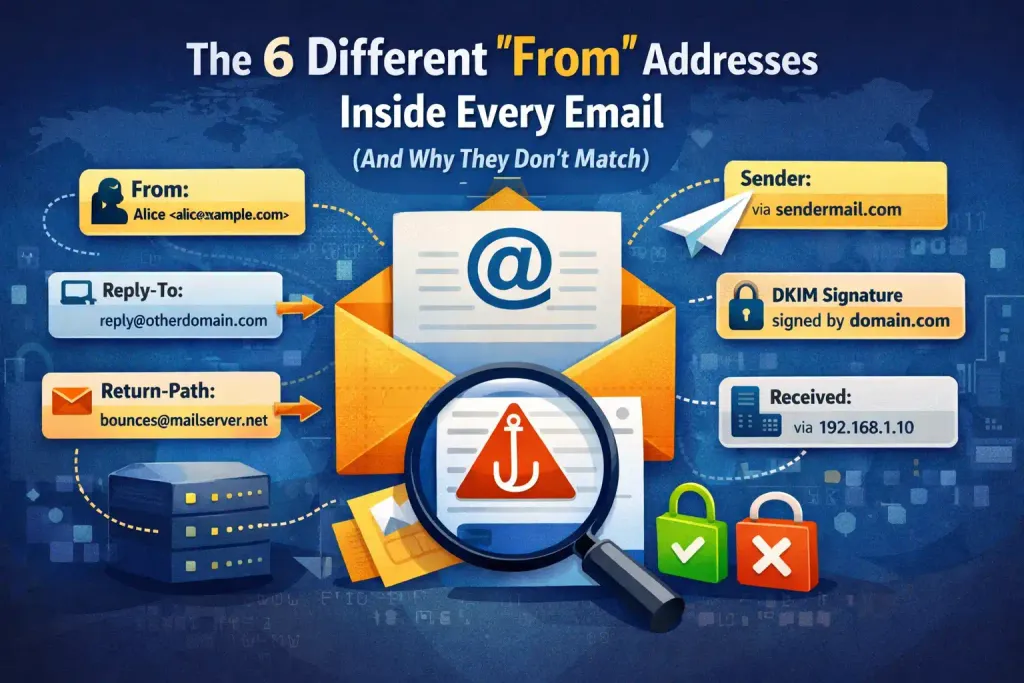
Most people think an email has one sender.
It doesn’t.
Every email carries multiple sender identities — some visible to you, some used only by mail servers, and some created purely for handling delivery.
That’s why:
- An email can look like it’s from one address
- But bounce somewhere else
- And be technically sent by a completely different system
Understanding these layers explains spam, phishing, forwarding problems — and why email authentication exists at all.
Let’s break them down.
1. The From: address (what you see in your inbox)
This is the one you recognise.
It’s the address shown in your email app — the name and email displayed at the top of a message.
Example:
From: “Your Bank” <[email protected]>
This is the human-facing identity. It tells the recipient who the message claims to be from.
But here’s the critical point:
👉 On its own, this address is just a label. It’s easy to fake.
That’s why phishing emails can appear to come from trusted brands. The visible From: line means nothing unless authentication systems verify it.
2. The Reply-To: address (where replies actually go)
When you hit “Reply,” your response doesn’t always go back to the From: address.
Emails can include a Reply-To: header that overrides it.
Example:
From: [email protected]
Reply-To: [email protected]
This is commonly used by:
- Customer support systems
- Marketing platforms
- Helpdesk tools
It isn’t suspicious by itself. But scammers abuse it to redirect replies to accounts they control.
3. The MAIL FROM (Envelope From) — the delivery sender
This is where things get more technical.
When one mail server sends a message to another, it doesn’t use the visible From: address. It uses a hidden identity known as the MAIL FROM address.
This is also called the envelope sender.
It exists only during SMTP delivery.
Think of it like this:
- The From: address is the letterhead inside the envelope.
- The MAIL FROM address is the return address written on the outside.
This identity is not normally shown to users.
It’s the address that:
- Receives bounces
- Is checked by SPF
- Is used during server-to-server delivery
This is one of the most important identities in modern email authentication.
4. The Return-Path: (the recorded bounce address)
After a message is successfully delivered, the receiving server stores the MAIL FROM value in a header called Return-Path:.
In practice:
The Return-Path is the delivered version of the MAIL FROM address.
Example:
From: [email protected]
Return-Path: [email protected]
This address is often controlled by:
- Email marketing platforms
- Transactional mail services
- Automated systems
It isn’t meant for people. It exists for machines handling delivery failures.
5. The Sender: header (sent on behalf of)
Sometimes an email is sent by one system on behalf of someone else.
In those cases, a Sender: header may appear.
Example:
From: [email protected]
Sender: [email protected]
This explains scenarios like:
- An assistant sending on behalf of an executive
- A newsletter tool sending on behalf of a brand
Most people never see this unless they inspect the full headers.
6. The Received: chain (how it travelled)
Every email contains a trail of server handoffs shown as multiple Received: lines.
They record:
- Which server accepted the message
- Where it came from
- When it was passed along
These don’t change the sender identity — but they show how the message moved, which is essential for detecting spoofing and abuse.
Why don’t all these addresses match?
Because email wasn’t designed as a single identity system.
It evolved to support:
- Forwarding
- Mailing lists
- Newsletters
- Helpdesks
- Automated systems
- Third-party senders
Each layer solved a different problem:
- One address for people
- One for replies
- One for delivery failures
- One for server routing
Modern authentication systems try to check that these identities align in trustworthy ways. But underneath, email remains layered and complex.
Why this matters for security
Scammers exploit this complexity.
They can:
- Fake the visible From: address
- Use a different Reply-To:
- Send through unrelated infrastructure
Without authentication checks like SPF, DKIM, and DMARC, email would be almost impossible to trust.
Modern email security doesn’t just ask:
“What address does this email claim to be from?”
It asks:
“Do the visible sender, the delivery sender (MAIL FROM), and the sending servers align in a way that proves legitimacy?”
When those identities don’t align properly, systems treat the message as suspicious.
The takeaway
An email doesn’t have one “from” address.
It has multiple identity layers:
- A visible identity (From:)
- A reply identity (Reply-To:)
- A delivery identity (MAIL FROM / Return-Path)
- A sending system identity (Sender:)
- A routing trail (Received:)
Email isn’t a single identity system.
It’s a stack of them.
And understanding that stack is the first step to understanding modern email security.
Get the weekly email
A short weekly roundup on email, privacy, and digital trust. No promos. Unsubscribe anytime.

