Amazon WorkMail: Quietly Serious Business Email
Amazon WorkMail looks basic at first glance — but beneath the minimal interface sits serious infrastructure. A hands-on look at what $4 per user really delivers for small and mid-sized businesses.

Amazon WorkMail: Quietly Serious Business Email
I didn’t set out to review Amazon WorkMail.
I already maintain an AWS account because I use Amazon Simple Email Service (SES) for a small side project. While working inside the AWS console, WorkMail appeared in the service list. Curiosity rather than intent led me to explore it.
I expected a basic hosted email product bolted onto AWS infrastructure. What I found was more deliberate than that.
If you’re curious why I treat email as more than a messaging tool, I’ve explained that perspective in How I think about email. WorkMail fits squarely into that framework. It is not trying to reimagine the inbox. It is positioning email as disciplined infrastructure.
The first impression, however, is understated.
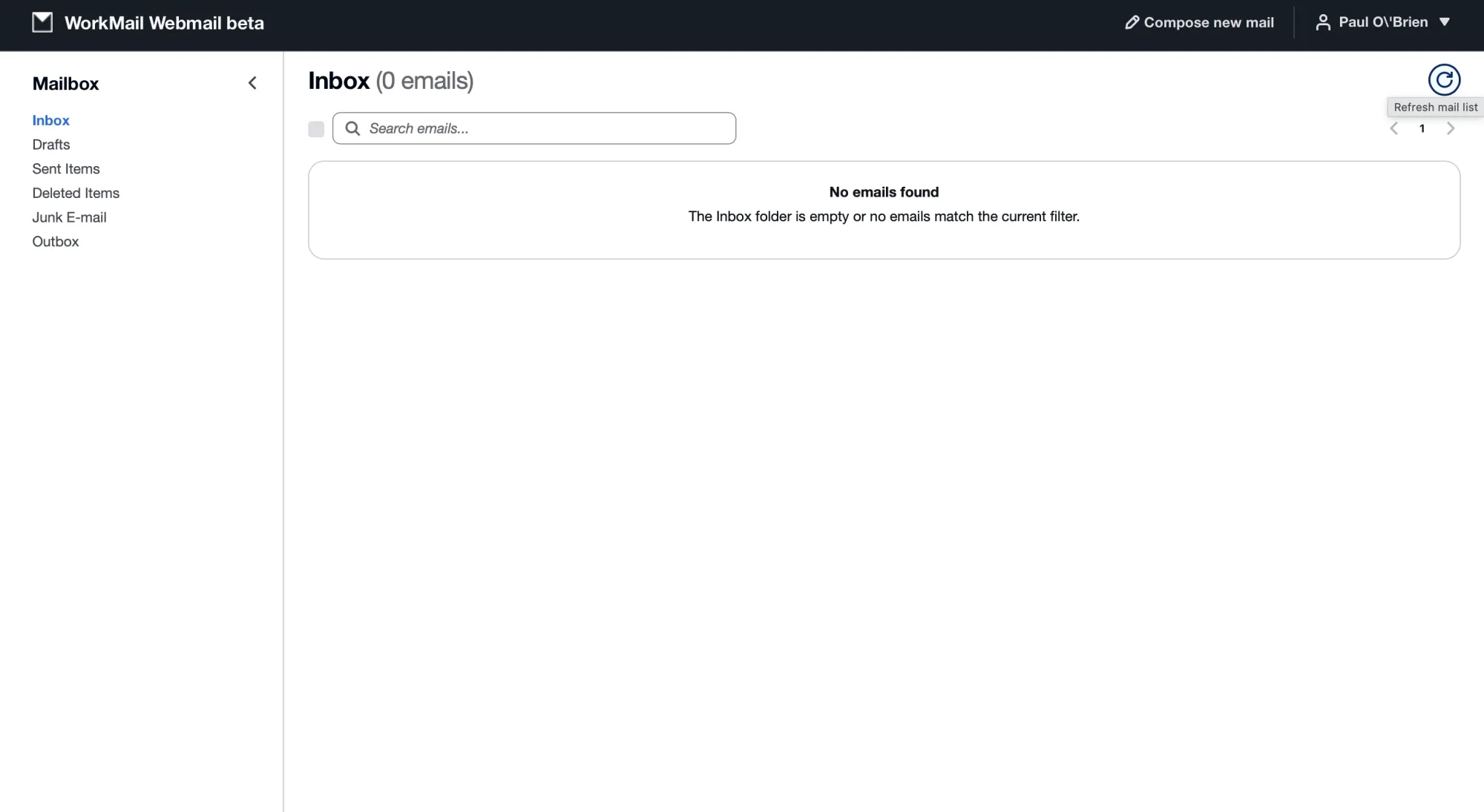
Amazon WorkMail’s webmail interface is minimal and neutral, prioritising structure over presentation.
The web interface is sparse. There is no design personality, no ambitious categorisation model, and no attempt to differentiate visually. Folders, messages, settings, calendar, and contacts appear exactly where you would expect them. A beta interface exists, but it is even more stripped back.
At first glance, it feels almost too plain. Some of the earliest webmail interfaces had more visual identity. WorkMail does not try to charm. It feels neutral by design.
That impression changes once you look beyond the surface.
A Conservative Surface, Familiar Foundations
Setting up WorkMail was straightforward, although familiarity with DNS configuration and email authentication makes the process easier. Adding MX records, configuring SPF, and verifying domain ownership will be routine for anyone comfortable with business email. For less technical users, the process may require patience.
Once configured, everything behaved predictably. Mail delivery was fast. Spam filtering performed at a level consistent with enterprise platforms. Rules follow the traditional Exchange model: conditional filtering based on sender, subject, or header, with actions such as moving, forwarding, or deleting messages.
Outlook integration via Exchange ActiveSync was seamless. The admin console is structured and clean, though it prioritises clarity over breadth of visible options. There is no attempt to layer AI features, productivity dashboards, or collaboration narratives over the inbox.
The pricing, at $4 per user per month, initially appears modest. The interface alone does not explain the cost.
The architecture does.
Encryption as Infrastructure, Not Marketing
WorkMail encrypts mailbox data before it is written to disk. This cannot be disabled. Encryption keys are protected using AWS Key Management Service (KMS). By default, AWS manages those keys, but organisations with compliance requirements can use customer-managed KMS keys.
This is not end-to-end encryption. It is server-side encryption enforced by AWS infrastructure. The distinction matters. However, encryption is not treated as an optional feature or premium tier. It is embedded at the architectural level.
Many small business providers reference encryption in marketing copy. WorkMail implements it as a baseline control, integrated with the same KMS framework used across AWS services. The approach reflects AWS’s broader security philosophy: enforce controls quietly rather than advertise them loudly.
Outbound Mail and SES Integration
All outbound mail from WorkMail is routed through Amazon SES. This gives the platform access to mature sending infrastructure, including bounce handling, abuse monitoring, and IP reputation management. There is no additional charge for outbound email sent through WorkMail.
By default, WorkMail uses an amazonses.com subdomain as the MAIL FROM domain. Organisations relying strictly on SPF for DMARC alignment may encounter deliverability issues unless a custom MAIL FROM domain is configured. WorkMail exposes this clearly rather than abstracting it away.
That pattern recurs throughout the product. WorkMail does not hide the mechanics of email. It expects administrators to understand alignment, authentication, and reputation. The moving parts behind the visible “From” address are explained in detail in The 6 different “From” addresses inside every email, and WorkMail assumes familiarity with those concepts.
DMARC Enforcement by Default
For new organisations, WorkMail enforces published DMARC policies on inbound mail. If a sending domain specifies a strict p=reject policy and a message fails authentication checks, WorkMail honours that instruction. This reduces spoofing risk and aligns with modern standards-based email security practices.
The enforcement is not presented as a headline feature. It is simply part of how the service operates. The tone is consistent: standards compliance over spectacle.
Directory-Centred Architecture
WorkMail is not merely a collection of mailboxes. It is directory-driven.
When creating an organisation, AWS either connects to an existing directory service or provisions one. That directory governs users, groups, shared resources, permissions, address book visibility, and free/busy lookups.
Deleting WorkMail does not automatically remove the underlying directory, which may continue to incur AWS charges if left active. This reinforces that WorkMail is an AWS service layered onto infrastructure, not a disposable SaaS subscription.
For organisations already operating within AWS, this structure is familiar. For smaller businesses, it introduces a governance layer that standalone email platforms typically abstract away.
Identity and Governance Through IAM
Administrative access to WorkMail is governed by AWS Identity and Access Management (IAM). Root credentials are discouraged. Instead, IAM users and roles define who can manage the environment.
Within WorkMail itself, users are created inside the associated directory, separate from AWS console access. This layered identity model mirrors enterprise governance patterns. It provides clarity and separation, though it may feel complex for small teams accustomed to simplified SaaS dashboards.
WorkMail exists inside AWS rather than alongside it. That distinction shapes how it behaves.
Exchange Compatibility Without Ecosystem Lock-In
WorkMail supports Exchange ActiveSync, IMAP over SSL, SMTP with TLS, Exchange Web Services (EWS), delegates, shared calendars, send-as permissions, and resource booking.
It does not attempt to bundle chat, document editing, or AI-assisted collaboration tools. Migration tooling targets organisations moving from Microsoft Exchange, Microsoft 365, or Google Workspace, signalling that WorkMail is aimed at structured business environments rather than individual consumers.
For companies accustomed to Exchange-style email — global address lists, shared resources, delegated access — WorkMail feels immediately recognisable. It delivers core functionality without attaching the broader Microsoft or Google productivity ecosystems.
Developer Awareness and Extensibility
Behind the restrained interface, WorkMail exposes Exchange Web Services and a Push Notifications API. Developers can subscribe to mailbox events, trigger workflows, and integrate with AWS Lambda or API Gateway. This allows email to function as part of broader cloud systems rather than as an isolated communication tool.
Most small teams will not use these capabilities. Their presence nevertheless signals that WorkMail is designed as infrastructure within AWS rather than as a consumer-facing inbox product.
Pricing and Positioning
At $4 per user per month, WorkMail includes encryption, directory integration, outbound email via SES, and enterprise-style administration without contracts or long-term commitments.
Compared to Microsoft 365 or Google Workspace, the price is aggressive while omitting bundled collaboration features. Compared to hosting-based IMAP accounts, it separates email from shared web hosting and introduces clearer governance and compliance posture.
It aligns with a broader pattern I have discussed in why people resist paying for email in the first place. WorkMail’s pricing feels disciplined rather than promotional. It reflects infrastructure cost rather than aspirational branding.
Position in the Market
WorkMail is not a privacy-first platform and does not implement end-to-end encryption. It is not a design-led reinvention of the inbox, nor is it a collaboration suite competitor.
It is standards-aligned, infrastructure-backed, directory-driven, governance-aware, and Exchange-compatible. The interface is deliberately neutral. The capabilities sit beneath the surface.
For small to mid-sized businesses operating within AWS, or organisations that want structured business-grade email without adopting a full productivity ecosystem, WorkMail represents a pragmatic option. For solopreneurs seeking polished UX or users prioritising zero-access encryption, it is unlikely to appeal.
Conclusion
Amazon WorkMail does not attempt to impress through interface design or marketing narrative. It does not reposition email as a productivity revolution.
Instead, it treats email as infrastructure: structured, standards-compliant, and integrated with cloud governance.
The interface is minimal.
The underlying system is not.
For organisations that value foundations over features, that distinction matters.
Get the weekly email
A short weekly roundup on email, privacy, and digital trust. No promos. Unsubscribe anytime.

