Why HEY Should Add ‘Mark as Unread’
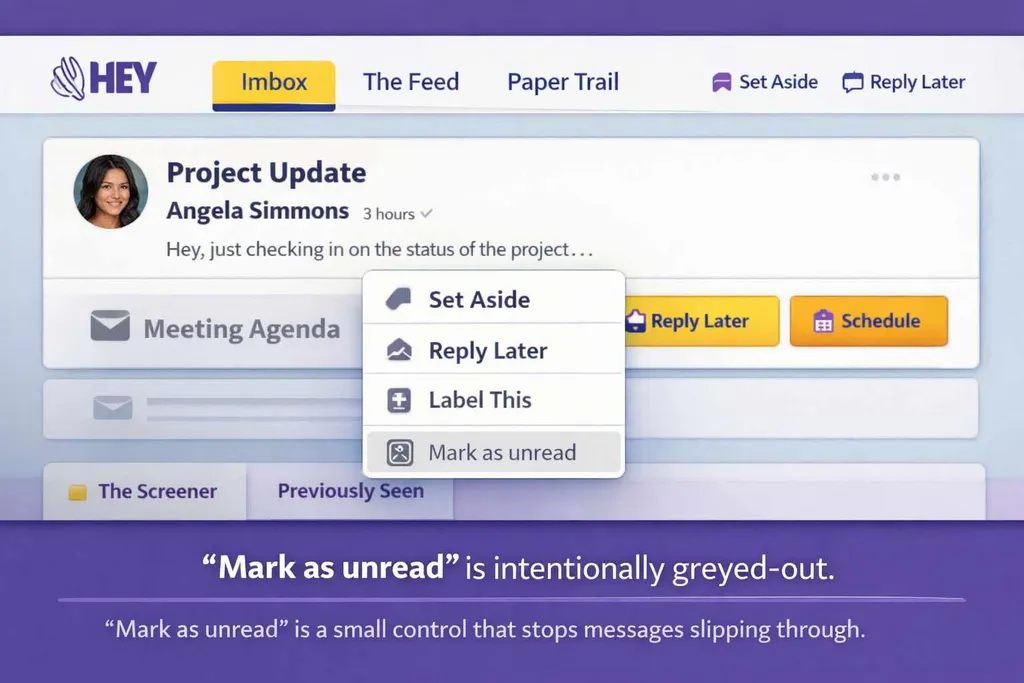
Some inboxes assume that once you’ve opened a message, you’ve dealt with it. HEY leans into that idea by design — replacing “unread” with workflow tools. But opening isn’t finishing. This is why “mark as unread” still matters, even in 2026.

Updated February 2026 with an expanded edit and clearer framing.
Email works best when it helps me remember what still needs attention.
That sounds obvious, but it’s surprisingly easy to break — and the easiest way to break it is to treat opened as the same thing as done.
A lot of inboxes quietly assume that once you’ve opened a message, it’s in the past. You saw it. It’s read. It’s no longer part of the problem. If it still needs action, the burden shifts to you to remember it and manage it somehow.
In real life, that’s not how email works.
Opening a message doesn’t mean you’re ready to deal with it. Half the time you’re just figuring out what it is and what it’s asking. And because email gets opened wherever you are — on your phone on hold, in the middle of a meeting, or between tasks — it’s often just a quick scan for the headline.
You’ve seen it, but you haven’t dealt with it.
And that’s why “mark as unread” is still one of the most useful — and least glamorous — features in email.
Opened doesn’t mean handled
When I mark something as unread after opening it, I’m not pretending I haven’t seen it.
I’m admitting something more honest: I’m not finished with this.
That’s the distinction that keeps an inbox workable. It’s a way of saying: this still belongs in the foreground. This is still active. This is still part of what I owe attention to.
Without that option, email starts to lie to you.
The inbox becomes a record of what you’ve glanced at, not what you’ve completed. You can still respond, of course. You can still search. You can still flag. But you lose the simplest signal of all — the one that says “this isn’t done yet” without forcing you into a heavier system.
“Unread” is a tool, not a status
Some people treat unread as a literal state: unread means unseen, read means seen.
I don’t use it like that.
For me, unread is closer to a bookmark. It’s the lightest possible reminder. It’s a way to keep a message in view without having to promote it to “important”, or decide which category it belongs in, or build a taxonomy around it.
It’s also reversible. I can mark something unread and return later. I can mark it read once it’s resolved. Nothing about that requires a new workflow — it’s just a small, respectful control.
The point isn’t productivity. The point is attention.
Where HEY makes a deliberate choice
This is where HEY gets genuinely interesting, because it breaks with the default.
HEY doesn’t treat unread as a flexible reminder state. It treats the inbox more like a triage line: once you open something, the expectation is that you make a decision about it. Reply later. Set it aside. File it. Do something — but don’t keep it hanging around as “unread”.
In place of “mark as unread”, HEY leans on explicit workflow tools. “Reply later” becomes the mechanism for unfinished work. The philosophy is consistent: if something needs attention, give it a purpose, not a vague status.
I understand why that appeals. It’s clean. It’s structured. It tries to remove the fuzzy middle — the part where email stops being a queue and starts being a blur.
But it also assumes something about how you work: that every email can be meaningfully triaged the moment you open it.
Mine can’t.
A lot of the time I read something, take it in, and park it until I can think properly. I might be waiting on context, or I might just not know what action it needs yet. I still want an easy way to signal: not now.
That’s what unread does for me. It’s a soft “not now” that keeps the message visible without demanding a decision.
Flags and labels don’t replace it
Yes, there are other ways to manage this.
You can star a message. You can flag it. You can apply a label. You can move it to a follow-up folder. You can create a task. You can use a separate to-do app.
I do some of those things sometimes. But they’re not the same.
A flag is a statement of priority. A label is a statement of category. A folder is a statement of where something belongs. All of those require you to decide what the message is.
Unread doesn’t.
Unread simply says: this still needs attention.
It’s the most neutral marker you can apply. It doesn’t force a system. It doesn’t create a permanent tag. It doesn’t require a judgement call. It’s the inbox equivalent of putting a piece of paper back on top of the pile because you haven’t dealt with it yet.
That’s why it’s so useful.
Email is asynchronous — and unread helps it stay that way
One of email’s strengths is that it’s not chat.
Email is supposed to allow delay. It’s built for thoughtful replies, for time zones, for back-and-forth over days, for “I’ll come back to this when I can.”
I’ve written more about that wider model in How I think about email.
When an inbox assumes “read = resolved”, it starts nudging you toward a more immediate mode. It pushes you to clear things rather than handle them properly. It turns the inbox into something you manage for visual cleanliness, rather than something that reflects reality.
“Mark as unread” keeps email honest. It protects the asynchronous nature of it. It lets you open something, learn what it is, and still leave it in a state that says “this is active”.
For me, that’s not a convenience feature. It’s a core part of how I stay calm around email.
This isn’t about optimisation — it’s about trust
I’m not trying to build an elaborate email system.
I’m trying to trust my inbox.
This is part of why I keep coming back to Email Is Still a Craft — Even If We Pretend It Isn’t: the “craft” part is mostly attention management.
I want to be able to glance at it and know, roughly, what still needs me. I want the visible state to mean something. I want a simple mechanism for unfinished work that doesn’t require extra structure every time.
Unread is that mechanism.
It’s small, but it changes how manageable email feels. It’s the difference between an inbox that quietly supports your attention and one that slowly becomes noise — not because it’s full, but because it stops telling the truth about what’s still open.
That’s why I still want “mark as unread”, even in 2026, even as inboxes get smarter, and even when services like HEY try to route you into other workflows.
Extra workflow usually means extra judgement calls.
“Mark as unread” lets you defer without negotiating with your own system.
Get the weekly email
A short weekly roundup on email, privacy, and digital trust. No promos. Unsubscribe anytime.
If you’re considering HEY more broadly, I’ve written a longer piece on whether it’s a brilliant reinvention or an overpriced experiment: HEY Email: Brilliant Reinvention or Overpriced Experiment?

